
Snazio NetCinema HD Player SZ1350
15. Conclusion
Review Pages
2. The Package
3. Setting up the player
4. Menus
5. Firmware update
6. Video Settings/Hacks
7. Connecting with PC
8. Wireless Connection
9. The Tests - Disc compatibility
10. Playback Tests - Page 1
11. Playback Tests - Page 2
12. Playback Tests - Page 3
13. Playback Tests - Page 4
14. Playback Tests - Page 5
15. Conclusion
 The Snazio* is the second network DVD/DivX player we have tested, after the IOData AveLink Player 2. The two players share the same "engine". However, Snazio* showed better playback performance in some areas. In general, we were satisfied with the performance of the SZ1350 since it is capable of playing back almost all Mpeg4 compatible (DivX/Xvid) formats, along with support for DivX HD and WMV9 (HD). The several input/output connections, will make it very easy to install with your current or future TV set, since the player also includes a DVI output. The network capabilities will further boost connectivity, whether it be wired or wireless. The included Epox CD/DVD loader didn't have any problems reading most of the current CD/DVD formats although DVD-RAM was not tested. It's possible for power users to modify their player with a DVD-R/-ROM drive, that gives even further media compatibility. Lastly, the player can become region free and upscaled for CSS DVD-Video content with the proper "mod", for up to 1080i which is important for HD TV users.
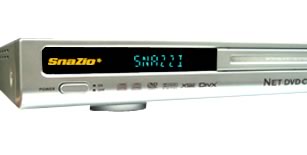
Of course, there are several negatives, or we should say problems, that Snazio* should fix with a future firmware upgrade to satisfy our needs. Don't forget that if you have internet access, your player can be updated online to upgrade it with new features and of course, fix possible bugs.
The price of the player is around US$350, which is not cheap, compared with low priced DVD/DivX players. However, none of those offer the connectivity and expandability of the SZ1350. Overall, a good product at a reasonable price.
- The Good
- Supports 10/100 local ethernet
- Supports Wi-Fi 802b/g connection
- Can playback without any problems High definition formats (DivX HD, WMV9, TS)
- Supports almost all combinations of Mpeg/DivX/Xvid encoded files, with the help of a PC Server
- WMV9 DRM files are playable (with specific procedure)
- Supports online services
- Can upscale CSS DVD content up to 1080i! (with the proper workaround)
- Can become region free
- Can recognize all CD/ DVD writable/re-writable discs
- Can upgrade its firmware automatically after connecting to the internet
- CD/DVD loader mods are possible
- Supports Subrip (.srt) subtitles, but only only in specific languages
- Includes a USB1.1/2.0 interface, giving extra capabilities (like connecting FAT32 HDD or USB Sticks)
- Supports NTFS formatted USB sticks
- The Bad
- Wi-Fi WPA encryption isn't supported (at least with current firmware)
- Possible Wi-Fi connection problems (at least with our setup)
- Doesn't support external NTFS HDD, either connected with the internal IDE or external USB interfaces
- Not many options given to skin the player menu/playback backgrounds
- Not much information displayed during playback for used files
- Xvid GMC isn't supported properly while DivX GMC does
- H264 is not supported
- Like To Be Fixed
- Doesn't support most European languages (like Greek) for filenames and subtitles
- Several problems with specific Audio and Video formats
- GUI Navigation needs improvement
Review Pages
2. The Package
3. Setting up the player
4. Menus
5. Firmware update
6. Video Settings/Hacks
7. Connecting with PC
8. Wireless Connection
9. The Tests - Disc compatibility
10. Playback Tests - Page 1
11. Playback Tests - Page 2
12. Playback Tests - Page 3
13. Playback Tests - Page 4
14. Playback Tests - Page 5
15. Conclusion










