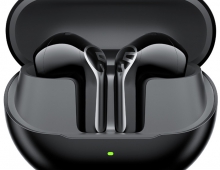
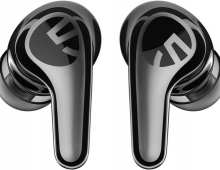
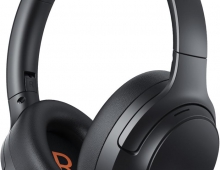
Soundpeats Air 5
4. Conclusion
At 3.8g per earbud, Air5 is genuinely featherlight. For users who dislike silicone tips, this semi‑in‑ear geometry can be a major comfort win because it avoids the ‘plugged ear’ sensation. The flip side is fit security. Stability is highly anatomy‑dependent: some may feel a secure fit even when moving, while others may describe the earbuds as feeling loose and slipping during more active use. This is exactly the kind of variability you expect from semi‑in‑ear products.
Sound: strong ingredients, but EQ is the keyWith a 13mm driver and an aptX‑capable Qualcomm platform, Air5 has the ingredients for strong sound in its category. But semi‑in‑ear physics limits deep sub‑bass and makes tuning highly sensitive to fit. That’s why EQ becomes central. For sure you will noticed a difference ‘before/after’EQ: average or weak out of the box, then excellent once the PeatsAudio EQ is tuned. In practical terms, Air5 should be treated as a tunable earbud rather than a fixed‑signature product. According to our ears
- Bass: Controlled and punchy, but limited in sub‑bass depth due to the open design
- Midrange: Clean and forward, with good vocal presence
- Treble: Detailed without excessive harshness
Recommended EQ starting points
A) “Balanced / Reference‑ish” (good first baseline)
Low bands (≈31–125 Hz): small boost (or flat)
Low‑mids (≈250–500 Hz): slight cut
Mids (≈1–2 kHz): slight boost for vocals
Presence/treble (≈4–8 kHz): small boost only if needed
Top (≈10–16 kHz): minimal changes
Goal: reduce warmth congestion while keeping open‑fit naturalness.
B) “Bass‑Controlled (Gym/Commute)”
31–63 Hz: small boost
125–250 Hz: cut slightly (tightens punch)
500 Hz–1 kHz: flat
2–4 kHz: slight boost (clarity)
8–10 kHz: keep controlled (avoid harshness at louder volumes)
Goal: punch without muddy low‑mids; helps in noisy environments where you turn volume up.
C) “Voice / Podcasts / Meetings”
31–125 Hz: slight cut
250–500 Hz: slight cut (reduces boxiness)
1–4 kHz: moderate boost (speech intelligibility)
8 kHz+: small boost if sibilance is not a problem
Goal: maximize articulation and reduce low‑end masking.
Or if you prefer something in summary:
- Balanced: small cut around 250–500Hz; slight lift around 1–2kHz; minimal treble boosts.
- Bass-Controlled: reduce 125–250Hz; add small 2–4kHz clarity lift.
- Voice/Podcasts: reduce bass; boost 1–4kHz for intelligibility.
- Avoid extreme boosts to reduce clipping/distortion risk.
The product sheet lists ‘AI Adaptive Noise Cancelling (ANC) & CVC’. On semi‑in‑ear earbuds, ANC should be treated as light attenuation rather than full isolation. The effect is also fit‑dependent: a looser fit reduces the amount of perceived attenuation. If your primary need is silence on a commute or flight, a sealed in‑ear model remains the correct product type.
Calls, multipoint, and daily usabilityMultipoint is supported and is genuinely useful if you bounce between phone and laptop/PC. While it is not the most frequently mentioned feature in the user dataset, it is often cited as a purchase reason by productivity users.
Call clarity is presents. A stem design helps place microphones closer to the mouth, and the sheet references CVC-style voice processing. The Air5 doubles as a ‘work earbud’ as much as a music earbud.
How to multipoint? Follow these steps: 1)Pair the headsets with Device A first. After successful pairing, turn off the Bluetooth function on Device A. 2)Repeat the pairing process to connect the headsets with Device B. Keep the headsets connected to Device B. 3)Turn on the Bluetooth function on Device A. 4) The headset will automatically connect with two devices next time after the first time dual device connection.
Battery and the caseSoundPEATS claims 6 hours single playtime and 30 hours total (AAC at 60% volume). Real‑world results vary with codec choice, volume, and mode selection. We did noticed sometimes that the charging case appear sensitive to seating—if a bud is not perfectly aligned on the charging pins, it may not charge, leading to a ‘one bud dead’ surprise later.
Enabling Snapdragon Sound / aptX Adaptive
Snapdragon Sound is not a toggle on the earbuds. It becomes active when your Android phone supports Snapdragon Sound/aptX Adaptive and both devices negotiate aptX Adaptive during Bluetooth connection. On iPhone, AAC/SBC are used, so Snapdragon Sound codec features are not utilized.
How to confirm Snapdragon Sound is active
✅ Signs it is working:
- Android notification sometimes says “aptX Adaptive”
- Cleaner transients, tighter bass
- Better call clarity
- Lower latency in video/gaming
❌ If you only see SBC/AAC → Snapdragon Sound is NOT active
Step-by-step (Android)1) Pair Air5 normally via Settings → Bluetooth.
2) Enable Developer Options: Settings → About phone → tap Build Number 7 times.
3) Developer Options → Bluetooth Audio Codec → select ‘aptX Adaptive’ (or the highest aptX option available).
4) Reconnect the earbuds.
If you experience low volume, enable ‘Disable Absolute Volume’ in Developer Options, toggle Bluetooth OFF/ON, then reconnect. Several users report that this resolves volume mapping issues on newer Android devices.
- Conclusion
The SoundPEATS Air5 represent a confident attempt to redefine what semi‑in‑ear wireless earbuds can offer at a mid‑range price. Rather than chasing maximum isolation or aggressive noise cancellation, they focus on comfort, usability, and feature depth, delivering an experience that feels thoughtfully targeted rather than compromised.
Where the Air5 succeed most is in **everyday practicality**. Their lightweight, silicone‑free design makes them exceptionally comfortable for long listening sessions, calls, and work‑from‑home use. Call quality is a clear strength, and modern connectivity features such as Bluetooth 5.4, dual‑device support, and advanced codecs give them a technical foundation that exceeds expectations for the price. Once properly tuned through the companion app, sound quality is well balanced and engaging, especially for vocals, podcasts, and casual music listening.
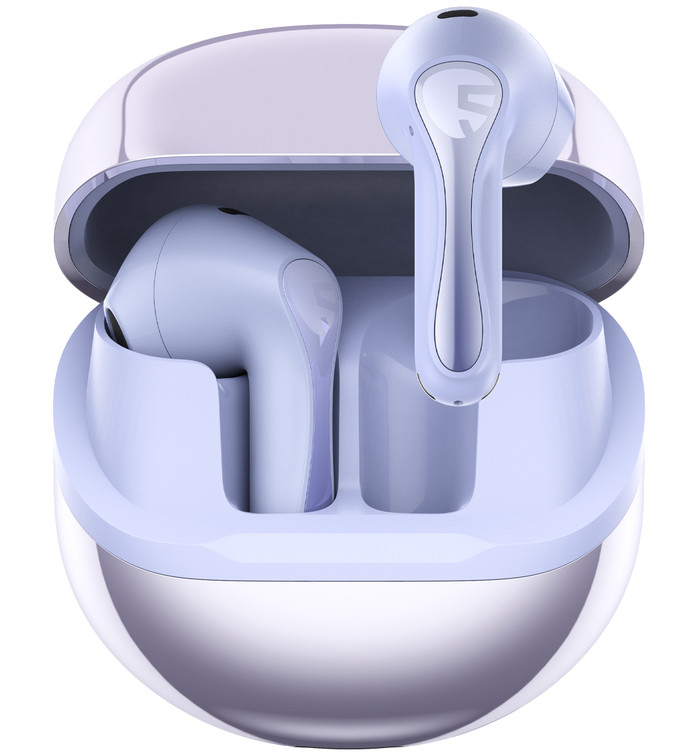
However, the Air5 are not without clear limitations. The open, semi‑in‑ear design inherently sacrifices stability and isolation, making them a poor choice for workouts or users who expect a locked‑in fit. Active Noise Cancelling, while present, plays a supporting role at best and should not be a deciding factor. The charging case may have issues, as some users reported for securing earbuds. Additionally, the reliance on the app for optimal performance adds friction that may frustrate users seeking a seamless, out‑of‑the‑box experience.
Taken as a whole, the SoundPEATS Air5 are best understood as comfort‑first earbuds with premium features at an accessible price, rather than all‑purpose, do‑everything wireless headphones. For listeners who value comfort, clear calls, modern connectivity, and strong value over secure fit and deep noise isolation, the Air5 make a compelling case. For more demanding use cases—such as sports, commuting in very noisy environments, or users who expect flawless hardware refinement—there are better‑suited alternatives. A strong, well‑priced semi‑in‑ear option that excels in comfort and everyday usability, provided its design trade‑offs align with your needs.
- Buy it if: you want semi-in-ear comfort with modern codecs, you take calls/meetings, and you are willing to EQ. If you prioritize maximum awareness and stability for sport, SoundPEATS’ clip-on open-ear products (POP Clip / PearlClip Pro / Clip1) are the closer match.
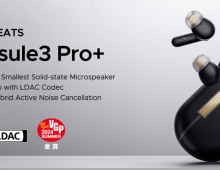
- Skip it if: you need strong isolation/true ANC, you hate companion apps/account registration, or you are sensitive to case/charging quirks. A sealed in-ear model like the Capsule3 Pro+ class is the more appropriate product type.

Pros
- Strong sound quality for a semi‑in‑ear (open‑style) design
- Clear mids and highs with respectable bass after EQ tuning
- Noticeable audio improvement when used with AptX Adaptive / Snapdragon Sound
- Excellent comfort due to the silicone‑free, lightweight design
- Suitable for long listening sessions without ear fatigue
- Very good call quality with clear voice pickup
- Bluetooth 5.4 provides fast pairing and stable connections
- Dual‑device connectivity works smoothly between phone and laptop
- Companion app offers EQ, ear‑canal presets, touch customization, ANC modes, and firmware updates
ANC helps reduce steady background noise (fans, traffic, aircraft hum) - Modern feature set at a competitive price
- Strong overall value for money compared to premium alternatives
Cons
- Fit stability depends heavily on ear shape, not secure enough for running, workouts, or active movement
- Lack of silicone tips reduces isolation and stability
- Active Noise Cancelling effect is limited and inconsistent, ineffective against voices and low‑frequency noise and possible humming or “seashell” effect when ANC is enabled
- Touch controls can feel inconsistent or trigger accidentally while no physical buttons result in reduced tactile precision
- Sometimes charging case design tends for earbuds may not seat correctly for charging
- Case lid opens too easily and magnets do not always secure earbuds
- Battery life can fall short of advertised figures, especially during calls or with ANC enabled