Breaking News

G.SKILL Demo New Memory Solutions for Gaming, Server, AI, Workstation Applications at Computex 2026 LIAN LI Launches HydroShift II OLED Curved 360 AIO LIAN LI Unveils O11 VISION-M CORSAIR PRO launches AI Workstations and Servers ASUS Announces T1 GeForce RTX 5070 and RTX 5060 Ti Graphics Cards

logo

  • Share Us
    • Facebook
    • Twitter
  • Home
  • Home
  • News
  • Reviews
  • Essays
  • Forum
  • Legacy
  • About
    • Submit News

    • Contact Us
    • Privacy

    • Promotion
    • Advertise

    • RSS Feed
    • Site Map

Search form

TEAC MP-350

Dec 28,2005 0

2. Retail Package


Review Pages

1. Introduction
2. Retail Package
3. Menu
4. Setting up
5. Tests
6. Conclusion


The TEAC MP-350 comes in two versions, one with 512MB and one with 1GB storage capacity. We received the 512MB version, which was black in colour. It is also available in white.

Again, as with the MP-400, the retail package is complete, and you will find a USB2.0 cable with which to connect the MP-350 to a PC, a carry pouch and carrying strap so you can carry it around safely, an AC charger to recharge its Lion battery, a line-in cable to connect it with another audio-in source, and last but not least, high quality earphones to listen to music with.
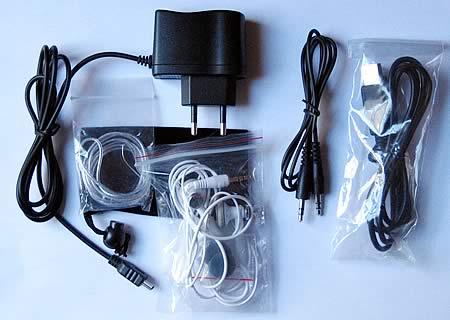
You will also find a quick user's guide, the device manual and a CD containing drivers for Windows98 as well as the MTV Converter software.

- The device
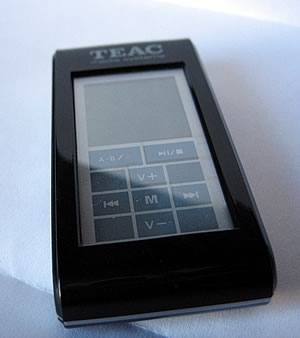
Like all TEAC's mp3 players, the MP-350 is very small and light weight. As we've already noted, the controls are located below the high resolution screen. The black finish is very impressive, and the menus also use a black background which matches in nicely.

On the right hand side, you will see the mini-USB port which connects the MP-350 to a PC. The image below shows the mini-USB2.0 port. The connecting cable is provided in the package (USB-A to mini-USB).
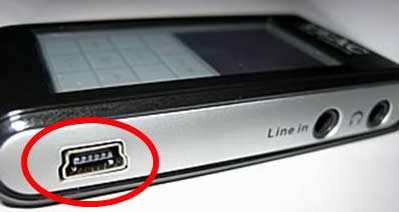
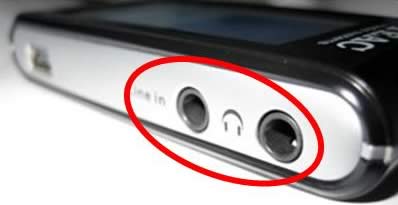
On the same side, you will also see the earphone and the line-in jacks.
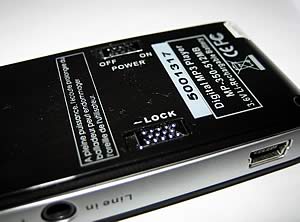
On the back of the MP-350, there are two special slide switches. The "lock" switch, locks the device so that the keys on the MP-350 aren't activated if accidentally pressed. The "power" switch powers the player on and off, but you probably don't need this if you intend to use the MP-350 on a daily basis. The button cuts off power to the circuitry and should only be used if you intend to leave the MP-350 unused for a long time (e.g. weeks or months).
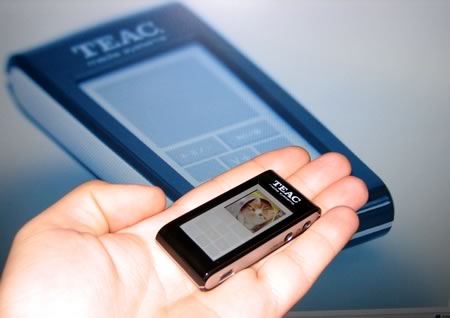
The following pictures show the nifty touch-pad on the MP-350. The "M" button in the center, stands for "Menu". With this key, you can select the playing mode (audio, video, etc), and navigate through the menus with the "next" and "previous" buttons. Holding the "play" button for a few seconds will power on and off the player.

No matter how impressive it looks having a touch-pad on the player, it might be a headache for people with large fingers. The player itself is so small that you'll have a tough time pressing the buttons if your fingers are not small enough. Women will probably love this player :-)
 

Review Pages

1. Introduction
2. Retail Package
3. Menu
4. Setting up
5. Tests
6. Conclusion


Pages

  • « first
  • ‹ previous
  • 1
  • 2
  • 3
  • 4
  • 5
  • 6
  • next ›
  • last »

TEAC

Tags: TEAC
Previous Post
Mushkin XP4000 Redline
Next Post
Intel D 820

Related Posts

  • New TEAC AX-505 Amplifier Looks Retro But Packs Power

  • New TEAC Power Amplifier Offers a Sonic Impact From a Tiny Box

  • TEAC Announces new High Performance Integrated Amplifier

  • TEAC TN-4D Turntable Coming This Quarter

  • TASCAM Introduces New DR-X Series Digital Audio Recorder and USB Audio Interface

  • Teac LP-R560K Supports Recording of Vinyl Records and Cassette Tapes on CDs

  • Teac Sees No Impact from Gibson Brands Filling for Bankruptcy

  • TEAC Releases New Reference Series Hi-Res Audio Models

Latest Reviews

Swit NP-FZ100 Battery
Cameras

Swit NP-FZ100 Battery

The Technology Stack Behind Modern Digital Gaming Platforms
Consumer Electronics

The Technology Stack Behind Modern Digital Gaming Platforms

be quiet! Dark Rock Pro 6
Cooling Systems

be quiet! Dark Rock Pro 6

How Online Casinos Use Encryption, Verification, and Risk Controls to Build User Trust
Enterprise & IT

How Online Casinos Use Encryption, Verification, and Risk Controls to Build User Trust

Why Low-Latency Infrastructure Matters More Than Raw Specs
Enterprise & IT

Why Low-Latency Infrastructure Matters More Than Raw Specs

Popular News

TEAMGROUP Launches EXPERT P34F Find My External SSD

TEAMGROUP Launches EXPERT P34F Find My External SSD

CORSAIR announces Vanguard Pro 96 and Vanguard 96 Gaming Keyboards

CORSAIR announces Vanguard Pro 96 and Vanguard 96 Gaming Keyboards

Samsung announces Galaxy Tab S11 and Galaxy S25 FE series

Samsung announces Galaxy Tab S11 and Galaxy S25 FE series

Viltrox Showcases Upcoming Lens Lineup and New TTL Flash at IBC 2025

Viltrox Showcases Upcoming Lens Lineup and New TTL Flash at IBC 2025

MSI Launches FORGE GK600 TKL WIRELESS Special Edition Compact Mechanical Keyboard

MSI Launches FORGE GK600 TKL WIRELESS Special Edition Compact Mechanical Keyboard

Panasonic Introduces the First Ultra-Telephoto Zoom Lens in the LUMIX S Series

Panasonic Introduces the First Ultra-Telephoto Zoom Lens in the LUMIX S Series

MSI Launches DATAMAG 40Gbps Magnetic Portable SSD

MSI Launches DATAMAG 40Gbps Magnetic Portable SSD

Viltrox Joins the L-Mount Alliance, Expanding Creative Possibilities

Viltrox Joins the L-Mount Alliance, Expanding Creative Possibilities

Main menu

  • Home
  • News
  • Reviews
  • Essays
  • Forum
  • Legacy
  • About
    • Submit News

    • Contact Us
    • Privacy

    • Promotion
    • Advertise

    • RSS Feed
    • Site Map
  • About
  • Privacy
  • Contact Us
  • Promotional Opportunities @ CdrInfo.com
  • Advertise on out site
  • Submit your News to our site
  • RSS Feed