Breaking News

G.SKILL Showcases DDR5-9200 1.1V 16GBx2 High-Speed CU-DIMM Memory Kit Sony Introduces BRAVIA 9 II and BRAVIA 7 II RGB TVs and the BRAVIA Theatre Trio Creative Announces Sound Blaster AE-X Acer Expands Gaming Portfolio With Predator Atlas 8 Handheld Powered by Intel COLORFUL Presents Limited Edition iGame GeForce RTX 5070 Ultra OC 12GB x 007 First Light Edition

logo

  • Share Us
    • Facebook
    • Twitter
  • Home
  • Home
  • News
  • Reviews
  • Essays
  • Forum
  • Legacy
  • About
    • Submit News

    • Contact Us
    • Privacy

    • Promotion
    • Advertise

    • RSS Feed
    • Site Map

Search form

Thermaltake Big Typhoon

Mar 22,2005 0

3. Performance/Overclocking


Review Pages

1. Introduction
2. Installation
3. Performance/Overclocking
4. Conclusion


Thermaltake Big Typhoon - 03 - Performance/Overclocking

To measure the CPU's temperature, we used SpeedFan v4.21 which provided us with real time monitoring and created a graph of the temperature over time. After letting the processor cool down in idle mode, we fired up Prime95 and ran the In-place large FFT test to heat it up to its maximum level. This is the graph of the temperature with the original Intel fansink:

The temperature starts at 36C and reaches 58C when running the stress test.

After installing the Big Typhoon, we again ran SpeedFan and watched as it produced the graph again.
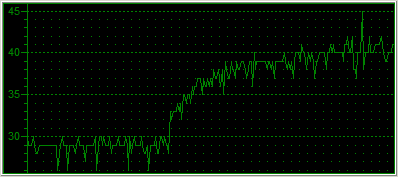
As you can see from the graph, the idle temperature is around 29 degrees Celsius. That's an amazing 7C drop for starters, and as the CPU started computing the Prime95 in-place FFT test, the temperature increased only up to 40 degrees, 18 degrees less than with the original Intel fansink.

Overclocking

The default settings for our Intel P4 LGA775 were 15 x 200MHz = 3.0GHz. In order to overclock our processor, we entered the BIOS and played around with the FSB clock and CPU Voltage settings. After some time experimenting with the FSB value, we concluded at setting the voltage to 1.6V and the FSB at 260MHz. This means the 3.0GHz P4 was now running at 15 x 260MHz = 3.9GHz.

At that speed, the system was able to boot and when running Prime95, which is very sensitive and hence ideal for identifying errors, reported all correct calculations. However, when trying to run 3D applications, the system would stall after a while and pop up an error message saying that the graphics card stopped responding.

So, we rebooted into the BIOS once again and set the FSB a little lower to 255MHz. The processor was now running excellently at 3.825GHz and both computational and 3D applications ran troublefree. Let's see the graph showing the temperature of the CPU starting from idle up to the same Prime95 torture test.
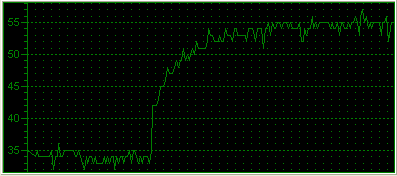
The idle temperature now starts from 35C due to the increased Voltage for the CPU. As we run the torture test, the line climbs up exponentially, stabilizing at around 55C.

With the installation of the Big Typhoon, we achieved a 825MHz increase in CPU clock while keeping the temperature at a lower level (2°C lower to be exact).


Review Pages

1. Introduction
2. Installation
3. Performance/Overclocking
4. Conclusion


Pages

  • « first
  • ‹ previous
  • 1
  • 2
  • 3
  • 4
  • next ›
  • last »

Thermaltake

Tags: Thermaltake
Previous Post
IOData AvelLink Player2
Next Post
Samsung TS-H552U

Related Posts

  • Thermaltake Launches AW360/420 AIO Liquid Cooler and WAir CPU Cooler for Workstations

  • Begin the Racing Journey with the Thermaltake GR300 Racing Simulator Cockpit

  • Thermaltake Unveils the Massive EXTREME with Cross-flow Fan

  • Thermaltake Releases the Toughpower TF3 1300W with Support for RTX50 Series GPUs

  • Thermaltake Unveils G6 Direct Drive Racing Wheel Bundle and GM5 3DOF Motion System

  • Thermaltake Launches the TT150 LED Bag in Different Sizes and New Colors

  • Thermaltake New TH V2 Ultra EX ARGB Sync AIO – Snow Edition is Now Available Worldwide

  • Thermaltake Coolers Support New-Gen Intel and AMD CPUs

Latest Reviews

Swit NP-FZ100 Battery
Cameras

Swit NP-FZ100 Battery

The Technology Stack Behind Modern Digital Gaming Platforms
Consumer Electronics

The Technology Stack Behind Modern Digital Gaming Platforms

be quiet! Dark Rock Pro 6
Cooling Systems

be quiet! Dark Rock Pro 6

How Online Casinos Use Encryption, Verification, and Risk Controls to Build User Trust
Enterprise & IT

How Online Casinos Use Encryption, Verification, and Risk Controls to Build User Trust

Why Low-Latency Infrastructure Matters More Than Raw Specs
Enterprise & IT

Why Low-Latency Infrastructure Matters More Than Raw Specs

Popular News

TEAMGROUP Launches EXPERT P34F Find My External SSD

TEAMGROUP Launches EXPERT P34F Find My External SSD

CORSAIR announces Vanguard Pro 96 and Vanguard 96 Gaming Keyboards

CORSAIR announces Vanguard Pro 96 and Vanguard 96 Gaming Keyboards

Samsung announces Galaxy Tab S11 and Galaxy S25 FE series

Samsung announces Galaxy Tab S11 and Galaxy S25 FE series

MSI Launches FORGE GK600 TKL WIRELESS Special Edition Compact Mechanical Keyboard

MSI Launches FORGE GK600 TKL WIRELESS Special Edition Compact Mechanical Keyboard

Viltrox Showcases Upcoming Lens Lineup and New TTL Flash at IBC 2025

Viltrox Showcases Upcoming Lens Lineup and New TTL Flash at IBC 2025

Panasonic Introduces the First Ultra-Telephoto Zoom Lens in the LUMIX S Series

Panasonic Introduces the First Ultra-Telephoto Zoom Lens in the LUMIX S Series

MSI Launches DATAMAG 40Gbps Magnetic Portable SSD

MSI Launches DATAMAG 40Gbps Magnetic Portable SSD

Viltrox Joins the L-Mount Alliance, Expanding Creative Possibilities

Viltrox Joins the L-Mount Alliance, Expanding Creative Possibilities

Main menu

  • Home
  • News
  • Reviews
  • Essays
  • Forum
  • Legacy
  • About
    • Submit News

    • Contact Us
    • Privacy

    • Promotion
    • Advertise

    • RSS Feed
    • Site Map
  • About
  • Privacy
  • Contact Us
  • Promotional Opportunities @ CdrInfo.com
  • Advertise on out site
  • Submit your News to our site
  • RSS Feed