Breaking News

G.SKILL Demo New Memory Solutions for Gaming, Server, AI, Workstation Applications at Computex 2026 LIAN LI Launches HydroShift II OLED Curved 360 AIO LIAN LI Unveils O11 VISION-M CORSAIR PRO launches AI Workstations and Servers ASUS Announces T1 GeForce RTX 5070 and RTX 5060 Ti Graphics Cards

logo

  • Share Us
    • Facebook
    • Twitter
  • Home
  • Home
  • News
  • Reviews
  • Essays
  • Forum
  • Legacy
  • About
    • Submit News

    • Contact Us
    • Privacy

    • Promotion
    • Advertise

    • RSS Feed
    • Site Map

Search form

Windows 7 RC

May 5,2009 0

7. New and updated Accessories


Review Pages

1. Introduction
2. Vista problems and Windows 7 solutions
3. Windows Vista & 7 installation and compatibility
4. UAC problems, visual and other smaller issues
5. Memory management
6. Control panel
7. New and updated Accessories
8. IExplorer 8, Windows Media Center 6.1 and WMP 12
9. Final words
10. New Features in Windows 7 - Taskbar
11. Start Menu, Gadgets and Explorer
12. Libraries and New Aero Effects
13. Network


Start Menu:
We have already pointed out some changes regarding the Start Menu, like the new shutdown button. An other important improvement, is that now with "search" you can search in more places like libraries and control panel. Lastly, in the right corner of the start menu, there are displayed specific tasks of some programs.

Click to enlargeClick to enlarge

The deeper search of Start Menu and some tasks that some programs may have.


Overall we like very much the new Taskbar and Task menu. One negative point, though, is the lack of the Quick Launch in some form. If you are used to having many folder shortcuts and programs in there, then you will have to take some time to adjust to the new way things work. For shortcuts about folders, you can pin them in Windows Explorer but if you have, say, 15 programs that you open them almost daily and want them all together then maybe the solution is to make a Quick Launch folder on the Start Menu and put all the shortcuts there.
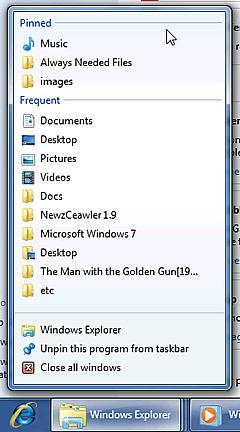

You can pin your favorite locations in the Windows Explorer shortcut.

Windows Explorer:
Windows Explorer hasn't changed a lot since Vista. Now, the additional details like date, added size, etc have a lighter colour in order to give emphasis to the name column.


Search now has history.

Some new shortcuts now appear in the column on the left, like network and computer. Moreover, the search now keeps history and the ability to use search tags like date added etc.

Click to enlarge
Small changes in Windows Explorer, you can see that there are more available places in the left menu.

The View styles now are located in the right corner and there is a new Tiles view.

Click to enlarge
The new Tiles View.

Finally in the Details view, the name column is shown better because it has a stronger font than the other columns.

Click to enlarge
The new Details view, except the name everything else has a softer colour.

Gadgets: As we mentioned earlier, Gadgets now work without the Sidebar. Except from this change, some Gadgets can have 2 sizes.


The bigger size of the Weather Gadget.

Another change is that now we can be informed if a gadget is outdated when there isn't an internet connection available by a small "timestamp".


An outdated Gadget. Notice the small text in the right that says "33 min ago" since the last update.

Only one more gadget that is our Windows Media Center is available in comparison with Vista. Let's hope that this will change in the final release. In our opinion, Gadgets is a nice addition and Microsoft should support it better.


Review Pages

1. Introduction
2. Vista problems and Windows 7 solutions
3. Windows Vista & 7 installation and compatibility
4. UAC problems, visual and other smaller issues
5. Memory management
6. Control panel
7. New and updated Accessories
8. IExplorer 8, Windows Media Center 6.1 and WMP 12
9. Final words
10. New Features in Windows 7 - Taskbar
11. Start Menu, Gadgets and Explorer
12. Libraries and New Aero Effects
13. Network


Pages

  • « first
  • ‹ previous
  • …
  • 3
  • 4
  • 5
  • 6
  • 7
  • 8
  • 9
  • 10
  • 11
  • …
  • next ›
  • last »

Windows

Microsoft

Tags: Windows Microsoft
Previous Post
Arctic Cooling Fusion 550R PSU
Next Post
DVD Burning at 22x

Related Posts

  • Snapdragon X Series is the Exclusive Platform to Power the Next Generation of Windows PCs with Copilot+ Today

  • Activision Blizzard King to Team Xbox

  • NVIDIA Studio Lineup Adds RTX-Powered Microsoft Surface Laptop Studio 2

  • Samsung and Microsoft Unveil First On-Device Attestation Solution for Enterprise

  • Introducing Xbox Game Pass Core, Coming This September

  • Announcing the next wave of AI innovation with Microsoft Bing and Edge

  • Microsoft Announces Security Copilot AI

  • Microsoft breaks new ground in healthcare with the next evolution of AI

Latest Reviews

Swit NP-FZ100 Battery
Cameras

Swit NP-FZ100 Battery

The Technology Stack Behind Modern Digital Gaming Platforms
Consumer Electronics

The Technology Stack Behind Modern Digital Gaming Platforms

be quiet! Dark Rock Pro 6
Cooling Systems

be quiet! Dark Rock Pro 6

How Online Casinos Use Encryption, Verification, and Risk Controls to Build User Trust
Enterprise & IT

How Online Casinos Use Encryption, Verification, and Risk Controls to Build User Trust

Why Low-Latency Infrastructure Matters More Than Raw Specs
Enterprise & IT

Why Low-Latency Infrastructure Matters More Than Raw Specs

Popular News

TEAMGROUP Launches EXPERT P34F Find My External SSD

TEAMGROUP Launches EXPERT P34F Find My External SSD

CORSAIR announces Vanguard Pro 96 and Vanguard 96 Gaming Keyboards

CORSAIR announces Vanguard Pro 96 and Vanguard 96 Gaming Keyboards

Samsung announces Galaxy Tab S11 and Galaxy S25 FE series

Samsung announces Galaxy Tab S11 and Galaxy S25 FE series

Viltrox Showcases Upcoming Lens Lineup and New TTL Flash at IBC 2025

Viltrox Showcases Upcoming Lens Lineup and New TTL Flash at IBC 2025

MSI Launches FORGE GK600 TKL WIRELESS Special Edition Compact Mechanical Keyboard

MSI Launches FORGE GK600 TKL WIRELESS Special Edition Compact Mechanical Keyboard

Panasonic Introduces the First Ultra-Telephoto Zoom Lens in the LUMIX S Series

Panasonic Introduces the First Ultra-Telephoto Zoom Lens in the LUMIX S Series

MSI Launches DATAMAG 40Gbps Magnetic Portable SSD

MSI Launches DATAMAG 40Gbps Magnetic Portable SSD

Viltrox Joins the L-Mount Alliance, Expanding Creative Possibilities

Viltrox Joins the L-Mount Alliance, Expanding Creative Possibilities

Main menu

  • Home
  • News
  • Reviews
  • Essays
  • Forum
  • Legacy
  • About
    • Submit News

    • Contact Us
    • Privacy

    • Promotion
    • Advertise

    • RSS Feed
    • Site Map
  • About
  • Privacy
  • Contact Us
  • Promotional Opportunities @ CdrInfo.com
  • Advertise on out site
  • Submit your News to our site
  • RSS Feed