LG Releases New magic Remote Control For Cinema 3D TVs
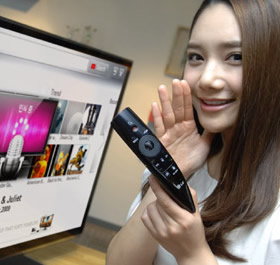
LG today unveiled a new remote control for its CINEMA
3D Smart TVs, the Magic Remote, which offers functions
including Voice Recognition, Wheel, Magic Gesture and
Pointing.
The new Magic Remote is our latest example,
incorporating new functions that will make it easier
for users to approach and use the CINEMA 3D Smart TVs,
particularly our Smart TV function which now has over
1,000 apps and a growing abundance of premium content,"
said Havis Kwon, President and CEO of LG Home
Entertainment Company.
 The Magic Remote's most obvious difference with
conventional remote controls is that push-buttons
constitute merely one dimension of the user experience.
By implementing voice recognition technology into Magic
Remote, users can enter text - such as search terms -
with voice commands.
The Magic Remote's most obvious difference with
conventional remote controls is that push-buttons
constitute merely one dimension of the user experience.
By implementing voice recognition technology into Magic
Remote, users can enter text - such as search terms -
with voice commands.
The Wheel located at the center of the Magic Remote enables users to swiftly scroll up and down various menus and apps. Meanwhile, the Pointing function (formerly known as Point and Click) allows users to simply point the Magic Remote toward the TV screen and drag the on-screen cursor to make selections. Through Pointing, users can also navigate through LG's Smart TV ecosystem without having to use multiple buttons and arrow keys. Additionally, physical Magic Gestures can be inputted as commands, enabling users to control CINEMA 3D Smart TVs with simple arm or wrist movements.
In addition to the four control functions, the Magic Remote also offers the 3D button, which undertakes 2D to 3D conversion with a single click of the button.
The Magic Remote's most obvious difference with
conventional remote controls is that push-buttons
constitute merely one dimension of the user experience.
By implementing voice recognition technology into Magic
Remote, users can enter text - such as search terms -
with voice commands.
The Wheel located at the center of the Magic Remote enables users to swiftly scroll up and down various menus and apps. Meanwhile, the Pointing function (formerly known as Point and Click) allows users to simply point the Magic Remote toward the TV screen and drag the on-screen cursor to make selections. Through Pointing, users can also navigate through LG's Smart TV ecosystem without having to use multiple buttons and arrow keys. Additionally, physical Magic Gestures can be inputted as commands, enabling users to control CINEMA 3D Smart TVs with simple arm or wrist movements.
In addition to the four control functions, the Magic Remote also offers the 3D button, which undertakes 2D to 3D conversion with a single click of the button.