Breaking News

DZOFILM Expands Arles Cine Lens System With 25–75mm and 65–180mm T2.6 Zooms G.SKILL Launches Trident Z5 Royal NeoX Series DDR5 Memory with AMD EXPO Technology XERON Launches NEX A61 ARGB CPU Air Cooler Viltrox to Unveil New Lenses And Production Solutions at IBC2026 ASUS Announces WiFi 8 Router

logo

  • Share Us
    • Facebook
    • Twitter
  • Home
  • Home
  • News
  • Reviews
  • Essays
  • About
    • Submit News

    • Contact Us
    • Privacy

    • Promotion
    • Advertise

    • RSS Feed

Search form

Mozilla Debuts The 'Australis' User Interface For Firefox

Mozilla Debuts The 'Australis' User Interface For Firefox

Enterprise & IT Nov 19,2013 0

Available in early adopters of the "Nightly" build, which are designed for preliminary testing, the new Firefox user interface brings a set of changes with a clean design and offers customization options.
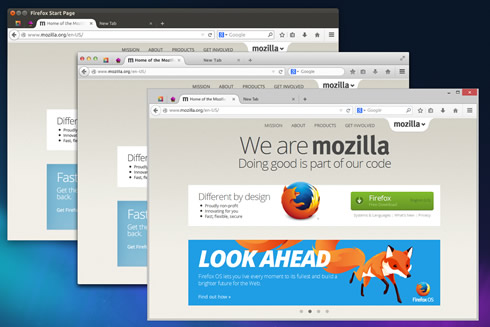


The new interface is also more extensible to better accommodate future features and additions; it offers a simpler presentation of add-ons; and a familiar look and feel across all Mozilla's platforms so that Firefox feels like Firefox everywhere.

One of the most noticeable changes in Australis is the new tab shape.
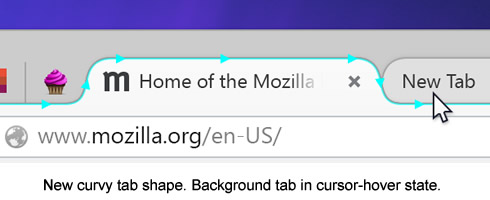
As important, though, is the distinction between foreground and background tabs. Background tabs are visually de-emphasized, leaving a space that’s uncluttered, where it’s quick to see which tab is currently selected. Tabs also slide forward into focus as you mouse over them, so you can better see where you’re heading.


In addition, Firefox’s tabs now sit higher in the titlebar, getting out of the way and leaving more screen space for web pages.

The default toolbar is also filled "carefully and sparingly" accoding to Mozilla. Some examples have already landed in earlier releases, like the forward button that only appears when there’s somewhere to go forward to, and the download button that shows progress when that’s relevant and hides it otherwise. In the new UI you’ll see this in a more prominent one-click bookmarking button paired with a button to get at those bookmarks.

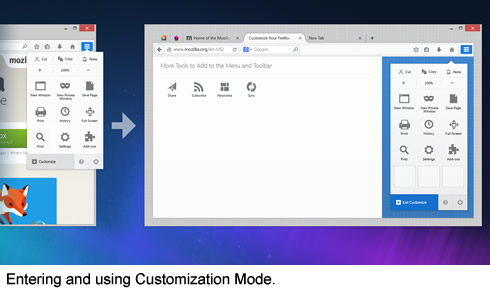
These always-used-by-everybody controls are front and center. Widely- but less frequently-used controls are quickly close at hand in the new, touch friendly menu at far right. For the rest, the 2% use-cases, new simpler customization is easier to find and use.

A new customization mode is very prominent in the new interface. Mozilla says this will serve as an on-ramp for more users to make Firefox into exactly what they need. It works with features shipped by default as well as with features that people add through add-ons.


Tags: Firefox
Previous Post
Toshiba Kira Ultrabook Has A 22-hour Battery Life
Next Post
ZTE Adds Two New Handsets To Its Nubia Line

Related Posts

  • Latest Firefox Helps You Keep Your Passwords Safe

  • Latest Firefox Updates Address Bar For Easier Search

  • Scroll Partners With Firefox to Build a Better Internet

  • Firefox Brings DNS Over HTTPS by Default for US Users

  • Mozilla Patches Critical Firefox Vulnerability

  • Firefox Announces New Partner in Delivering Private DNS Services

  • Firefox 71 Supports Picture-in-Picture

  • Mozilla Removes Avast Extensions From Their Add-on Store on Spyware Issues

Latest News

DZOFILM Expands Arles Cine Lens System With 25–75mm and 65–180mm T2.6 Zooms
Cameras

DZOFILM Expands Arles Cine Lens System With 25–75mm and 65–180mm T2.6 Zooms

G.SKILL Launches Trident Z5 Royal NeoX Series DDR5 Memory with AMD EXPO Technology
PC components

G.SKILL Launches Trident Z5 Royal NeoX Series DDR5 Memory with AMD EXPO Technology

XERON Launches NEX A61 ARGB CPU Air Cooler
Cooling Systems

XERON Launches NEX A61 ARGB CPU Air Cooler

Viltrox to Unveil New Lenses And Production Solutions at IBC2026
Cameras

Viltrox to Unveil New Lenses And Production Solutions at IBC2026

ASUS Announces WiFi 8 Router
Enterprise & IT

ASUS Announces WiFi 8 Router

Popular Reviews

Endorfy Thock V2 Wireless Keyboard

Endorfy Thock V2 Wireless Keyboard

The Quiet Technology Behind the Spin

The Quiet Technology Behind the Spin

SoundPeats Cove Pro

SoundPeats Cove Pro

Akaso Brave 8 Lite

Akaso Brave 8 Lite

Kioxia Exceria Plus G3 512GB microSD

Kioxia Exceria Plus G3 512GB microSD

be quiet! Dark Perk Mice

be quiet! Dark Perk Mice

SoundPeats C30

SoundPeats C30

XbotGo Chamaleon

XbotGo Chamaleon

Main menu

  • Home
  • News
  • Reviews
  • Essays
  • About
    • Submit News

    • Contact Us
    • Privacy

    • Promotion
    • Advertise

    • RSS Feed
  • About
  • Privacy
  • Contact Us
  • Promotional Opportunities @ CdrInfo.com
  • Advertise on out site
  • Submit your News to our site
  • RSS Feed