Ahead Nero 5.5 CD-R Software
2. New Features/Menu changes
Nero 5.5 preview - Page 2
New Features/Menu changes
New Features:
- Nero Wave Editor
- Advanced Nero Cover Designer
- Nero MPEG1 Video Encoder
- VCD / SVCD Menu Creation
- Audio Plug-In Interface
- Embedded Nero API (Application Program Interface)
- Nero Toolkit (Nero CD Speed , Nero Drive Speed)
- True multitasking recording engine simultaneously records up to 32 CD-R/RW
drives
- Record verification option
- Virus Checker
- Advanced Nero Imagedrive
- CD Extra format pre-mastering support
- Win NT4/2000 security select which users are allowed to burn under Win NT4/2000
Impressions
 We
got a preview version from Ahead in order to test the new features. The preview
version was much bigger (12mb) than the usual Nero 5.0x versions. In order to
be installed the setup program requested to remove previous 5.0.4.4 version.
We complied with the setup request and after the necessary reboot the software
welcome us with a changed about screen.
We
got a preview version from Ahead in order to test the new features. The preview
version was much bigger (12mb) than the usual Nero 5.0x versions. In order to
be installed the setup program requested to remove previous 5.0.4.4 version.
We complied with the setup request and after the necessary reboot the software
welcome us with a changed about screen.
 The
basic look of Nero still feels and looks the same. Correct? Yes and no! The
interface might look the same but the file explorer window has been improved.
The
basic look of Nero still feels and looks the same. Correct? Yes and no! The
interface might look the same but the file explorer window has been improved.
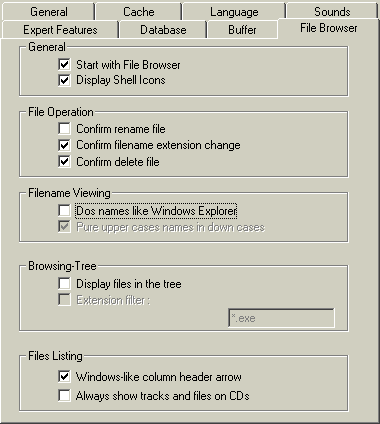
In previous 5.0x version when you maximized/resized the Nero window the file browser window remained the same. Now the file explorer window maximizes. The only new at the Preferences tab is the addition of the File Browser tab (check right picture):
 As
we have said earlier the Nero 5.5 has done great improvement over the build-in
File Explorer. As you can see from the above picture there are many things you
can adjust. Let's move ahead and see if something new is in the rest Nero 5.5
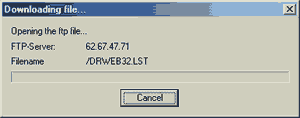
sub-menus. The only difference between the previous Nero is the extra options
in the help menu. There you can adjust the if the "Nero Wizard" will
be displayed, update the Antivirus Scanner with the latest signatures (anti-virus
search engine from Dr.Webnot sure which antivirus scan engine is used from Nero
5.5):
As
we have said earlier the Nero 5.5 has done great improvement over the build-in
File Explorer. As you can see from the above picture there are many things you
can adjust. Let's move ahead and see if something new is in the rest Nero 5.5
sub-menus. The only difference between the previous Nero is the extra options
in the help menu. There you can adjust the if the "Nero Wizard" will
be displayed, update the Antivirus Scanner with the latest signatures (anti-virus
search engine from Dr.Webnot sure which antivirus scan engine is used from Nero
5.5):
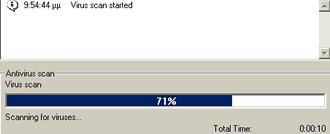
also if you decide later to use the antivirus option (found in the BURN-Tab) you will have to wait until Nero finishes virus scan:
and enter a new serial number. You will read later on why this is added in the Nero 5.5 - (multiple recorders support :)

Erase RW: As you can see the option are the same as with the latest 5.0.4.4 version:
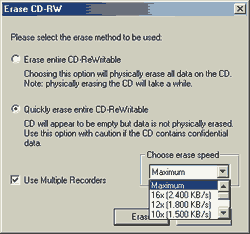
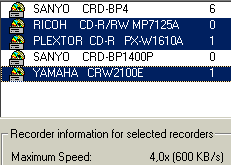
Lets tick "Use Multiple Recorders" and select 3 recorders:
- Ricoh MP7125A (supports 10x RW)
- Plextor PX-W1610A (supports 10x RW)
- Yamaha 2100E (supports 8x RW)
 In
our first test the Ricoh MP7125A/Yamaha 2100E contained HS-RW (10x) 74min media
and the Plextor PX-W1610A 4x RW 80min media. All recorders finished erasing,
however Nero kept displaying the erase box menu. After a while the system halted!
We tried again with the above recorders setup and with HS-RW media in all drives.
We had again the above behavior.
In
our first test the Ricoh MP7125A/Yamaha 2100E contained HS-RW (10x) 74min media
and the Plextor PX-W1610A 4x RW 80min media. All recorders finished erasing,
however Nero kept displaying the erase box menu. After a while the system halted!
We tried again with the above recorders setup and with HS-RW media in all drives.
We had again the above behavior.
When we changed the recorders test setup with Sanyo CRD-BP4 (instead of Yamaha 2100E), the erase task completed without any problem. This leads us to the conclusion that Nero 5.5 may have a bug or it simply wants all recorders have the same re-writing speed. Note that even we had selected not to re-eject the CD after every task, the trays of the Ricoh, Sanyo BP4 kept ejected! Maybe another bug?