
be quiet! Dark Rock Pro Elite
3. Tests
In order to test the CPU cooler we used the following configuration:
- CPU: AMD Ryzen 5 5600X
- Thermal compound: be quiet! DC2
- Case: bequiet! Silent Base 802
- Case fans: Front: 2x140 front and 1x140 at the back, all are be quiet! Silent Wings 3 High-Speed RPM speed controllable via SmartFan BIOS + Asus Xpert4 software
- CPU Fan: Stock 120mm + 135mm fans either in Quiet or Performance Modes
- Motherboard: Asus X570 E-Gaming with 4802 BIOS
- Memory: 2x16GB G.skill Trident Z RGB CL14 @ 3200MHz CL14 (XMP Profile) @ 1.35V
- PSU: be quiet! Straight Power 11 650Watt
- HDD: Crucial MX500 SSD
- VGA: Asus 1060 6GB Dual
- Ambient room temperature ~ 25 Celsius (with AC climate control) - Environment Temperature measurements: Precision Gold N09AQ Envirometer Meter
- Operating system: Windows 11 x64 with all the latest updates installed
- Software: OCCT Enterprise Edition (2 sec interval monitor)
Before each run, we left the CPU cooler cooled down and we reset the OCCT Enterprise Edition values to be accurate. We set the CPU fan speeds at "Smart Mode" with the Asus Xpert4 software. The case fans were also set at SmartFan mode with the option for Auto Fan Stop at low loads down to 0% for the two front fans and auto for the back case fan.
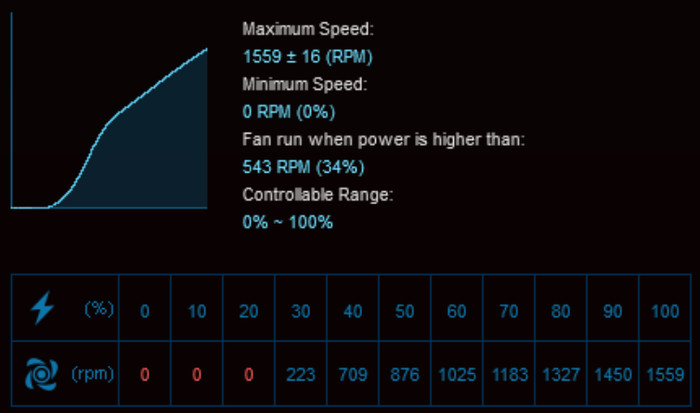

The CPU fans were detected from the Asus motherboard and gave us the following fan curve
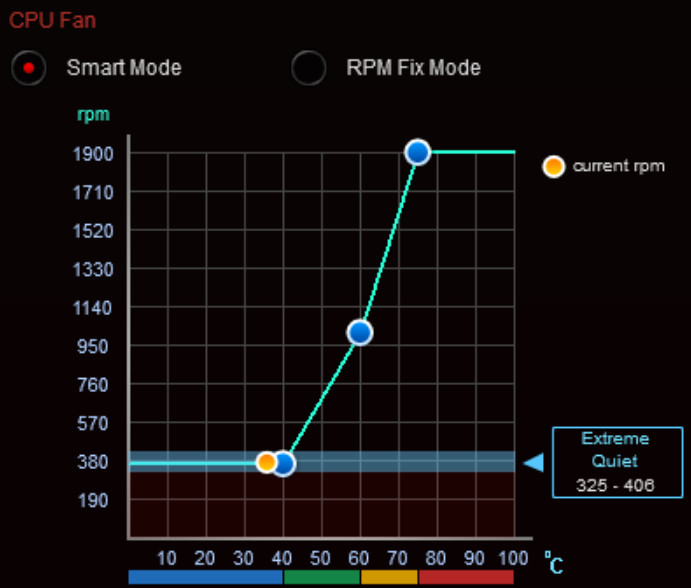
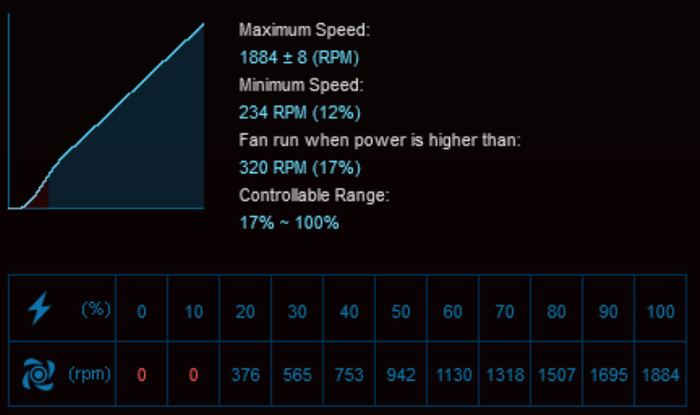
Bios settings:
- Ai Overclock Tuner: D.O.C.P -> XMP DDR-3200 CL14
- BCLK Frequency: 100MHz
- FCLK Frequency: 1600MHz
- CPU core ratio: Auto
- TPU: Keep Current Setting
- Performance Bias: Auto
- VDDCR CPU Voltage: 1.100V
- VDDCD SOC Voltage: 0.900V
- DRAM Voltage: 1.350V (XMP)
- Precision Boost Overdrive: Auto
- Rest BIOS options: Auto

All tests were done with OCCT Enterprise Edition with a 30min run and we noted all temperatures as were noted from the software. For maximum temperature, we used the following settings:
- Data Set: Small
- Mode: Extreme
- Load Type: Steady
- Monitor: 2 sec interval
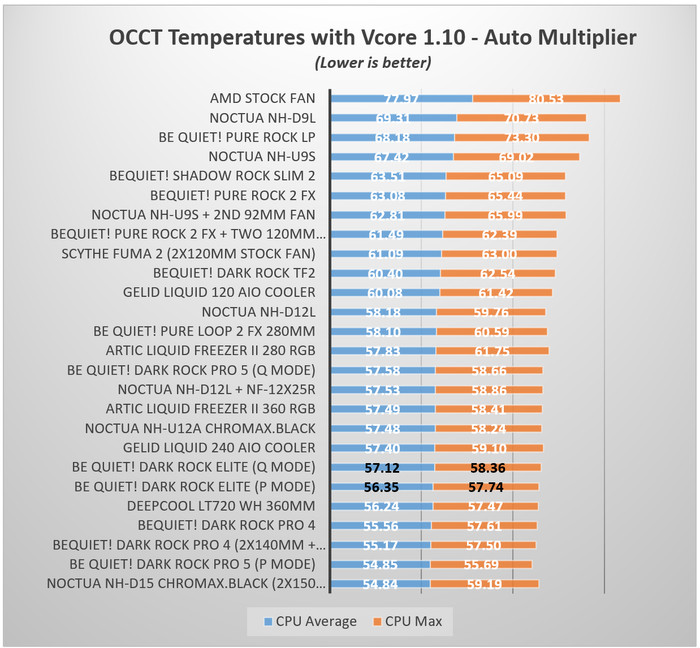
The first test was to see how the Dark Rock Pro Elite performs on Full load. As the OCCT build-in graph showed, the system at idle was running at 40 Celcius and at full load at 59.50 Celsius max. It's possible to further improve performance if you tweak the fan curve but for now, we left everything stock, as most users will do.
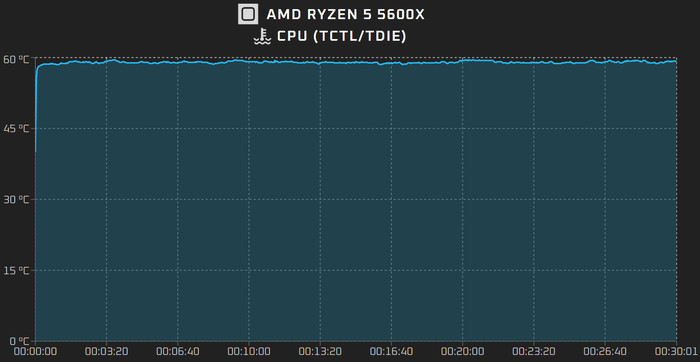
Dark Rock Pro 5 Performance Mode

Dark Rock Pro 5 Quiet Mode
We have already seen very good performance from the Dark Rock Pro 5, how better is the Elite model? Well, not much. While temperature differences are very small and could be in the error margin, as with most benchmarks, we double-checked the results and while average temperatures do tell one truth, we believe the "better" performance of the Dark Rock Pro 5 vs the Dark Rock Pro Elite comes from the front 120mm, which has higher ramp fan curve and probably kicks in earlier so it give slight better scores. Both the Q/P modes don't have so much impact with "normal" Vcore voltages, so we would leave it after all to Q for lower noise levels.
Overclocking
Bios settings:
- Ai Overclock Tuner: D.O.C.P -> XMP DDR-3200 CL14
- BCLK Frequency: 100MHz
- FCLK Frequency: 1600MHz
- CPU core ratio: 45Χ
- TPU: Keep Current Setting
- Performance Bias: Auto
- VDDCR CPU Voltage: 1.18125V
- VDDCD SOC Voltage: 0.900V
- DRAM Voltage: 1.350V (XMP)
- Precision Boost Overdrive: Auto
- Rest BIOS options: Auto

All tests were done with OCCT Enterprise Edition with a 30min run and we noted all temperatures as were noted from the software. For maximum temperature, we used the following settings:
- Data Set: Small
- Mode: Extreme
- Load Type: Steady
- Monitor: 2 sec interval
The fan curve for this test was as with the previous test. Below are the two temperature graphs from the Performance vs Quiet mode.
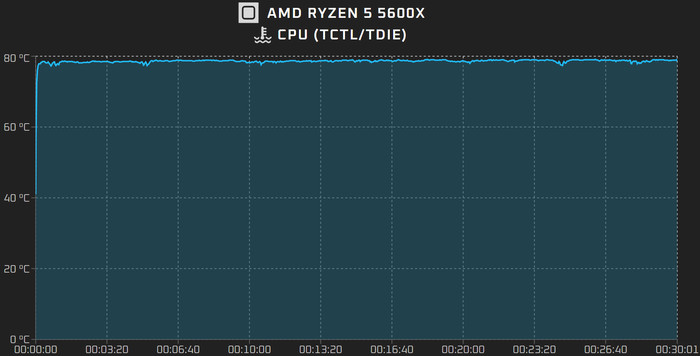
Dark Rock Pro 5 Performance Mode
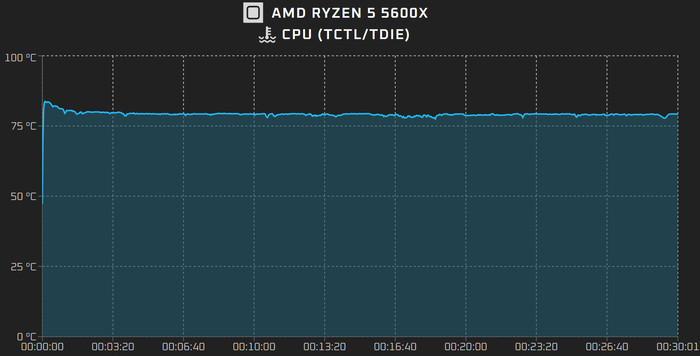
Dark Rock Pro 5 Quiet Mode
When performing overclock at the AMD Ryzen 5600X and therefore increasing produced TDP (~120Watt), the Dark Rock Pro Elite was better than the Dark Rock Pro 5 CPU cooler by two Celsius and managed to sustain very good average temperatures during our thermal load test. The Dark Rock Pro 5 is another beast but, since it has a small 120mm front fan, will eventually lose some performance. The Dark Rock Pro 4 will win both of these products when armed with three (3) fans and therefore has higher airflow and higher noise levels as well. The Q mode does drop a bit the overall performance but we don't mind at all.
