Breaking News

Sony Expands Its Turntable Lineup with New Wireless Models ENDORFY introduces Atlas Electric desks Sony Unveils LinkBuds Clip Open Earbuds be quiet! enters high-end gaming mouse market with Dark Perk Ergo and Dark Perk Sym ASUS ROG announces ROG Strix GS-BE7200 Dual-Band WiFi 7 Gaming Router

logo

  • Share Us
    • Facebook
    • Twitter
  • Home
  • Home
  • News
  • Reviews
  • Essays
  • Forum
  • Legacy
  • About
    • Submit News

    • Contact Us
    • Privacy

    • Promotion
    • Advertise

    • RSS Feed
    • Site Map

Search form

DVD Technical Guide

Aug 30,2005 0

7. Read-Only Disc File Format


Review Pages

1. DVD History
2. Concepts and Structure of the DVD Format
3. The Future of DVD
4. Design Concept of the Physical Specification
5. Features of the DVD Physical Specification
6. The DVD Data Format
7. Read-Only Disc File Format
8. Video Format
9. Video Format - Page 2
10. Video Format - Page 3
11. Audio Format
12. Audio Format - Page 2
13. Audio Format - Page 3
14. Audio Format - Page 4
15. Audio Format - Page 5
16. DVD-R and DVD-RW
17. DVD-R and DVD-RW - Page 2
18. DVD-R and DVD-RW - Page 3
19. DVD-R and DVD-RW - Page 4
20. DVD-RAM
21. DVD-RAM - Page 2
22. DVD-RAM - Page 3
23. DVD-RAM - Page 4


Chapter 3 Read-Only Disc File Format

3.1 Structure of the DVD-ROM Logical Format
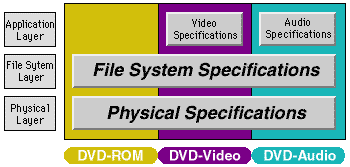
The file format of the DVD-ROM family is common to DVD-ROM (computer applications), DVD-Video, and DVD-Audio discs. This makes it possible to handle the same content in the same way on both consumer-oriented stand-alone devices and computer systems. However, there are a few minor restrictions on the file system for DVD-Video and DVD-Audio. This is to make it possible to play these discs on stand-alone devices which use simple software.

3.2 Overview of the DVD-ROM File Format
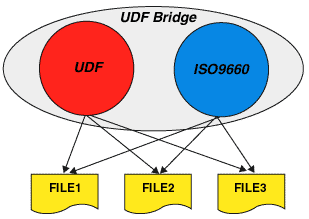
DVD-ROM uses the UDF (Universal Disk Format), but can also be accessed using ISO-9660, to provide compatibility with previous systems. This hybrid file system is called "UDF Bridge." As both file systems are able to access any file on the disc, all content on the disc can be accessed by using either file system.

3.3 Relationship with the Application Format
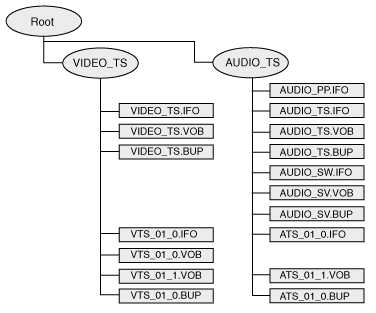
The files used for DVD-Video and DVD-Audio are arranged in directories called VIDEO_TS and AUDIO_TS, respectively. The files in these directories have predetermined names and extensions. Files with the extension ".IFO" contain application information needed to reproduce the content. For each ".IFO" file there is always a back-up file with the same name but the ".BUP" extension. Files with the ".VOB" extension contain the actual video or audio content.


Source: http://www.pioneer.co.jp/crdl/tech/index-e.html


Review Pages

1. DVD History
2. Concepts and Structure of the DVD Format
3. The Future of DVD
4. Design Concept of the Physical Specification
5. Features of the DVD Physical Specification
6. The DVD Data Format
7. Read-Only Disc File Format
8. Video Format
9. Video Format - Page 2
10. Video Format - Page 3
11. Audio Format
12. Audio Format - Page 2
13. Audio Format - Page 3
14. Audio Format - Page 4
15. Audio Format - Page 5
16. DVD-R and DVD-RW
17. DVD-R and DVD-RW - Page 2
18. DVD-R and DVD-RW - Page 3
19. DVD-R and DVD-RW - Page 4
20. DVD-RAM
21. DVD-RAM - Page 2
22. DVD-RAM - Page 3
23. DVD-RAM - Page 4

 

Pages

  • « first
  • ‹ previous
  • …
  • 3
  • 4
  • 5
  • 6
  • 7
  • 8
  • 9
  • 10
  • 11
  • …
  • next ›
  • last »

DVD

Pioneer

Tags: DVD Pioneer
Previous Post
A Revolutionary by Accident
Next Post
Windows Vista Public Beta 1 - Part 2

Related Posts

  • Pioneer Japan announces BDR-WX01DM for US market

  • Pioneer Japan announces new optical storage drives for JIS X6257 archive format

  • Pioneer Japan updates its CD-DVD Software utility

  • Pioneer Japan announces new BDR-X13J-X external BD Writer and BDR-WX01DM for archiving

  • Pioneer Japan releases new firmware updates for external Blu-Ray Recorders

  • Pioneer BDR-XD08UMB-S External Blu-Ray Recorder

  • Pioneer Japan updates firmware for their X13 lineup (30-01-2023)

  • Pioneer BDR-X13U-S

Latest Reviews

The Difference Between American and European Stakes and Why It Changes How People Bet
Enterprise & IT

The Difference Between American and European Stakes and Why It Changes How People Bet

Endorfy Thock V2 Wireless Keyboard
PC components

Endorfy Thock V2 Wireless Keyboard

Noctua NH-D15 G2 Chromax.Black
Cooling Systems

Noctua NH-D15 G2 Chromax.Black

EnGenius ECW520 AP
Enterprise & IT

EnGenius ECW520 AP

Noctua NP-DM3 desk mat
Gaming

Noctua NP-DM3 desk mat

Popular News

COLORFUL Introduces CVN B850I GAMING FROZEN Motherboard

COLORFUL Introduces CVN B850I GAMING FROZEN Motherboard

COLORFUL Presents CVN X870 ARK FROZEN Motherboard for AMD Ryzen 9000 CPUs

COLORFUL Presents CVN X870 ARK FROZEN Motherboard for AMD Ryzen 9000 CPUs

TEAMGROUP Launches EXPERT P34F Find My External SSD

TEAMGROUP Launches EXPERT P34F Find My External SSD

ASRock AM5 Motherboards Now Fully Support AMD Ryzen 9 9950X3D & 9900X3D Processors

ASRock AM5 Motherboards Now Fully Support AMD Ryzen 9 9950X3D & 9900X3D Processors

Samsung announces Galaxy Tab S11 and Galaxy S25 FE series

Samsung announces Galaxy Tab S11 and Galaxy S25 FE series

Viltrox Showcases Upcoming Lens Lineup and New TTL Flash at IBC 2025

Viltrox Showcases Upcoming Lens Lineup and New TTL Flash at IBC 2025

CORSAIR announces Vanguard Pro 96 and Vanguard 96 Gaming Keyboards

CORSAIR announces Vanguard Pro 96 and Vanguard 96 Gaming Keyboards

Panasonic Introduces the First Ultra-Telephoto Zoom Lens in the LUMIX S Series

Panasonic Introduces the First Ultra-Telephoto Zoom Lens in the LUMIX S Series

Main menu

  • Home
  • News
  • Reviews
  • Essays
  • Forum
  • Legacy
  • About
    • Submit News

    • Contact Us
    • Privacy

    • Promotion
    • Advertise

    • RSS Feed
    • Site Map
  • About
  • Privacy
  • Contact Us
  • Promotional Opportunities @ CdrInfo.com
  • Advertise on out site
  • Submit your News to our site
  • RSS Feed