Breaking News

Hollyland Launches Pyro 7 Ultra, an All-in-One Wireless Monitoring System for Professional Film Production ADATA Powers AI Servers, Edge Systems and Intelligent Applications with Enterprise Memory and Storage Acer Expands Gaming Handheld Portfolio with Predator Atlas 7 Sony Expands its ULT POWER SOUND series Lineup with 3 New Bass-Powered Speakers Sonos Introduces Sonos 27, the Next Generation of Its Audio Operating System

logo

  • Share Us
    • Facebook
    • Twitter
  • Home
  • Home
  • News
  • Reviews
  • Essays
  • About
    • Submit News

    • Contact Us
    • Privacy

    • Promotion
    • Advertise

    • RSS Feed

Search form

Evermore GT-800BT GPS

Nov 7,2008 0

2. The package


Review Pages

1. Features, specifications
2. The package
3. Using the device
4. Evermore Moremapper Software
5. GPS Receiver Tests
6. Final Words


Evermore GT-800BT GPS is currnently available in online stores for ~$99.

The product is obviously different than simple GPS solution due to its logging abilities.

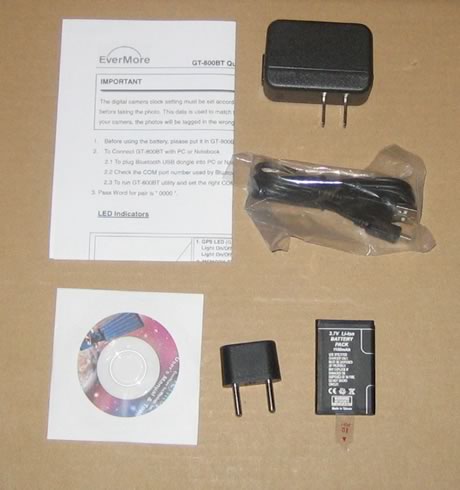
In the package you will find only the essentials and we would like to see car charging adapter:

  • 1x USB cable
  • 1x EU Plug
  • 1x AC Power Adapter with USB
  • 1x Moremapper Software CD
  • 1x GT-800BT GPS unit
  • 1x Re-chargeable battery
  • 1x Quick installation guide

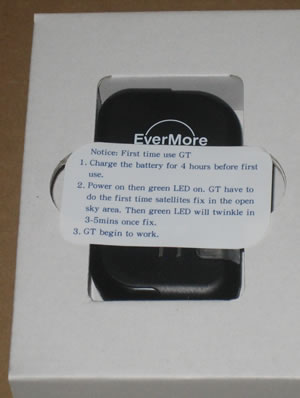
A big sticker inside the box provides basic instructions users should follow when they will use the device for the first time. The Evermore GT-800BT should be charged for 4 hours before first use. After powering on, the Green LED will light up indicating that the GT is performing the first time satellite fix. Once the green LED twinkle, the GT is ready to work. Sattelite fixing may take 3-5 minutes.
The Evermore GT-800 is a small, standard-sized GPS receiver and its weight is 60gr (including battery).

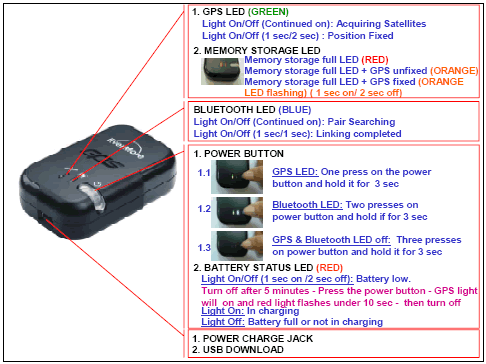
Below you can find information about the LEDs and buttons found on the device:
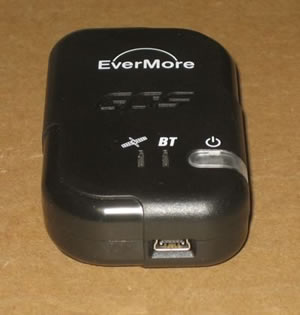
The main on/off switch is placed on the front side of the device. The mini-USB port for charging and connecting the device to the PC is placed at the bottom side.

Opening the case on the back, again we will find a warning about properly charging the device before use.

The bottom label gives us more details about the product's features.


Review Pages

1. Features, specifications
2. The package
3. Using the device
4. Evermore Moremapper Software
5. GPS Receiver Tests
6. Final Words


Pages

  • « first
  • ‹ previous
  • 1
  • 2
  • 3
  • 4
  • 5
  • 6
  • next ›
  • last »

Evermore

Tags: Evermore
Previous Post
Qstarz Q1300BT GPS
Next Post
Gainward HD4870 1GB GS

Related Posts

  • Evermore DL-200BT

  • Evermore BT-R900

Latest Reviews

be quiet! Dark Power 14 IO
PC components

be quiet! Dark Power 14 IO

SanDisk High Endurance 512GB microSDXC
Cameras

SanDisk High Endurance 512GB microSDXC

Samsung PRO Ultimate 512GB microSDXC
Cameras

Samsung PRO Ultimate 512GB microSDXC

be quiet! Light Mount TKL
Consumer Electronics

be quiet! Light Mount TKL

be quiet! Light Loop IO LCD
Cooling Systems

be quiet! Light Loop IO LCD

Popular News

CORSAIR announces Vanguard Pro 96 and Vanguard 96 Gaming Keyboards

CORSAIR announces Vanguard Pro 96 and Vanguard 96 Gaming Keyboards

MSI Launches FORGE GK600 TKL WIRELESS Special Edition Compact Mechanical Keyboard

MSI Launches FORGE GK600 TKL WIRELESS Special Edition Compact Mechanical Keyboard

TEAMGROUP Launches EXPERT P34F Find My External SSD

TEAMGROUP Launches EXPERT P34F Find My External SSD

Samsung announces Galaxy Tab S11 and Galaxy S25 FE series

Samsung announces Galaxy Tab S11 and Galaxy S25 FE series

Viltrox Showcases Upcoming Lens Lineup and New TTL Flash at IBC 2025

Viltrox Showcases Upcoming Lens Lineup and New TTL Flash at IBC 2025

Panasonic Introduces the First Ultra-Telephoto Zoom Lens in the LUMIX S Series

Panasonic Introduces the First Ultra-Telephoto Zoom Lens in the LUMIX S Series

MSI Launches DATAMAG 40Gbps Magnetic Portable SSD

MSI Launches DATAMAG 40Gbps Magnetic Portable SSD

MSI’s Latest AMD X870E MAX & EVO Series Motherboards

MSI’s Latest AMD X870E MAX & EVO Series Motherboards

Main menu

  • Home
  • News
  • Reviews
  • Essays
  • About
    • Submit News

    • Contact Us
    • Privacy

    • Promotion
    • Advertise

    • RSS Feed
  • About
  • Privacy
  • Contact Us
  • Promotional Opportunities @ CdrInfo.com
  • Advertise on out site
  • Submit your News to our site
  • RSS Feed