Breaking News

Sony Introduces New Colour to INZONE H9 II Headset and INZONE E9 In-ear Headphones Club 3D announces new products for October 2026 Razer Unveils All-New Wolverine V4 Line ASUS Republic of Gamers Ships ROG Rapture GT-BN98 Router GMK Unveils TriggerKey, a New Mechanical Key System for Greater Precision and Comfort

logo

  • Share Us
    • Facebook
    • Twitter
  • Home
  • Home
  • News
  • Reviews
  • Essays
  • About
    • Submit News

    • Contact Us
    • Privacy

    • Promotion
    • Advertise

    • RSS Feed

Search form

G.Skill Flare X5 DDR5-5600 64GB

Oct 8,2023 0

2. Tests


Review Pages

1. Introduction / Retail Package
2. Tests
3. Conclusion


For our tests, we used the following test system

  • AMD 7950X CPU + Noctua NH-U12A Chromax.black (2x120mm fans)
  • Asus ProArt X670E-CREATOR WIFI Motherboard with the latest BIOS installed (1602 AGESA 1.0.0.7c)
  • MSI 4090 Suprim X Graphics Card with the latest Nvidia Drivers installed
  • Samsung 980Pro 1TB with the latest BIOS NVME SSD
  • Seasonic Vertex GX 1000W Power Supply
  • Dell S2721QS 4K Monitor @ 60Hz
  • Windows 11 Pro Edition + latest updates installed
  • Test Stability:
    • quick testing 30min OCCT v12 Memory Test
    • stable testing Testmem5 absolute(01102021)@anta777.cfg (3 cycles)

Both modules were installed at the B2/B4 channels suggested by the motherboard vendor. We had to manually perform ClearCMOS to get everything started and the memory training for the DDR5 platform with the Asus motherboard isn't long, the first boot came around 20 seconds, and the first power up. After that point, the system is much faster at boot.

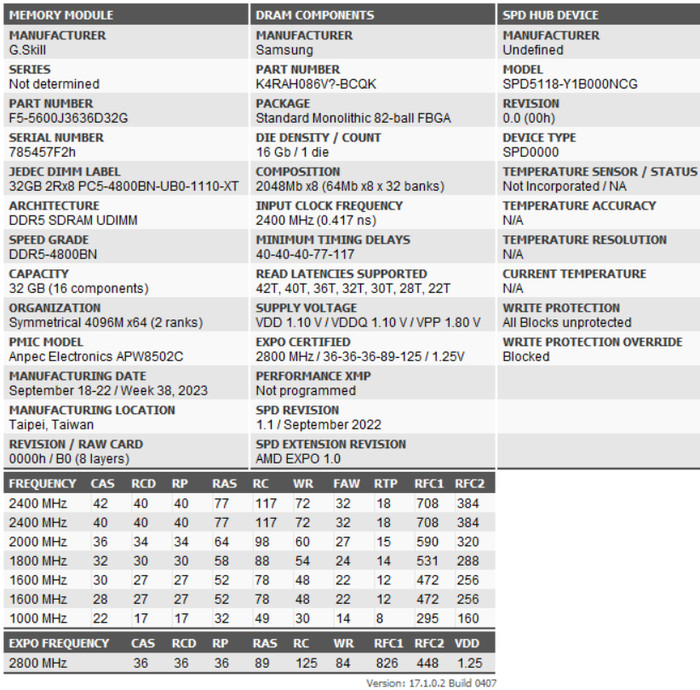
Using the free latest version of the Thaiphoon Burner which includes more information about the used modules. It seems the G.Skill Flare X5 series is using Samsung memory modules.
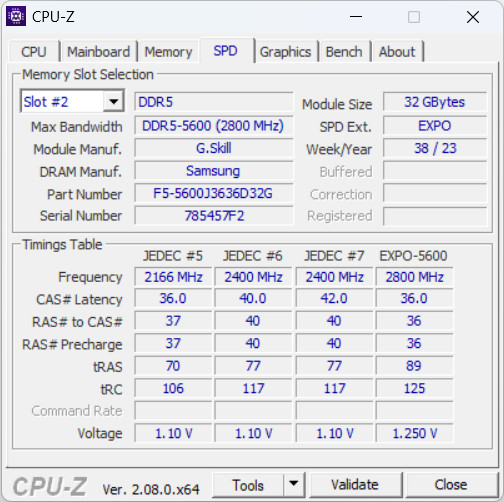
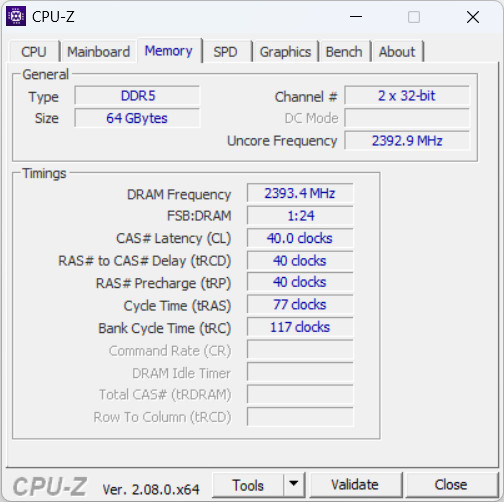
After getting the first boot, the Asus motherboard recognized and set the memory initially at DDR5-4800MHz CL40 1.10V, without enabling any EXPO/XMP profiles.
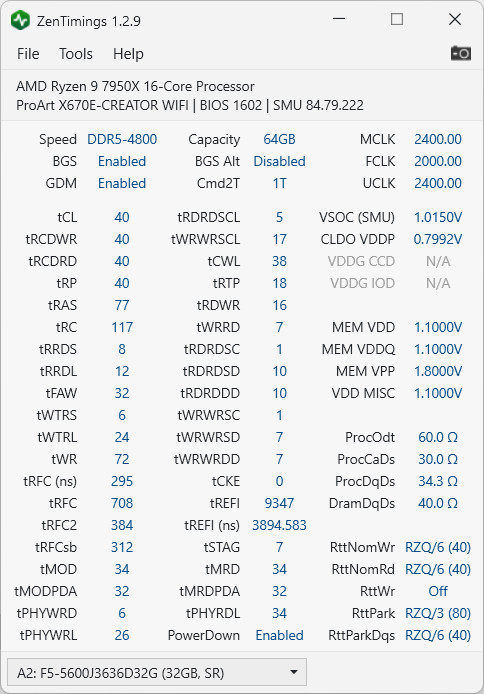
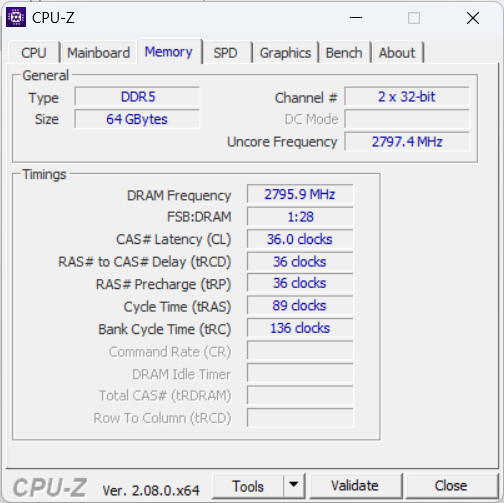
Under the BIOS motherboard, we can set the EXPO / XMP profile, for the AMD system there is only one choice, DDR5-5600 CL36.
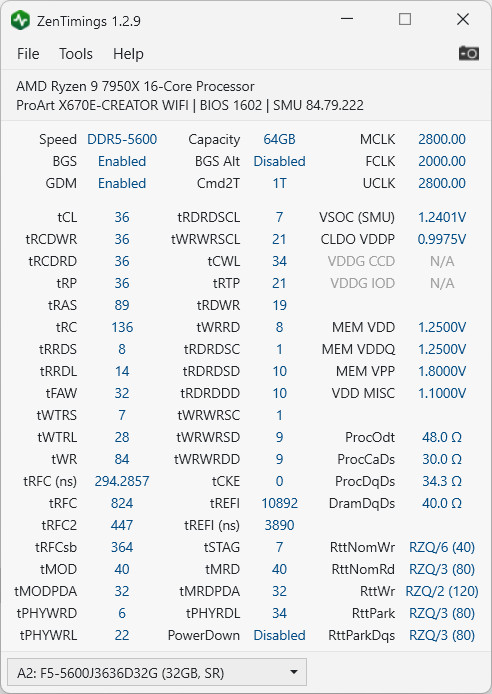
From our testing, you can get tighter timings at 6000MHz with CL30 and 1.40V. Note that you may get worse or better timings depending on your system and voltages.
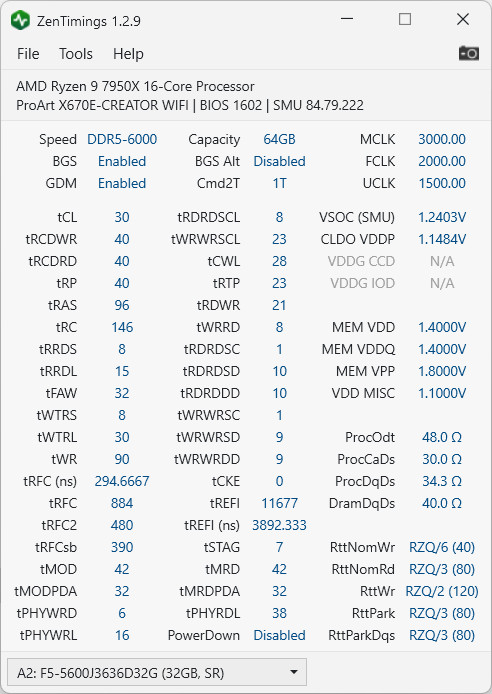
At 1.40V the temperatures were high enough so playing around with memory timings and voltages is needed.
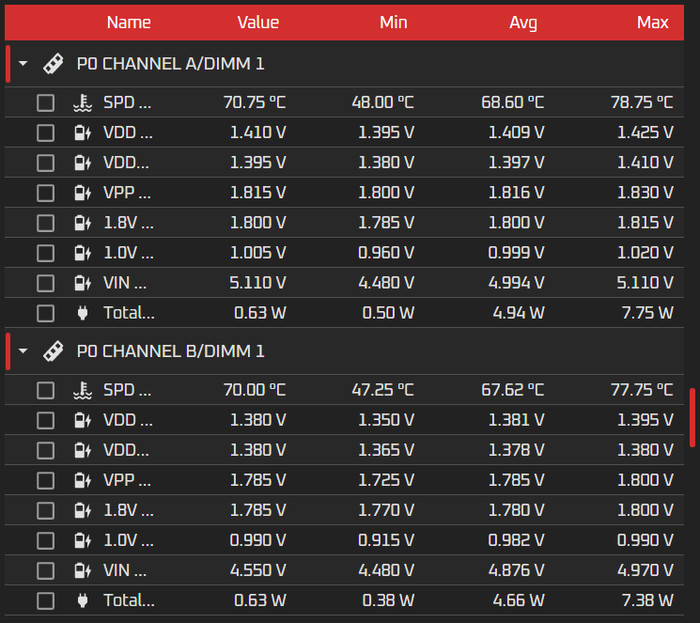
Usually, Asus motherboard do include other memory presets for various memory kits (Ai Tweaker->DRAM Timing Control -> Memory Presets, so in any case you need to check them out as well. For our tests, we performed tests at all the above running speeds to showcase all possible scenarios you could run this memory kit.

AIDA64 Cache And Memory Benchmark (v6.92.6600)
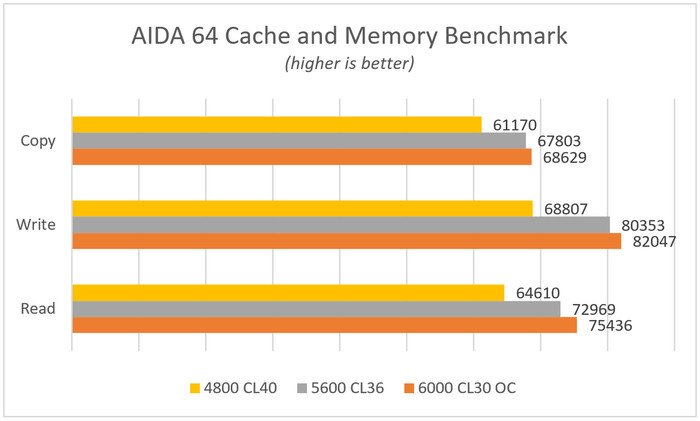
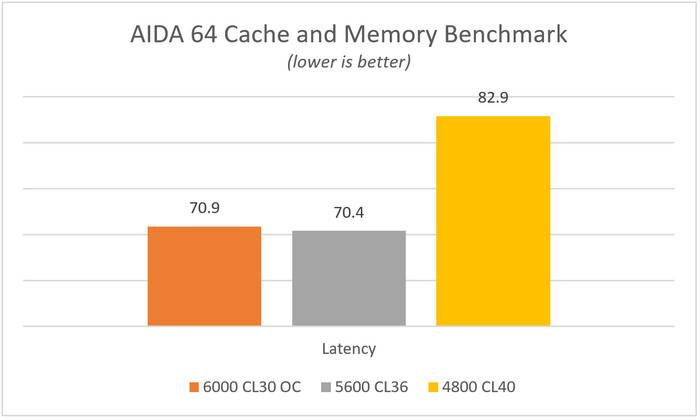
The highest memory performance comes from the 6000CL30 which needs 1.40V to be stable. The default EXPO profile DDR5-5600 CL36 also gives very good performance and you should really enable it under BIOS. The AIDA64 Cache benchmark reports around 70.4ns for the 5600CL36 and around 70.9ns for the 6000CL30 setting.
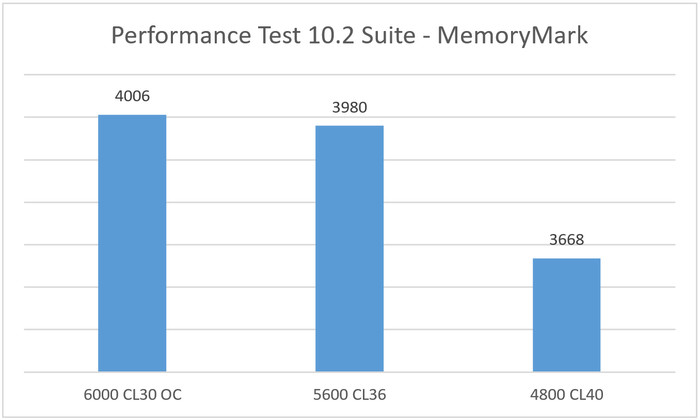
MemoryMark (Performance Test 10.2 Suite)

This test gives an overall score for the installed memory, the 6000CL30 OC gave a higher score than the 5600CL36 with 4006 points.
GeekBench v6.0.3

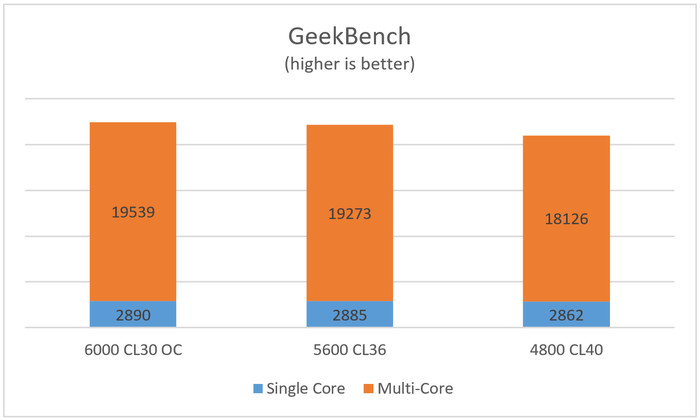
Passing to the well-known GeekBench, this software tests the performance either in single or total cores, and as we can see there is a performance difference in both single/multi-core index scores as memory frequency rises.
PCMark10

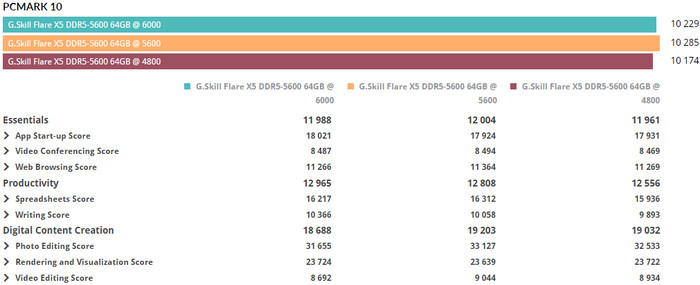
We used the latest version of the well-known PCMark10 and we saw some performance differences in the total overall score, after setting the various memory frequencies of the tested memory. The 5600CL36 default memory setting gave the highest overall score with 10285 points, while the 6000 CL30 was slightly behind with 10229 points.
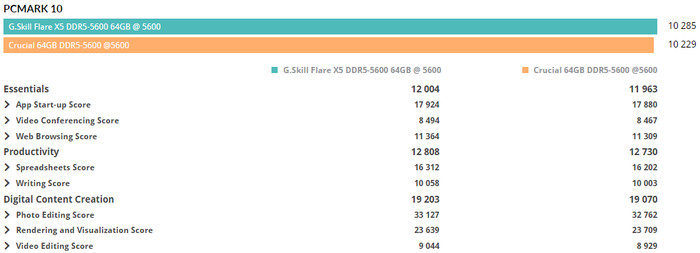
Comparing the Crucial DDR5-5600 CL40 vs the G.Skill Flare X5 5600CL36, we do find the G.Skill to perform better and be faster in all tests.
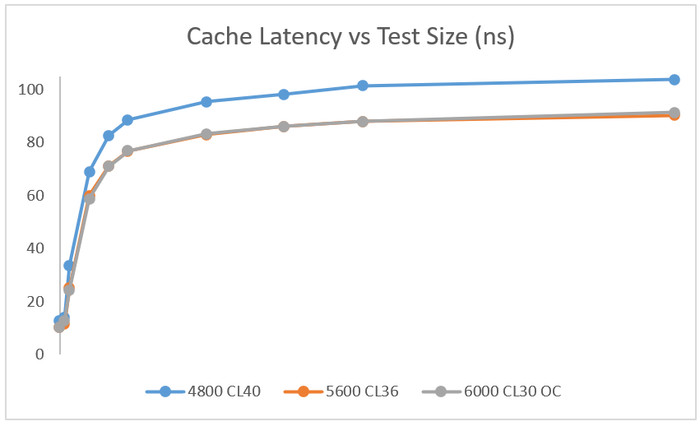
Using an open-source benchmark software called MicrobenchmarksGui, we made a graph of the various memory frequencies and the cache latency as measured by the software. The cache latency of both 6000 CL30 OC and 5600 CL36 seems to be very similar.
 

Review Pages

1. Introduction / Retail Package
2. Tests
3. Conclusion


Pages

  • « first
  • ‹ previous
  • 1
  • 2
  • 3
  • next ›
  • last »

G.SKILL

Tags: G.SKILL
Previous Post
Streacom BC1 V2 Bench Table
Next Post
Silicon Power UD90 2TB NVME SSD

Related Posts

  • G.SKILL Launches Trident Z5 Royal NeoX Series DDR5 Memory with AMD EXPO Technology

  • G.SKILL Launches Flare X5X Series with AMD EXPO Ultra Low Latency

  • G.SKILL Demos Trident Z5 NeoX RGB Series DDR5 with AMD EXPOT Technology

  • G.SKILL Demos Overclocked DDR5-10000 512GB (64GBx8) R-DIMM and other products at Computex 2026

  • G.SKILL Showcases DDR5-9200 1.1V 16GBx2 High-Speed CU-DIMM Memory Kit

  • G.SKILL Demo New Memory Solutions for Gaming, Server, AI, Workstation Applications at Computex 2026

  • G.SKILL DDR5 Memory Kits Confirmed as Intel XMP 3.0 'Ready' for Intel Core Ultra 200S Plus Series Processors

  • G.SKILL Officially Commences World Cup 2026 Overclocking Competition with $40,000 USD Total Prize Pool

Latest Reviews

Fanxiang MP83 M.2 NVMe SSD Enclosure
Enterprise & IT

Fanxiang MP83 M.2 NVMe SSD Enclosure

Ugreen CM642 USB4.0 Enclosure
PC components

Ugreen CM642 USB4.0 Enclosure

be quiet! Dark Power 14 IO
PC components

be quiet! Dark Power 14 IO

SanDisk High Endurance 512GB microSDXC
Cameras

SanDisk High Endurance 512GB microSDXC

Samsung PRO Ultimate 512GB microSDXC
Cameras

Samsung PRO Ultimate 512GB microSDXC

Popular News

MSI’s Latest AMD X870E MAX & EVO Series Motherboards

MSI’s Latest AMD X870E MAX & EVO Series Motherboards

COLORFUL Launches iGame B850M ULTRA Series Micro-ATX Motherboards

COLORFUL Launches iGame B850M ULTRA Series Micro-ATX Motherboards

COLORFUL Presents Limited Edition Chitu MAG-60 Magnetic Keyboard Inspired by the Year of the Horse

COLORFUL Presents Limited Edition Chitu MAG-60 Magnetic Keyboard Inspired by the Year of the Horse

COLORFUL Launches iGame B850I MINI OC V14 Motherboard

COLORFUL Launches iGame B850I MINI OC V14 Motherboard

COLORFUL Presents iGame Z890 ULTRA-S W and iGame Z890M ULTRA Z Motherboards

COLORFUL Presents iGame Z890 ULTRA-S W and iGame Z890M ULTRA Z Motherboards

COLORFUL Launches the iGame X870E VULCAN W OC Motherboard

COLORFUL Launches the iGame X870E VULCAN W OC Motherboard

COLORFUL Expands B850 Motherboard Lineup with New CVN, Battle-Ax, and MEOW Models

COLORFUL Expands B850 Motherboard Lineup with New CVN, Battle-Ax, and MEOW Models

ASRock Adds Support for One Sub-Channel DRAM Module on Intel DDR5 Motherboards

ASRock Adds Support for One Sub-Channel DRAM Module on Intel DDR5 Motherboards

Main menu

  • Home
  • News
  • Reviews
  • Essays
  • About
    • Submit News

    • Contact Us
    • Privacy

    • Promotion
    • Advertise

    • RSS Feed
  • About
  • Privacy
  • Contact Us
  • Promotional Opportunities @ CdrInfo.com
  • Advertise on out site
  • Submit your News to our site
  • RSS Feed