Breaking News

GoPro Unveils GP3 Lenovo Unveils Adaptive AI PCs, Modular Concepts, and Lenovo Qira Rollout at MWC 2026 Say hello to MacBook Neo Seagate Delivers Industry’s Highest Capacity Hard Drives with Next-Generation Mozaic 4 Plus ZTE Launches Linkpro plus Wi-Fi 8 Solution at MWC Barcelona 2026

logo

  • Share Us
    • Facebook
    • Twitter
  • Home
  • Home
  • News
  • Reviews
  • Essays
  • Forum
  • Legacy
  • About
    • Submit News

    • Contact Us
    • Privacy

    • Promotion
    • Advertise

    • RSS Feed
    • Site Map

Search form

Nero 8 Preview

Sep 25,2007 0

2. Installation


Review Pages

1. Introduction
2. Installation
3. Nero StartSmart Introduction
4. Burning with StartSmart
5. Conclusion


The Nero 8 installation process is very easy and straightforward. There are three installation options: Nero 8, PhotoShow Express and SecurDisc Viewer.
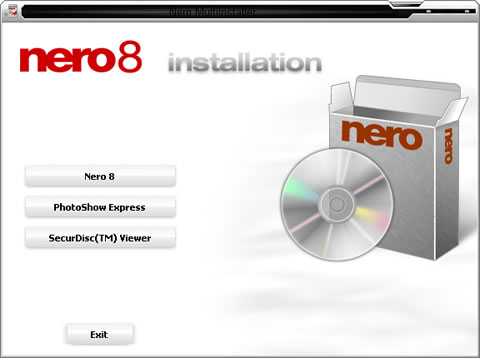
Our main interest of course is to see how the new Nero 8 looks. As with Nero 7, Nero 8 bulks a "free" Ask Toolbar, which for some is considered as a "legitimate Internet Explorer toolbar", while for others it isn't. In any case, we will install Nero 8 without the Ask Toolbar:

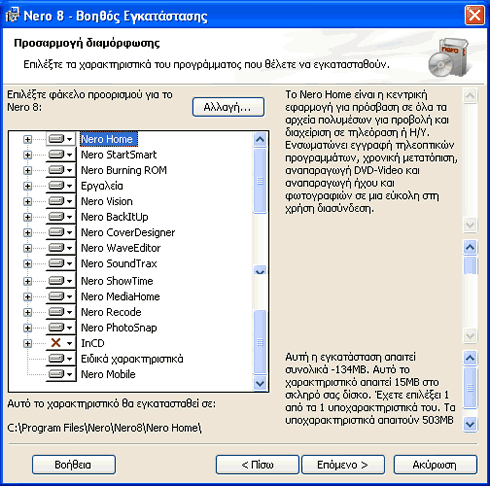
Not much has changed from the previous Nero 7 installer:
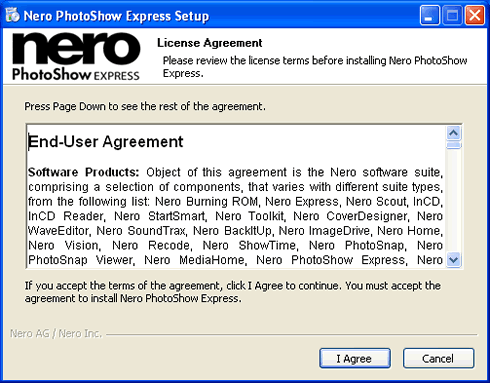
To install PhotoShow Express, we need to agree to the "End-User Agreement"
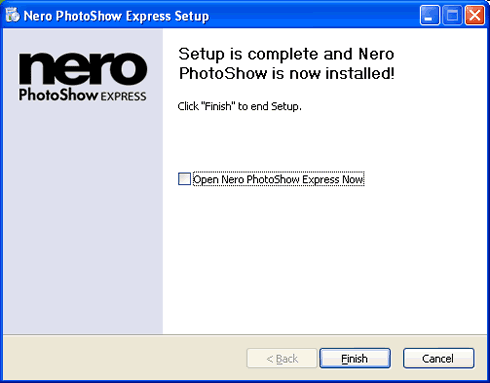
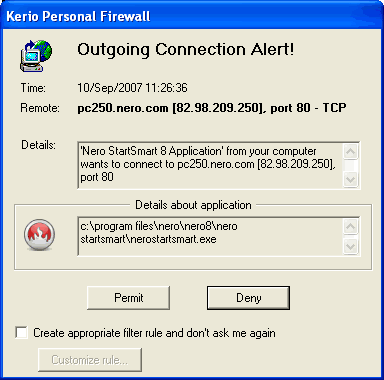
With the installation complete, running for the first time, Nero StartSmart tries to connect to the internet, as we can see from our firewall alert:
 

Review Pages

1. Introduction
2. Installation
3. Nero StartSmart Introduction
4. Burning with StartSmart
5. Conclusion


Pages

  • « first
  • ‹ previous
  • 1
  • 2
  • 3
  • 4
  • 5
  • next ›
  • last »

nero

DVD

Blu-Ray

HD DVD

burning

Tags: nero DVD Blu-Ray HD DVD burning
Previous Post
Samsung WEP185 BT Headset
Next Post
PC2-6400 SO-DIMM Roundup

Related Posts

  • Scientists develop the petabit optical disc – 2000x UHD Blu-ray

  • Pioneer BDR-X13U-S

  • Pioneer BDR-S13U-X Blu-Ray Recorder

  • Xbox Series X owners complain about UHD Blu-ray playback issues

  • Nero Announces Platinum 365 & Nero Platinum Unlimited

  • Pioneer Launches Two External 16x Blu-ray Disc Burners

  • New Nero Platinum Released in Two Versions

  • Multimedia-focused Nero 2019 Released

Latest Reviews

Why Streaming Live Casino Games Demands Smarter Tech
Enterprise & IT

Why Streaming Live Casino Games Demands Smarter Tech

Kioxia Exceria Plus G3 512GB microSD
Cameras

Kioxia Exceria Plus G3 512GB microSD

SoundPeats Cove Pro
Consumer Electronics

SoundPeats Cove Pro

Asustor AS5404T 4-Bay NAS System
Enterprise & IT

Asustor AS5404T 4-Bay NAS System

be quiet! Pure Power 13M 1200W
PC components

be quiet! Pure Power 13M 1200W

Popular News

COLORFUL Introduces CVN B850I GAMING FROZEN Motherboard

COLORFUL Introduces CVN B850I GAMING FROZEN Motherboard

COLORFUL Presents CVN X870 ARK FROZEN Motherboard for AMD Ryzen 9000 CPUs

COLORFUL Presents CVN X870 ARK FROZEN Motherboard for AMD Ryzen 9000 CPUs

TEAMGROUP Launches EXPERT P34F Find My External SSD

TEAMGROUP Launches EXPERT P34F Find My External SSD

Samsung announces Galaxy Tab S11 and Galaxy S25 FE series

Samsung announces Galaxy Tab S11 and Galaxy S25 FE series

Viltrox Showcases Upcoming Lens Lineup and New TTL Flash at IBC 2025

Viltrox Showcases Upcoming Lens Lineup and New TTL Flash at IBC 2025

CORSAIR announces Vanguard Pro 96 and Vanguard 96 Gaming Keyboards

CORSAIR announces Vanguard Pro 96 and Vanguard 96 Gaming Keyboards

Panasonic Introduces the First Ultra-Telephoto Zoom Lens in the LUMIX S Series

Panasonic Introduces the First Ultra-Telephoto Zoom Lens in the LUMIX S Series

MSI Launches DATAMAG 40Gbps Magnetic Portable SSD

MSI Launches DATAMAG 40Gbps Magnetic Portable SSD

Main menu

  • Home
  • News
  • Reviews
  • Essays
  • Forum
  • Legacy
  • About
    • Submit News

    • Contact Us
    • Privacy

    • Promotion
    • Advertise

    • RSS Feed
    • Site Map
  • About
  • Privacy
  • Contact Us
  • Promotional Opportunities @ CdrInfo.com
  • Advertise on out site
  • Submit your News to our site
  • RSS Feed