Plextor PX-760A
28. Autostrategy
Review Pages
2. Reading Tests
3. CD Error Correction
4. DVD Error Correction
5. Protected Discs
6. CD Recording Tests
7. CD Writing Quality - Plextools
8. CD Writing Quality - Clover System
9. DVD Writing Tests
10. DVD Writing Quality - Page 1
11. DVD Writing Quality - Page 2
12. DVD Writing Quality - Page 3
13. DVD Writing Quality - Page 4
14. DVD Writing Quality - Page 5
15. DVD Writing Quality - Page 6
16. DVD Writing Quality - Page 7
17. DVD Writing Quality - Almedio
18. DVDR DL - Page 1
19. DVDR DL - Page 2
20. PX-760A vs CATS - Page 1
21. PX-760A vs CATS - Page 2
22. PX-760A vs CATS - Page 3
23. PX-760A vs CATS - Page 4
24. Booktype Setting
25. Media Quality Check Utility
26. Conclusion
27. Q-Check TA Function
28. Autostrategy

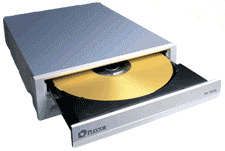
Plextor's PX-760A is the first 18X burner to be launched on the market. However, the DVD-R DL writing speed remains at 6X. All tests have been done with the auto selection mode enabled in order to let the drive choose the best writing strategy.
As a CD reader, the PX-760A is one of the fastest out there, supporting 48X reading speed, while it is also fast as a DVD reader. DVD+/-R/ROM can be read at 16X, while DL media can be read at 12X. As a DVD ripper, the PX-760A is quite fast, but remember to disable the riplock function, by pressing the eject button for three seconds without any disc inserted.
The PX-760A provides very good CD error correction, managing to read all five tracks of the CD Check Audio Test Disc, while it also performed admirably with the ABEX 721R disc and had a perfect score with the ABEX 721 test disc. In our DVD error correction tests, the drive performed even better although in a few cases, reading never reached maximum speed. All tested DVDs were read successfully without any errors, with the only glitch occurring with the ABEX TDV-541 test disc. Ripping protected discs is not a strong point for the PX-760A drive, despite the fact that it read the Safedisc v2 protected disc at high speeds, but this is an old protection and is not being used anymore. Nevertheless, the drive failed to bypass the latest game protections but it did successfully rip all the protected audio CDs that we tried.
CD-R writing quality is rather low, and despite the fact that in Plextools, the error levels were within the acceptable limits, Clover Systems had a different opinion, which judged that none of the discs had excellent quality. For the first time, we tested DVD+/-R at 18X burning speed, which is the highest available speed to date. However, the quality depends on the brand, with Plextor (Taiyo Yuden) 18X media that we tested producing high error levels in Plextools which were confirmed by Almedio AEC-1000. Verbatim on the other hand, even at this high speed, reported high quality. Nevertheless, we recommend lower burning speeds for better results. At 16X, the drive performed well, however the quality again was dependent on the media.
With DL media, the drive supports 10X for DVD+R DL and 6X for DVD-R DL. The quality here was good and the error levels were within the limits, while with RW media, the error levels were low with reasonably smooth speed graphs from CDSpeed.
As for Book-type, the drive cannot change the book-type for DVD+RW media. However, by default, it is set to DVD-ROM. :-) Oh, and if you want to change the book-type for the rest of the media, don't forget to install Plextools because only from there, will you be able to set it.
- The Good
- 18X DVD+/-R burning speed
- 10X +R DL burning speed
- Very good CD/DVD error correction
- Supports protected Audio discs
- Writing Quality with most media
- We liked the Media Quality Check utility
- Plextools is always an advantage for Plextor drives
- Can measure writing quality on CD/DVD media
- The Bad
- Cannot create working backups of SafeDisc's most recent versions
- Does not support DVD overburning
- Cannot read 90/99min audio discs
- Doesn't support Bitsetting change for DVD+RW
- Like to be fixed
- DVD writing quality with specific media
| Retail Package |  |
| Reading | |
| Error Correction |  |
| Protected Discs | |
| Writing | |
| Features | |
Review Pages
2. Reading Tests
3. CD Error Correction
4. DVD Error Correction
5. Protected Discs
6. CD Recording Tests
7. CD Writing Quality - Plextools
8. CD Writing Quality - Clover System
9. DVD Writing Tests
10. DVD Writing Quality - Page 1
11. DVD Writing Quality - Page 2
12. DVD Writing Quality - Page 3
13. DVD Writing Quality - Page 4
14. DVD Writing Quality - Page 5
15. DVD Writing Quality - Page 6
16. DVD Writing Quality - Page 7
17. DVD Writing Quality - Almedio
18. DVDR DL - Page 1
19. DVDR DL - Page 2
20. PX-760A vs CATS - Page 1
21. PX-760A vs CATS - Page 2
22. PX-760A vs CATS - Page 3
23. PX-760A vs CATS - Page 4
24. Booktype Setting
25. Media Quality Check Utility
26. Conclusion
27. Q-Check TA Function
28. Autostrategy