
Breaking News

ASUS Announces ProArt PA40SU USB4 SSD Enclosure Akasa Introduces 10 Gigabit PCIe Network Card for Desktop, Workstation and Server Upgrades KIOXIA Unveils Value-Oriented QLC-based EG7 Series SSDs for PC OEMs Viltrox Unveils New 35mm and 55mm F1.8 EVO Lenses for Sony FE and Nikon Z Mounts ASRock Adds Support for One Sub-Channel DRAM Module on Intel DDR5 Motherboards

logo

  • Share Us
    • Facebook
    • Twitter
  • Home
  • Home
  • News
  • Reviews
  • Essays
  • Forum
  • Legacy
  • About
    • Submit News

    • Contact Us
    • Privacy

    • Promotion
    • Advertise

    • RSS Feed
    • Site Map

Search form

Shuttle SN27P2

May 21,2007 0

4. A Look Inside


Review Pages

1. Introduction
2. Full specifications
3. The Package
4. A Look Inside
5. Installation
6. bios
7. Everest Ultimate Edition 2006 - SiSoft Sandra
8. PCMARK - 3DMARK
9. Science Mark - PovRay - Nero Digital
10. CINEBENCH -SuperPI
11. Overclocking
12. Conclusion


Opening the case is very easy, (four screws on the back). However, after that, you need to use a philips screwdriver, since there are so many screws to remove in order to install CPU, memory and HDDs.

There are two HDD cases. The material is made out of aluminium, however, there are no special measures taken to absorb noise and vibrations (for example rubber mounts). You need to remove the four screws for each bay in order to proceed further into the interior of the case.
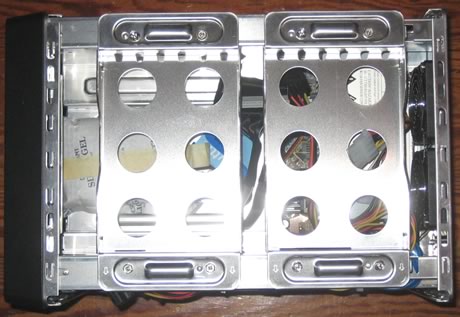
Moving south, we can see that SATA and power cables are already pre-installed, so you don't have to worry about cabling. Good move from Shuttle.

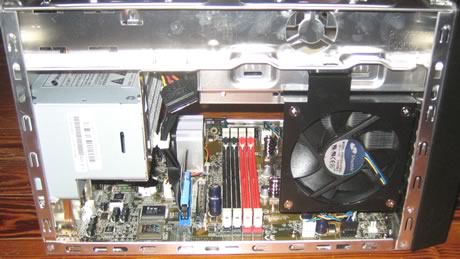
Zooming on to the board, we can see the four memory banks (8GB maximum capacity).

While on the right, you can see the three (3) SATA connectors (+ one external SATA) and the PCI/PCI-E slots:

On the left, there is a big fan to cool down the CPU
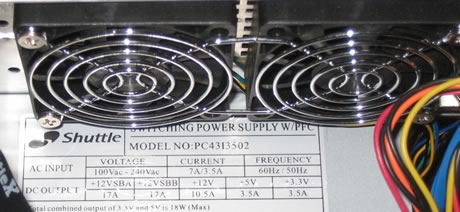
There are also two 60mm fans to remove heat from the interior of the case, while the PSU is rated at 400Watts and is quiet enough:
After removing the two HDD bays, we can see another bay, this time for am optical storage device and of course Floppy drive or perhaps another HDD. Again, IDE cables are pre-installed as well as power cables:
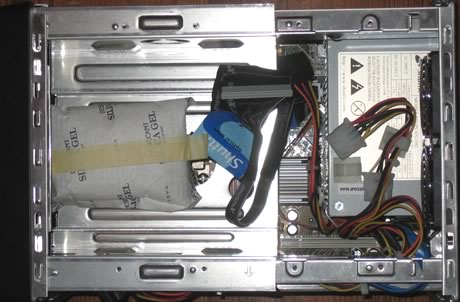
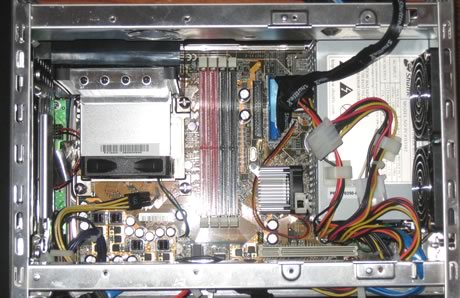
Removing the storage bay, we can get a top view of the board
 

Review Pages

1. Introduction
2. Full specifications
3. The Package
4. A Look Inside
5. Installation
6. bios
7. Everest Ultimate Edition 2006 - SiSoft Sandra
8. PCMARK - 3DMARK
9. Science Mark - PovRay - Nero Digital
10. CINEBENCH -SuperPI
11. Overclocking
12. Conclusion


Pages

  • « first
  • ‹ previous
  • 1
  • 2
  • 3
  • 4
  • 5
  • 6
  • 7
  • 8
  • 9
  • …
  • next ›
  • last »

Shuttle

AMD

SFF

Tags: Shuttle AMD SFF
Previous Post
Corsair PC2-6400C4
Next Post
Turtle Beach Audio Advantage SRM

Related Posts

  • MINISFORUM Showcases Agent Computing Solutions

  • Shuttle Launches the XZ890G2

  • Samsung and AMD Expand Strategic Collaboration on Next-Generation AI Memory Solutions

  • AMD Ryzen AI PRO 400 Series CPUs Deliver Advanced AI for Desktops

  • AMD at CES 2026

  • ASUS Announces Turbo Radeon AI Pro R9700 32GB Graphics Card

  • AMD Introduces EPYC Embedded 4005 Processors for Low-Latency Applications at the Edge

  • Shuttle Introduces SPCNV03 Ultra-Compact Edge AI Computer

Latest Reviews

In the Age of AI Phishing, the Best User Experience Might Be the One That Feels Safest
Enterprise & IT

In the Age of AI Phishing, the Best User Experience Might Be the One That Feels Safest

SoundPeats C30
Consumer Electronics

SoundPeats C30

Why Streaming Live Casino Games Demands Smarter Tech
Enterprise & IT

Why Streaming Live Casino Games Demands Smarter Tech

Kioxia Exceria Plus G3 512GB microSD
Cameras

Kioxia Exceria Plus G3 512GB microSD

SoundPeats Cove Pro
Consumer Electronics

SoundPeats Cove Pro

Popular News

TEAMGROUP Launches EXPERT P34F Find My External SSD

TEAMGROUP Launches EXPERT P34F Find My External SSD

Samsung announces Galaxy Tab S11 and Galaxy S25 FE series

Samsung announces Galaxy Tab S11 and Galaxy S25 FE series

Viltrox Showcases Upcoming Lens Lineup and New TTL Flash at IBC 2025

Viltrox Showcases Upcoming Lens Lineup and New TTL Flash at IBC 2025

CORSAIR announces Vanguard Pro 96 and Vanguard 96 Gaming Keyboards

CORSAIR announces Vanguard Pro 96 and Vanguard 96 Gaming Keyboards

Panasonic Introduces the First Ultra-Telephoto Zoom Lens in the LUMIX S Series

Panasonic Introduces the First Ultra-Telephoto Zoom Lens in the LUMIX S Series

MSI Launches FORGE GK600 TKL WIRELESS Special Edition Compact Mechanical Keyboard

MSI Launches FORGE GK600 TKL WIRELESS Special Edition Compact Mechanical Keyboard

MSI Launches DATAMAG 40Gbps Magnetic Portable SSD

MSI Launches DATAMAG 40Gbps Magnetic Portable SSD

Viltrox Joins the L-Mount Alliance, Expanding Creative Possibilities

Viltrox Joins the L-Mount Alliance, Expanding Creative Possibilities

Main menu

  • Home
  • News
  • Reviews
  • Essays
  • Forum
  • Legacy
  • About
    • Submit News

    • Contact Us
    • Privacy

    • Promotion
    • Advertise

    • RSS Feed
    • Site Map
  • About
  • Privacy
  • Contact Us
  • Promotional Opportunities @ CdrInfo.com
  • Advertise on out site
  • Submit your News to our site
  • RSS Feed



