Breaking News

Logitech G325 LIGHTSPEED Delivers Comfort, Style, and Game-Ready Audio Samsung Launches Glasses-Free 3D Digital Signage Globally at ISE 2026 Levelplay Launches Combat Liquid HUD and Combat Liquid SE AIO CPU Coolers Intel Launches new Intel Xeon 600 Processors for Workstation Club 3D Announced their first new products of 2026

logo

  • Share Us
    • Facebook
    • Twitter
  • Home
  • Home
  • News
  • Reviews
  • Essays
  • Forum
  • Legacy
  • About
    • Submit News

    • Contact Us
    • Privacy

    • Promotion
    • Advertise

    • RSS Feed
    • Site Map

Search form

SONY BW-RU101 PDD

Feb 23,2005 0

7. Installation - Page 2


Review Pages

1. Introduction
2. Blue laser technology
3. Design
4. Specifications
5. The media
6. Installation - Page 1
7. Installation - Page 2
8. Software
9. Tests
10. Conclusion


SONY BW-RU101 PDD - Page 7

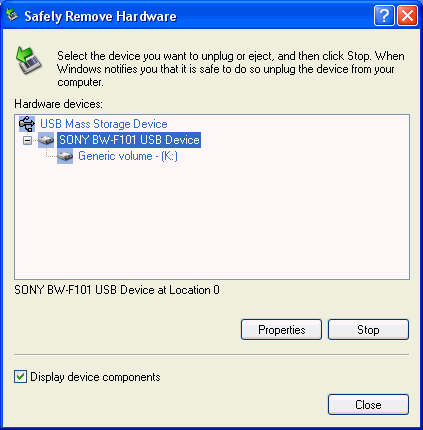
Installation was fairly straightforward, simply plug-in the power and USB 2.0 cables and then switch on the drive. The drive was recognized by Windows XP as a mass storage device on our PC, with device id BW-F101 ID:
Looking at the system properties, the drive was listed under Disk Drives and not under DVD/CD-ROM drives:

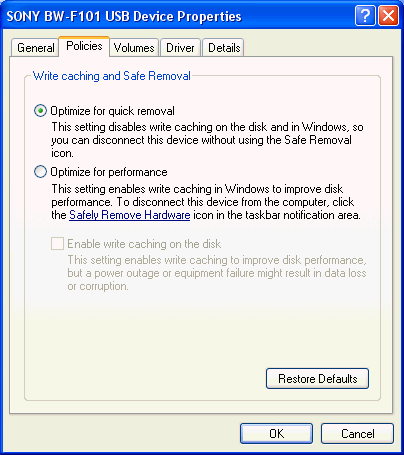
You can set the write caching mode, quick removal or performance, according to your needs from the properties dialog window:
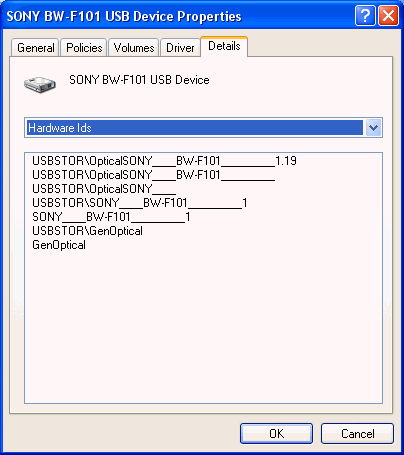
The drive's installed firmware was 1.19, the latest available. SONY offers free firmware upgrades with a password/login process:
The SONY PDD drive is compatible with computers running Windows 2000/XP (FAT32 or NTFS), Windows Server 2003 (NTFS), Mac OS10.x (HFS) and certain varieties of UNIX, including Linux, without installing any special drivers. Information on drivers and software is available from this link. For Windows, the disc drive utility is provided as bundled software for external drives BW-RS101 and BW-RU101.

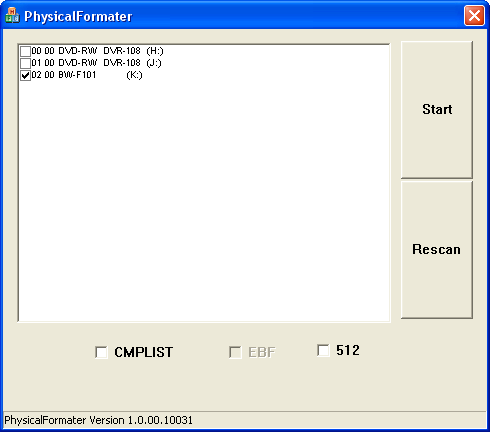
Before being able to use a disc, the user should carry out a physical format of the disc. This will check the integrity of the disc and relocate bad sectors if present. This can be performed in one of two ways:

The first is available through Sony's Physical Format utility:
 

Review Pages

1. Introduction
2. Blue laser technology
3. Design
4. Specifications
5. The media
6. Installation - Page 1
7. Installation - Page 2
8. Software
9. Tests
10. Conclusion


Pages

  • « first
  • ‹ previous
  • …
  • 2
  • 3
  • 4
  • 5
  • 6
  • 7
  • 8
  • 9
  • 10
  • next ›
  • last »

Sony

Tags: Sony
Previous Post
MSI NX6600GT AGP
Next Post
Sony SCD-XB790 SACD Player

Related Posts

  • Sony Evolves Large Display Lineup with the Launch of the BRAVIA Professional Displays BZ-P Series

  • Sony at BSC Expo 2026

  • Sony Expands Its Turntable Lineup with New Wireless Models

  • Sony Unveils LinkBuds Clip Open Earbuds

  • Sony Launches Alpha 7 V and FE 28-70mm f/3.5-5.6 OSS II

  • First look at PlayStation’s 27” Gaming Monitor

  • Sony Unveils Sony FE 100mm F2.8 Macro GM OSS

  • Sony Reimagines its 10 Series with Xperia 10 VII

Latest Reviews

XbotGo Chamaleon
Consumer Electronics

XbotGo Chamaleon

be quiet! Dark Perk Mice
Gaming

be quiet! Dark Perk Mice

Acemagic W1
PC components

Acemagic W1

be quiet! Power Zone 2 1200W
PC components

be quiet! Power Zone 2 1200W

The Difference Between American and European Stakes and Why It Changes How People Bet
Enterprise & IT

The Difference Between American and European Stakes and Why It Changes How People Bet

Popular News

COLORFUL Introduces CVN B850I GAMING FROZEN Motherboard

COLORFUL Introduces CVN B850I GAMING FROZEN Motherboard

COLORFUL Presents CVN X870 ARK FROZEN Motherboard for AMD Ryzen 9000 CPUs

COLORFUL Presents CVN X870 ARK FROZEN Motherboard for AMD Ryzen 9000 CPUs

TEAMGROUP Launches EXPERT P34F Find My External SSD

TEAMGROUP Launches EXPERT P34F Find My External SSD

ASRock AM5 Motherboards Now Fully Support AMD Ryzen 9 9950X3D & 9900X3D Processors

ASRock AM5 Motherboards Now Fully Support AMD Ryzen 9 9950X3D & 9900X3D Processors

Samsung announces Galaxy Tab S11 and Galaxy S25 FE series

Samsung announces Galaxy Tab S11 and Galaxy S25 FE series

Viltrox Showcases Upcoming Lens Lineup and New TTL Flash at IBC 2025

Viltrox Showcases Upcoming Lens Lineup and New TTL Flash at IBC 2025

CORSAIR announces Vanguard Pro 96 and Vanguard 96 Gaming Keyboards

CORSAIR announces Vanguard Pro 96 and Vanguard 96 Gaming Keyboards

Panasonic Introduces the First Ultra-Telephoto Zoom Lens in the LUMIX S Series

Panasonic Introduces the First Ultra-Telephoto Zoom Lens in the LUMIX S Series

Main menu

  • Home
  • News
  • Reviews
  • Essays
  • Forum
  • Legacy
  • About
    • Submit News

    • Contact Us
    • Privacy

    • Promotion
    • Advertise

    • RSS Feed
    • Site Map
  • About
  • Privacy
  • Contact Us
  • Promotional Opportunities @ CdrInfo.com
  • Advertise on out site
  • Submit your News to our site
  • RSS Feed