Breaking News

Sony Introduces New Colour to INZONE H9 II Headset and INZONE E9 In-ear Headphones Club 3D announces new products for October 2026 Razer Unveils All-New Wolverine V4 Line ASUS Republic of Gamers Ships ROG Rapture GT-BN98 Router GMK Unveils TriggerKey, a New Mechanical Key System for Greater Precision and Comfort

logo

  • Share Us
    • Facebook
    • Twitter
  • Home
  • Home
  • News
  • Reviews
  • Essays
  • About
    • Submit News

    • Contact Us
    • Privacy

    • Promotion
    • Advertise

    • RSS Feed

Search form

Terramaster F8-SSD

Mar 22,2025 0

7. Conclusion


Review Pages

1. Introduction
2. Retail Package
3. Installing TOS
4. Getting familiar with TOS
5. Creating Storage Volumes
6. Tests
7. Conclusion


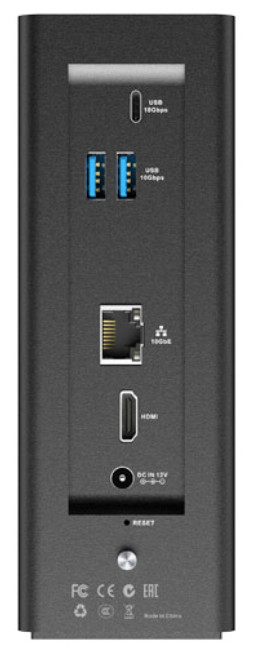
The TerraMaster F8-SSD is a different solution for users who wish to get an NVME SSD-based NAS server with a 10G port connection. The product has small dimensions, consumes less power compared with a traditional NAS server with HDDs, and produces almost no noise, since all NVMEs are passive-cooled, apart from the two spinning fans at the back. The system can be upgraded from the 8GB DDR5 SO-DIMM up to 64GB DDR5 SO-DIMM, however no ECC memory is being supported. Due to the CPU restrictions, the eight (8) PCIe slots are limited to PCIe 3.0 x1 port which in theory should give you enough bandwidth to fill the 10G port connectivity.
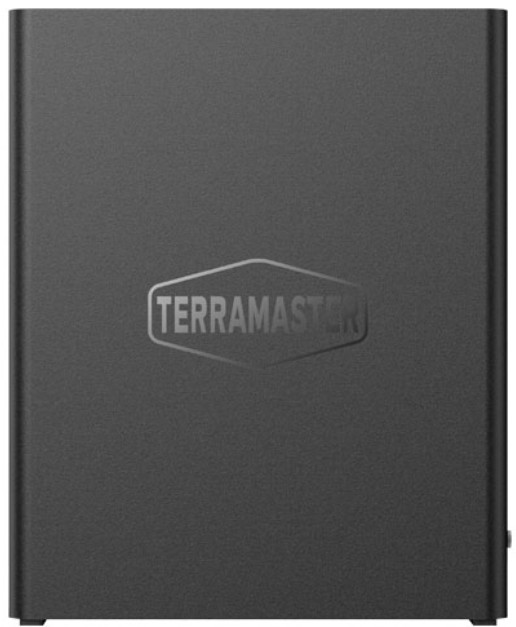
The TNAS operating system has matured enough and the 6.xx version works very well without many problems. We did notice some issues with GUI and the 8x NVME SSDs we installed, we would wanted a separate NVME temperature control widget or better reports for %CPU usage over the period. Again Terramaster continues to evolve with each release of the TNAS and all upgrades are for free with this powerhouse you are covered for the years to come. The TNAS operating system does offer many apps to choose from that should accelerate your tasks (backup, virtualization), and the fact that it's an Intel x64-based machine, means you can use it to install also alternative operating systems (either Linux or Windows based) and experiment with with on your own. If we had to suggest something to Terramaster, would be to include a second 10G port and perhaps make the device slightly bigger so that each NVME SSD that is being installed has a great gap for better cooling performance and airflow. Maybe even use in the future a better CPU that would allow PCIe x4 Gen support for even higher speed with dual 10G nic.
Concluding this review, the Terramaster F8-SSD is a rather unique product for experienced users that wish to move to memory storage, since both the buying cost and the cost per GB for the NVMEs is not low, at least compared with a traditional NAS server that it's based only with HDDs. Of course, there are also hybrid solutions (like the F424-Max that can hold both HDDs and PCIe x4 NVMEs) from Terramaster that users can look for. Both the F8-SSD and the F8-SSD Plus deserve your attention and if you are in the market for a compact, robust, low-noise power consumption solution, take a look at the full specs and read carefully our review.

 

Review Pages

1. Introduction
2. Retail Package
3. Installing TOS
4. Getting familiar with TOS
5. Creating Storage Volumes
6. Tests
7. Conclusion


Pages

  • « first
  • ‹ previous
  • 1
  • 2
  • 3
  • 4
  • 5
  • 6
  • 7

TerraMaster

Tags: TerraMaster
Previous Post
Epomaker Carbon 60
Next Post
Epomaker HE 68

Related Posts

  • TerraMaster Launches Storage Upgrade Season with Up to 30% Off During Prime Big Deal Days

  • TerraMaster Launches 725 Series Xeon Rackmount NAS

  • TerraMaster Rolls Out Official Storage Upgrade Program

  • TerraMaster Offers up to 25% Off on Selected NAS & DAS

  • TerraMaster F4-425 Pro features the world’s first AI-native TOS 7 NAS system

  • TerraMaster Prime Day 2026 Sale Offers Up to 25% Off

  • TerraMaster announces D1 SSD Rugged Enclosure

  • TerraMaster Spring Sale 2026 Upgraded Up To 30%

Latest Reviews

Fanxiang MP83 M.2 NVMe SSD Enclosure
Enterprise & IT

Fanxiang MP83 M.2 NVMe SSD Enclosure

Ugreen CM642 USB4.0 Enclosure
PC components

Ugreen CM642 USB4.0 Enclosure

be quiet! Dark Power 14 IO
PC components

be quiet! Dark Power 14 IO

SanDisk High Endurance 512GB microSDXC
Cameras

SanDisk High Endurance 512GB microSDXC

Samsung PRO Ultimate 512GB microSDXC
Cameras

Samsung PRO Ultimate 512GB microSDXC

Popular News

MSI’s Latest AMD X870E MAX & EVO Series Motherboards

MSI’s Latest AMD X870E MAX & EVO Series Motherboards

COLORFUL Launches iGame B850M ULTRA Series Micro-ATX Motherboards

COLORFUL Launches iGame B850M ULTRA Series Micro-ATX Motherboards

COLORFUL Presents Limited Edition Chitu MAG-60 Magnetic Keyboard Inspired by the Year of the Horse

COLORFUL Presents Limited Edition Chitu MAG-60 Magnetic Keyboard Inspired by the Year of the Horse

COLORFUL Launches iGame B850I MINI OC V14 Motherboard

COLORFUL Launches iGame B850I MINI OC V14 Motherboard

COLORFUL Presents iGame Z890 ULTRA-S W and iGame Z890M ULTRA Z Motherboards

COLORFUL Presents iGame Z890 ULTRA-S W and iGame Z890M ULTRA Z Motherboards

COLORFUL Launches the iGame X870E VULCAN W OC Motherboard

COLORFUL Launches the iGame X870E VULCAN W OC Motherboard

COLORFUL Expands B850 Motherboard Lineup with New CVN, Battle-Ax, and MEOW Models

COLORFUL Expands B850 Motherboard Lineup with New CVN, Battle-Ax, and MEOW Models

ASRock Adds Support for One Sub-Channel DRAM Module on Intel DDR5 Motherboards

ASRock Adds Support for One Sub-Channel DRAM Module on Intel DDR5 Motherboards

Main menu

  • Home
  • News
  • Reviews
  • Essays
  • About
    • Submit News

    • Contact Us
    • Privacy

    • Promotion
    • Advertise

    • RSS Feed
  • About
  • Privacy
  • Contact Us
  • Promotional Opportunities @ CdrInfo.com
  • Advertise on out site
  • Submit your News to our site
  • RSS Feed