Breaking News

ASUS ProArt RTX Spark Windows PCs Available for Immediate Pre-Order Kioxia Introduces E1.L QLC-based SSDs for Hyperscale Data Centers CORSAIR Launches the HS80 v2 MAX WIRELESS Gaming Headset Sony Announces the World's First Eclipsa Audio Certified Microphone1 for Smartphones Razer Unveils the Basilisk V4 Line

logo

  • Share Us
    • Facebook
    • Twitter
  • Home
  • Home
  • News
  • Reviews
  • Essays
  • About
    • Submit News

    • Contact Us
    • Privacy

    • Promotion
    • Advertise

    • RSS Feed

Search form

Terramaster F8-SSD

Mar 22,2025 0

6. Tests


Review Pages

1. Introduction
2. Retail Package
3. Installing TOS
4. Getting familiar with TOS
5. Creating Storage Volumes
6. Tests
7. Conclusion


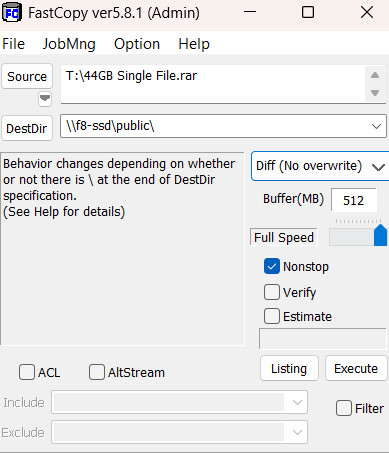
To test the performance of the F8-SSD (latest TNAS version) we connected via the 10G RJ45 to the EnGenius EnGenius ECS2512FP and we transferred files from a 10G connected PC (AMD 7950X - Asus X670E ProArt) with the FastCopy software under Windows 11 operating system (latest updates/build installed). Write Cache was ENABLED during the read/writing tests for all installed NVME SSDs at the F8-SSD, while no App was running in the background. Microsoft Defender was DISABLED during the read/write tests. Most of our tests were linear transfers (44GB/ 200GB). The source drive was a Crucial T705 2TB NVME placed at a PCIe 5.0 slot so there would be a file transfer bottleneck. All storage pools have a BTRFS file system (TNAS default).
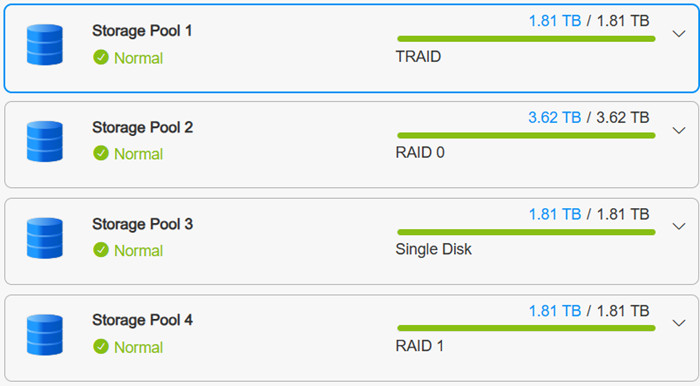
Test (MB/sec) TRAID
(system disk)
Single Disk RAID0 RAID1
44GB single file from PC to NAS 793.7 768,0 820,4 810.9
44GB single file from NAS to PC 838.2 647.1 657.5 555.3
200GB single file from PC to NAS 737.1 715.7 776.8 611.9

Performance-wise, we saw spikes of written data up to 1.1GB/sec, while reading back to the PC from the NAS server seems to top around 700-800MB/sec. We noticed that during reading/writing, CPU usage went up to 40-50% depending on and dropping. We expected a little more to be honest since this model is advertised as capable of up to 1.2GB/sec.

Users can install also their version of other operating systems, either Linux or Windows-based, take a look at the following posts from Terramaster Official forums, we won't cover this in this review.

  • Best alternative OS for TerraMaster Hardware
  • How to install TrueNAS or other system using an F8 SSD


Review Pages

1. Introduction
2. Retail Package
3. Installing TOS
4. Getting familiar with TOS
5. Creating Storage Volumes
6. Tests
7. Conclusion


Pages

  • « first
  • ‹ previous
  • 1
  • 2
  • 3
  • 4
  • 5
  • 6
  • 7
  • next ›
  • last »

TerraMaster

Tags: TerraMaster
Previous Post
Epomaker Carbon 60
Next Post
Epomaker HE 68

Related Posts

  • TerraMaster Launches Storage Upgrade Season with Up to 30% Off During Prime Big Deal Days

  • TerraMaster Launches 725 Series Xeon Rackmount NAS

  • TerraMaster Rolls Out Official Storage Upgrade Program

  • TerraMaster Offers up to 25% Off on Selected NAS & DAS

  • TerraMaster F4-425 Pro features the world’s first AI-native TOS 7 NAS system

  • TerraMaster Prime Day 2026 Sale Offers Up to 25% Off

  • TerraMaster announces D1 SSD Rugged Enclosure

  • TerraMaster Spring Sale 2026 Upgraded Up To 30%

Latest Reviews

Fanxiang MP83 M.2 NVMe SSD Enclosure
Enterprise & IT

Fanxiang MP83 M.2 NVMe SSD Enclosure

Ugreen CM642 USB4.0 Enclosure
PC components

Ugreen CM642 USB4.0 Enclosure

be quiet! Dark Power 14 IO
PC components

be quiet! Dark Power 14 IO

SanDisk High Endurance 512GB microSDXC
Cameras

SanDisk High Endurance 512GB microSDXC

Samsung PRO Ultimate 512GB microSDXC
Cameras

Samsung PRO Ultimate 512GB microSDXC

Popular News

MSI’s Latest AMD X870E MAX & EVO Series Motherboards

MSI’s Latest AMD X870E MAX & EVO Series Motherboards

COLORFUL Launches iGame B850M ULTRA Series Micro-ATX Motherboards

COLORFUL Launches iGame B850M ULTRA Series Micro-ATX Motherboards

COLORFUL Presents Limited Edition Chitu MAG-60 Magnetic Keyboard Inspired by the Year of the Horse

COLORFUL Presents Limited Edition Chitu MAG-60 Magnetic Keyboard Inspired by the Year of the Horse

COLORFUL Launches iGame B850I MINI OC V14 Motherboard

COLORFUL Launches iGame B850I MINI OC V14 Motherboard

COLORFUL Presents iGame Z890 ULTRA-S W and iGame Z890M ULTRA Z Motherboards

COLORFUL Presents iGame Z890 ULTRA-S W and iGame Z890M ULTRA Z Motherboards

COLORFUL Launches the iGame X870E VULCAN W OC Motherboard

COLORFUL Launches the iGame X870E VULCAN W OC Motherboard

COLORFUL Expands B850 Motherboard Lineup with New CVN, Battle-Ax, and MEOW Models

COLORFUL Expands B850 Motherboard Lineup with New CVN, Battle-Ax, and MEOW Models

ASRock Adds Support for One Sub-Channel DRAM Module on Intel DDR5 Motherboards

ASRock Adds Support for One Sub-Channel DRAM Module on Intel DDR5 Motherboards

Main menu

  • Home
  • News
  • Reviews
  • Essays
  • About
    • Submit News

    • Contact Us
    • Privacy

    • Promotion
    • Advertise

    • RSS Feed
  • About
  • Privacy
  • Contact Us
  • Promotional Opportunities @ CdrInfo.com
  • Advertise on out site
  • Submit your News to our site
  • RSS Feed