Breaking News

ASUS Announces ProArt Router PRT-BE5000 and ProArt Switch PQG-U1080 CORSAIR Expands the Popular FRAME Series Case Lineup DeepCool Launches the LT360 VISION ARGB Noctua and Asetek Announce Flagship AIO Liquid Coolers Toshiba Begins Sampling of 30-34 TB SMR Nearline Hard Disk Drives

logo

  • Share Us
    • Facebook
    • Twitter
  • Home
  • Home
  • News
  • Reviews
  • Essays
  • Forum
  • Legacy
  • About
    • Submit News

    • Contact Us
    • Privacy

    • Promotion
    • Advertise

    • RSS Feed
    • Site Map

Search form

New Cortana Coming to Windows 10 Focuses on Business Users

New Cortana Coming to Windows 10 Focuses on Business Users

Enterprise & IT Feb 28,2020 0

Microsoft announcd an updated Cortana experience in Windows 10 that will deliver more help from your assistant in Microsoft 365.

This next step in Cortana’s evolution will bring personal productivity assistance as a free update to the latest version of Windows 10 coming this spring. The upcoming update to Windows 10 will include access to a new Cortana with an emphasis on productivity.

Through this updated Cortana experience, Microsoft will roll out new Cortana services delivered through Microsoft 365 backed by the privacy, security and compliance promises of Office 365 services.

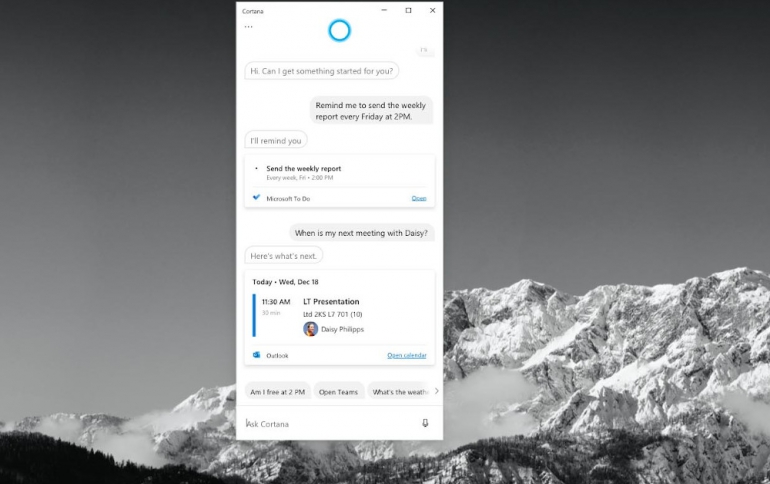
The new Cortana in Windows 10 features a chat-based UI that gives you the ability to interact with Cortana using your voice or the keyboard.

For English (United States) users, Cortana will assist you in better managing your schedule and tasks by staying on top of your calendar and focusing on what matters with meeting insights. You can speak or type requests to find people or files, or quickly create or query emails. You can also easily check your calendar, set a reminder, or add to your lists in Microsoft To Do:

  • “What’s next on my calendar?”
  • “Remind me to send the ‘weekly report’ every Friday at 2pm.”
  • “Add ‘status report’ to my task list.”

And Cortana will continue to help you get answers from Bing, set alarms and timers, open apps, adjust settings, or give you a joke you can share with colleagues, friends or family.

Outside of the United States, the initial release of the Cortana experience in Windows 10 will include answers from Bing and the ability to chat with Cortana. Microsoft plans to enhance the international experience with more productivity-based capabilities in the future.

As part of Cortana’s evolution into a personal productivity assistant in Microsoft 365, you’ll see some changes in how Cortana works in the latest version of Windows 10. Microsoft has tightened access to Cortana so that you must be securely logged in with your work or school account or your Microsoft account before using Cortana, and some consumer skills including music, connected home and third-party skills will no longer be available in the updated Cortana experience in Windows 10. Microsoft is also making some changes to where Cortana helps you. The company is ending support for Cortana in older versions of Windows that have reached their end-of-service dates. Microsoft will also be turning off the Cortana services in the Microsoft Launcher on Android by the end of April.

Tags: Cortanawindows 10
Previous Post
FCC Proposes Over $200 Million fines Against Wireless Carriers For Failing to Protect Consumer Location Data
Next Post
The Geneva Motor Show is Cancelled Due to Coronavirus

Related Posts

  • Windows Search to Show COVID19 Info in Search, Your Phone App Lets You Control Music Apps

  • Microsoft Brings More Widgets for Apps to The Xbox Game Bar

  • Microsoft Says Hackers Take Advantage of Windows Vulnerability

  • Microsoft Says Coronavirus Will Impact Windows 10 Updates

  • Windows 10 is Powering 1 Billion Active Devices

  • Windows 10 Critical Security Update Patches SMB Vulnerability

  • Microsoft Discloses Unpatched Critical SMB Vulnerability in Windows

  • Microsoft Announces a Cloud-based Print Solution

Latest News

ASUS Announces ProArt Router PRT-BE5000 and ProArt Switch PQG-U1080
Enterprise & IT

ASUS Announces ProArt Router PRT-BE5000 and ProArt Switch PQG-U1080

CORSAIR Expands the Popular FRAME Series Case Lineup
Cooling Systems

CORSAIR Expands the Popular FRAME Series Case Lineup

DeepCool Launches the LT360 VISION ARGB
Cooling Systems

DeepCool Launches the LT360 VISION ARGB

Noctua and Asetek Announce Flagship AIO Liquid Coolers
Cooling Systems

Noctua and Asetek Announce Flagship AIO Liquid Coolers

Toshiba Begins Sampling of 30-34 TB SMR Nearline Hard Disk Drives
Enterprise & IT

Toshiba Begins Sampling of 30-34 TB SMR Nearline Hard Disk Drives

Popular Reviews

be quiet! Dark Mount Keyboard

be quiet! Dark Mount Keyboard

be quiet! Light Mount Keyboard

be quiet! Light Mount Keyboard

Akaso 360 Action camera

Akaso 360 Action camera

Dragon Touch Digital Calendar

Dragon Touch Digital Calendar

be quiet! Pure Loop 3 280mm

be quiet! Pure Loop 3 280mm

Noctua NF-A12x25 G2 fans

Noctua NF-A12x25 G2 fans

Arctic Liquid Freezer III 360 Pro Argb

Arctic Liquid Freezer III 360 Pro Argb

Soft2bet and the unseen hardware that makes instant play possible

Soft2bet and the unseen hardware that makes instant play possible

Main menu

  • Home
  • News
  • Reviews
  • Essays
  • Forum
  • Legacy
  • About
    • Submit News

    • Contact Us
    • Privacy

    • Promotion
    • Advertise

    • RSS Feed
    • Site Map
  • About
  • Privacy
  • Contact Us
  • Promotional Opportunities @ CdrInfo.com
  • Advertise on out site
  • Submit your News to our site
  • RSS Feed