Breaking News

SAMA Introduces the S32 WOOD, a Compact M-ATX Case Bundled with an 80 PLUS Gold PSU Thypoch Completes Simera-C Cine Prime Lineup with New 100mm T1.9 Lens CORSAIR Launches the RM1200e Power Supply with Built-in PinProtect GPU Overcurrent Protection and Platinum-certified Efficiency CORSAIR Changes the Game with PureVector, a Science-Based Personalized Aiming Technology, Launching Exclusively in the SABRE v3 PRO PureVector Mouse Series AMD FSR Upscaling 4.1 Boosts Frames and Image Quality on More Devices

logo

  • Share Us
    • Facebook
    • Twitter
  • Home
  • Home
  • News
  • Reviews
  • Essays
  • About
    • Submit News

    • Contact Us
    • Privacy

    • Promotion
    • Advertise

    • RSS Feed

Search form

Sign into Your Microsoft Account Without a Password

Sign into Your Microsoft Account Without a Password

PC components Nov 20,2018 0

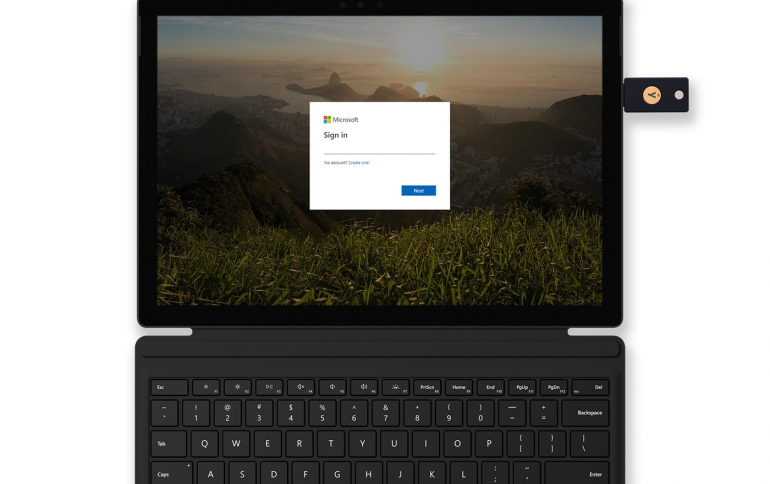
Microsoft is offering you the option of signing into your personal Microsoft account using the Edge browser and either Windows Hello or a FIDO2-based security device.

The option, available in the latest Windows update, allows you to sign in with your Microsoft account to online Microsoft services using Windows Hello or a compatible security key. A security key is a little USB or NFC (Near Field Communication) device with built-in enhanced security that protects your credentials by requiring biometric or PIN to unlock it. Your Microsoft account provides you access to Microsoft digital services – from accessing your OneDrive, to making purchases in Microsoft Store, and more. Microsoft-compatible security key are sold separately from Microsoft's partners, including Yubico and Feitian Technology.

Microsoft is also making it easier to protect your identity on Windows. In the Windows Security app, available on all Windows 10 PCs2, the company has made updates to the Account Protection page, which alerts you if there’s an action to take to improve your account protection. From here, you can set up Windows Hello and you’ll also be alerted if there’s an issue with Dynamic Lock. As a refresher, Dynamic Lock works when you Bluetooth pair your phone to your PC – once you’re out of range with your phone, your PC will automatically lock.

Microsoft has also made it easier to set up Windows Hello from the lock screen, which means no more digging through Settings. Once you’ve signed into your free Microsoft account, you’ll see the Windows Hello icon show up next to the password icon – just click, enter your password, and follow the steps to setting up Windows Hello.


Tags: Windows Hellowindows 10
Previous Post
GeForce RTX Battlefield V Bundle Announced
Next Post
Cadence Announces Tapeout of GDDR6 IP on Samsung's 7LPP Process

Related Posts

  • Windows Search to Show COVID19 Info in Search, Your Phone App Lets You Control Music Apps

  • Microsoft Brings More Widgets for Apps to The Xbox Game Bar

  • Microsoft Says Hackers Take Advantage of Windows Vulnerability

  • Microsoft Says Coronavirus Will Impact Windows 10 Updates

  • Windows 10 is Powering 1 Billion Active Devices

  • Windows 10 Critical Security Update Patches SMB Vulnerability

  • Microsoft Discloses Unpatched Critical SMB Vulnerability in Windows

  • Microsoft Announces a Cloud-based Print Solution

Latest News

SAMA Introduces the S32 WOOD, a Compact M-ATX Case Bundled with an 80 PLUS Gold PSU
Enterprise & IT

SAMA Introduces the S32 WOOD, a Compact M-ATX Case Bundled with an 80 PLUS Gold PSU

Thypoch Completes Simera-C Cine Prime Lineup with New 100mm T1.9 Lens
Cameras

Thypoch Completes Simera-C Cine Prime Lineup with New 100mm T1.9 Lens

CORSAIR Launches the RM1200e Power Supply with Built-in PinProtect GPU Overcurrent Protection and Platinum-certified Efficiency
PC components

CORSAIR Launches the RM1200e Power Supply with Built-in PinProtect GPU Overcurrent Protection and Platinum-certified Efficiency

CORSAIR Changes the Game with PureVector, a Science-Based Personalized Aiming Technology, Launching Exclusively in the SABRE v3 PRO PureVector Mouse Series
Gaming

CORSAIR Changes the Game with PureVector, a Science-Based Personalized Aiming Technology, Launching Exclusively in the SABRE v3 PRO PureVector Mouse Series

AMD FSR Upscaling 4.1 Boosts Frames and Image Quality on More Devices
GPUs

AMD FSR Upscaling 4.1 Boosts Frames and Image Quality on More Devices

Popular Reviews

Endorfy Thock V2 Wireless Keyboard

Endorfy Thock V2 Wireless Keyboard

SoundPeats Cove Pro

SoundPeats Cove Pro

The Quiet Technology Behind the Spin

The Quiet Technology Behind the Spin

Akaso Brave 8 Lite

Akaso Brave 8 Lite

SoundPeats C30

SoundPeats C30

be quiet! Dark Perk Mice

be quiet! Dark Perk Mice

Kioxia Exceria Plus G3 512GB microSD

Kioxia Exceria Plus G3 512GB microSD

XbotGo Chamaleon

XbotGo Chamaleon

Main menu

  • Home
  • News
  • Reviews
  • Essays
  • About
    • Submit News

    • Contact Us
    • Privacy

    • Promotion
    • Advertise

    • RSS Feed
  • About
  • Privacy
  • Contact Us
  • Promotional Opportunities @ CdrInfo.com
  • Advertise on out site
  • Submit your News to our site
  • RSS Feed