
Breaking News

CORSAIR Launches the RM1200e Power Supply with Built-in PinProtect GPU Overcurrent Protection and Platinum-certified Efficiency CORSAIR Changes the Game with PureVector, a Science-Based Personalized Aiming Technology, Launching Exclusively in the SABRE v3 PRO PureVector Mouse Series AMD FSR Upscaling 4.1 Boosts Frames and Image Quality on More Devices TerraMaster TerraSync Update COLORFUL Launches iGame X870E ULTRA-S V14 Motherboard

logo

  • Share Us
    • Facebook
    • Twitter
  • Home
  • Home
  • News
  • Reviews
  • Essays
  • About
    • Submit News

    • Contact Us
    • Privacy

    • Promotion
    • Advertise

    • RSS Feed

Search form

Apple announces iOS 14 with some nice aesthetic tweaks and several useful features

Apple announces iOS 14 with some nice aesthetic tweaks and several useful features

Smartphones Jun 23,2020 0

Apple today unveiled iOS 14 at WWDC 2020. The latest iteration of the mobile operating system brings several useful features and a few new tweaks to the iPhone’s look and feel.

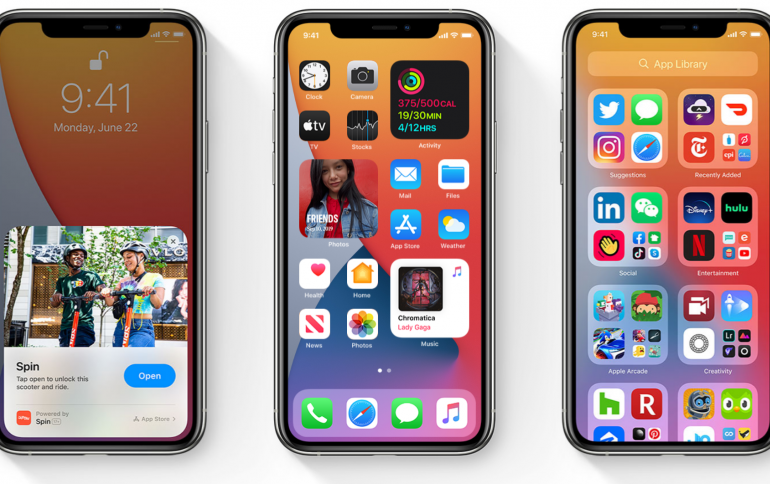
Perhaps the biggest update iOS 14 brings is the ability to place Widgets on the iOS home screen. Users will be able to drop an app widget within their app array on their phone’s home screen, and apps will rearrange themselves accordingly. Home screen widgets will be available in multiple sizes to allow users to set up their home screen in a few different arrangements. Widgets can also be arranged in a “Smart Stack” that layers Widgets on top of each other and lets users swipe to the one they want. Smart Stacks can also predict which Widget is most relevant to a user based on typical app usage throughout the day. 

iOS 14 also brings a slew of other features, including an App Library, a new home screen that automatically organizes all downloaded apps into categorical folders. Currently, it looks like the App Library is sorted by the phone, not the user. Picture-in-Picture finally comes to iOS with this update, allowing users to watch videos or FaceTime calls in a small inset while they use a separate app. Phone call pop-ups have been downsized to a small banner along the top of the phone rather than taking up the entire screen. 

Messages got an overhaul as well. Users can now pin up to nine important conversations so that they remain at the top of the Messages list. Users will also be able to directly ping someone in a conversation via a Mention, and group messages threads can be set to notify users only when they are directly pinged. Inline replies are also available in Messages so that users can directly reply to a specific message in a group, creating a kind of sub-thread. Of course, there are the requisite new Memoji options: new age options, 20 new hairstyles and head coverings, and an option to add a face mask to your Memoji.

Apple also debuted a new Translate app. Similar to Google Translate and others, Translate can translate both written and spoken dialogue into a myriad of languages. At launch, Translate will support 11 languages. Translate can also run fully offline by downloading language libraries.

App Clips were also introduced. These are small (<10 MB) apps that are meant for transactional needs. The example Apple gave was paying for a parking spot. Rather than downloading an entire app, users can scan a “clip code” (similar to a QR code) to download an App Clip, pay with Apple Pay, and then dismiss the clip, which deletes the app and associated data. 

There are lots of other new features in iOS 14, including unlocking and starting compatible cars via NFC, performance improvements in Safari, a new compact visualizer for Siri, new privacy features, and much, much more. Head over to Apple’s dedicated WWDC page for more information. 

Tags: Apple
Previous Post
AirPods Pro gain 'spatial audio' for Dolby Atmos, 7.1, 5.1 surround
Next Post
Dell Introduces new 27-inch curved and flat panel gaming monitors

Related Posts

  • Apple announces new product for 2026

  • Apple Unveils Next-Generation Mac Lineup and Silicon Architecture M6, M5 Pro, M5 Max, and M5 Ultra

  • Apple Overhauls EU App Store Rules

  • Apple introduces AirPods Max 2

  • Apple introduces the new M5 Pro/Max powered laptops and new Studio Display

  • Apple introduces iPhone 17e and new new iPad Air

  • Apple introduces new AirTag with expanded connectivity range and improved findability

  • Apple introduces Digital ID

Latest News

CORSAIR Launches the RM1200e Power Supply with Built-in PinProtect GPU Overcurrent Protection and Platinum-certified Efficiency
PC components

CORSAIR Launches the RM1200e Power Supply with Built-in PinProtect GPU Overcurrent Protection and Platinum-certified Efficiency

CORSAIR Changes the Game with PureVector, a Science-Based Personalized Aiming Technology, Launching Exclusively in the SABRE v3 PRO PureVector Mouse Series
Gaming

CORSAIR Changes the Game with PureVector, a Science-Based Personalized Aiming Technology, Launching Exclusively in the SABRE v3 PRO PureVector Mouse Series

AMD FSR Upscaling 4.1 Boosts Frames and Image Quality on More Devices
GPUs

AMD FSR Upscaling 4.1 Boosts Frames and Image Quality on More Devices

TerraMaster TerraSync Update
Enterprise & IT

TerraMaster TerraSync Update

COLORFUL Launches iGame X870E ULTRA-S V14 Motherboard
PC components

COLORFUL Launches iGame X870E ULTRA-S V14 Motherboard

Popular Reviews

Endorfy Thock V2 Wireless Keyboard

Endorfy Thock V2 Wireless Keyboard

SoundPeats Cove Pro

SoundPeats Cove Pro

The Quiet Technology Behind the Spin

The Quiet Technology Behind the Spin

Akaso Brave 8 Lite

Akaso Brave 8 Lite

SoundPeats C30

SoundPeats C30

be quiet! Dark Perk Mice

be quiet! Dark Perk Mice

Kioxia Exceria Plus G3 512GB microSD

Kioxia Exceria Plus G3 512GB microSD

XbotGo Chamaleon

XbotGo Chamaleon

Main menu

  • Home
  • News
  • Reviews
  • Essays
  • About
    • Submit News

    • Contact Us
    • Privacy

    • Promotion
    • Advertise

    • RSS Feed
  • About
  • Privacy
  • Contact Us
  • Promotional Opportunities @ CdrInfo.com
  • Advertise on out site
  • Submit your News to our site
  • RSS Feed



