Breaking News

Samsung Brings Satellite Communication Support to Galaxy Smartphones Across the Globe vivo Announces MWC 2026 Attendance and sets to Showcase New Flagship X300 Ultra Razer Elevates Everyday Carry with the Laptop Sleeve 16” with Wireless Charging Samsung Unveils Galaxy S26 Series and Galaxy Buds4 Razer announces Kiyo V2 4K AI Webcamera

logo

  • Share Us
    • Facebook
    • Twitter
  • Home
  • Home
  • News
  • Reviews
  • Essays
  • Forum
  • Legacy
  • About
    • Submit News

    • Contact Us
    • Privacy

    • Promotion
    • Advertise

    • RSS Feed
    • Site Map

Search form

Noctua NH-P1 passive CPU cooler

Jul 1,2021 0

3. Installation process


Review Pages

1. Introduction
2. Retail Package
3. Installation process
4. NF-A12x25 LS-PWM fan
5. Testing Methodology
6. Test Results
7. Conclusion


Installing the CPU cooler requires several steps. The retail box includes all the needed information in order to install the CPU cooler either with Intel or AMD platform. For our tests we used the AMD Ryzen 5600X, so we had to unpack the AMD labeled plastic sleeve. There are two mounting bars and four (4) plastic spacers with long screws to attach to the motherboard backplate.
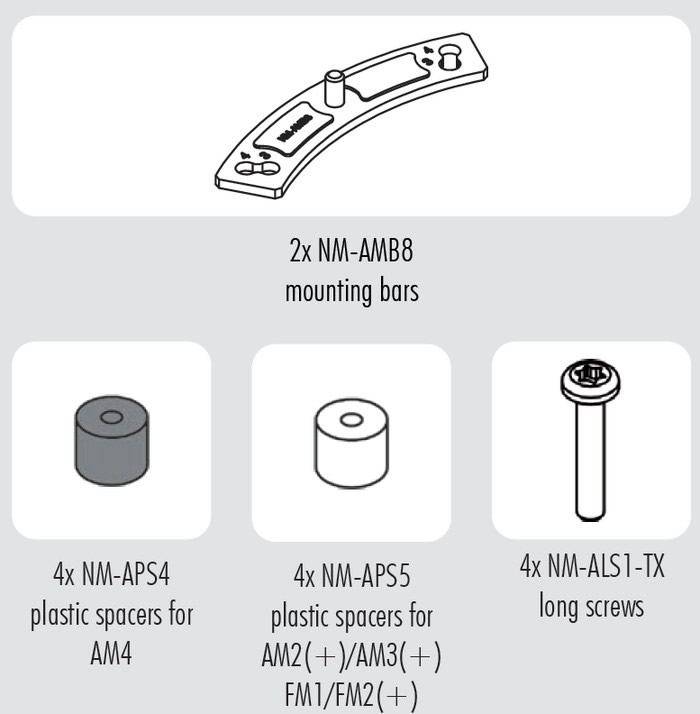
Installation is not difficult; at the end you have to add the included thermal compound and secure the CPU cooler to the already pre-installed base brackets.
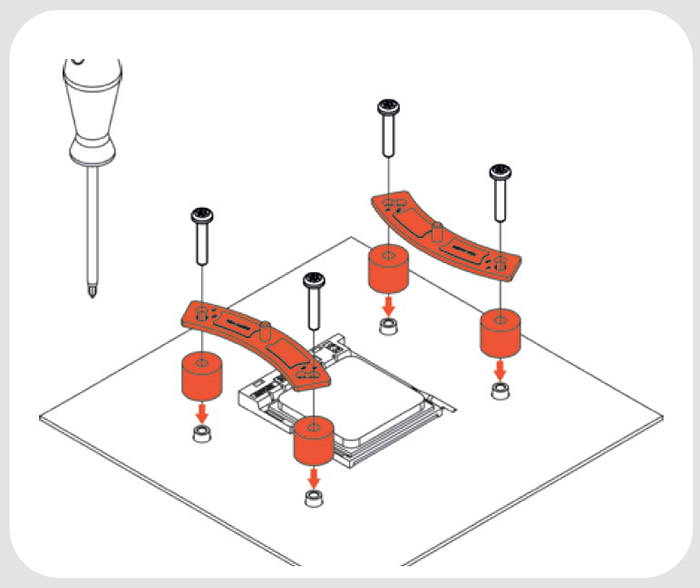
Below you can see the mounting brackets installed at the motherboard.

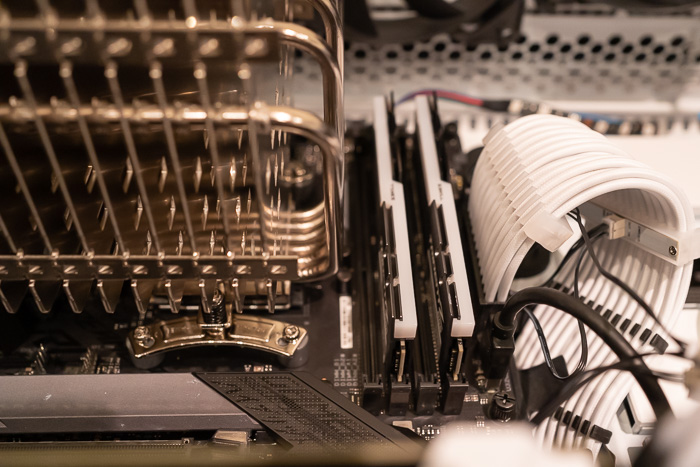
The included long screw is needed to secure the NH-P1 passive cooler to the motherboard.

Due to the design, there is enough distance from memory modules
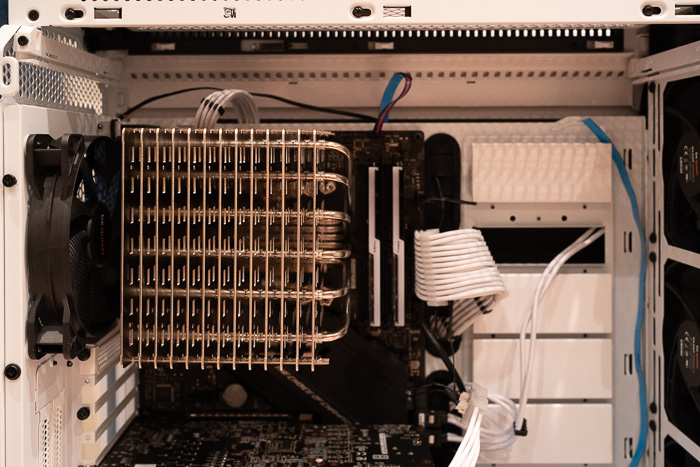
Depending the case, you can have plenty of room around the CPU or not...

In our case we removed all top fans from the case to have plenty of space and secure the afterwards Noctua NF-A12x25 LS-PWM fan.
 

Review Pages

1. Introduction
2. Retail Package
3. Installation process
4. NF-A12x25 LS-PWM fan
5. Testing Methodology
6. Test Results
7. Conclusion


Pages

  • « first
  • ‹ previous
  • 1
  • 2
  • 3
  • 4
  • 5
  • 6
  • 7
  • next ›
  • last »

Noctua

Tags: Noctua
Previous Post
Noctua NH-D15 chromax.black CPU Cooler
Next Post
NAS for Professionals in Small Office

Related Posts

  • Noctua NH-D15 G2 Chromax.Black

  • Noctua NP-DM3 desk mat

  • Noctua presents chromax.black versions of its NH-D15 G2 and NF-A14x25 G2

  • Noctua celebrates 20-year anniversary with new website and desk mat

  • Noctua NF-A12x25 G2 fans

  • ASUS and Noctua announce ASUS GeForce RTX 5080 Noctua Edition graphics card

  • Noctua introduces NF-A12x25 G2 next-generation 120mm fan

  • Noctua at Computex 2025

Latest Reviews

Kioxia Exceria Plus G3 512GB microSD
Cameras

Kioxia Exceria Plus G3 512GB microSD

SoundPeats Cove Pro
Consumer Electronics

SoundPeats Cove Pro

Asustor AS5404T 4-Bay NAS System
Enterprise & IT

Asustor AS5404T 4-Bay NAS System

be quiet! Pure Power 13M 1200W
PC components

be quiet! Pure Power 13M 1200W

Server-Side Gaming Why Canadian Online Casinos Are Abandoning Local Clients for HTML5 Clouds
Enterprise & IT

Server-Side Gaming Why Canadian Online Casinos Are Abandoning Local Clients for HTML5 Clouds

Popular News

COLORFUL Introduces CVN B850I GAMING FROZEN Motherboard

COLORFUL Introduces CVN B850I GAMING FROZEN Motherboard

COLORFUL Presents CVN X870 ARK FROZEN Motherboard for AMD Ryzen 9000 CPUs

COLORFUL Presents CVN X870 ARK FROZEN Motherboard for AMD Ryzen 9000 CPUs

TEAMGROUP Launches EXPERT P34F Find My External SSD

TEAMGROUP Launches EXPERT P34F Find My External SSD

Samsung announces Galaxy Tab S11 and Galaxy S25 FE series

Samsung announces Galaxy Tab S11 and Galaxy S25 FE series

Viltrox Showcases Upcoming Lens Lineup and New TTL Flash at IBC 2025

Viltrox Showcases Upcoming Lens Lineup and New TTL Flash at IBC 2025

CORSAIR announces Vanguard Pro 96 and Vanguard 96 Gaming Keyboards

CORSAIR announces Vanguard Pro 96 and Vanguard 96 Gaming Keyboards

Panasonic Introduces the First Ultra-Telephoto Zoom Lens in the LUMIX S Series

Panasonic Introduces the First Ultra-Telephoto Zoom Lens in the LUMIX S Series

MSI Launches DATAMAG 40Gbps Magnetic Portable SSD

MSI Launches DATAMAG 40Gbps Magnetic Portable SSD

Main menu

  • Home
  • News
  • Reviews
  • Essays
  • Forum
  • Legacy
  • About
    • Submit News

    • Contact Us
    • Privacy

    • Promotion
    • Advertise

    • RSS Feed
    • Site Map
  • About
  • Privacy
  • Contact Us
  • Promotional Opportunities @ CdrInfo.com
  • Advertise on out site
  • Submit your News to our site
  • RSS Feed