Breaking News

GAMEMAX Unveils NEX C53 Panoramic Chassis be quiet! announces new Power Zone 2 1200W and Pure Power 13 M 1200W Thypoch announces 21mm f/3.5 M Mount Lens ASUS showcases new AI technologies and celebrates 20 years of ROG gaming at CES Prograde Digital Announces Pro Card Caddy

logo

  • Share Us
    • Facebook
    • Twitter
  • Home
  • Home
  • News
  • Reviews
  • Essays
  • Forum
  • Legacy
  • About
    • Submit News

    • Contact Us
    • Privacy

    • Promotion
    • Advertise

    • RSS Feed
    • Site Map

Search form

Pioneer DVR-720H-s DVD Recorder

Nov 2,2004 0

23. Writing Quality Tests


Review Pages

1. Introduction
2. Packaging & Interior Look
3. Control Menu
4. The Tuner menu
5. The Video In/Out Menu
6. The Audio Out menu
7. The Language menu
8. The Recording menu
9. The Playback menu
10. Reading Tests
11. Compressed Audio (data CD/DVD)
12. Making a recording (DVD)
13. Making a recording (HDD)
14. Recording Options
15. Chase Play Feature
16. Timer Recording & Disc Navigator (DVD)
17. Editing and Finalizing a DVD-Video Disc
18. Disc Navigator (HDD)
19. Copy Menu (HDD -> DVD)
20. Copy Menu (DVD -> HDD)
21. Copy Menu (Disc Backup)
22. The Photoviewer
23. Writing Quality Tests
24. Error Correction Tests
25. Conclusion


Pioneer DVR-720H-s DVD Recorder

Writing Quality Tests

In order to test the writing quality and readability of the burned media, we used two readers with two software applications:

  • The LiteON SOHD-167T with patched firmware being able to read DVD5 up to 16X CAV and DVD9 up to 10X CAV. For the transfer rate tests we used the latest Nero CDSpeed version.
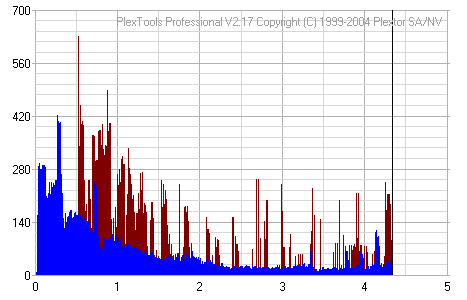
  • The Plextor PX-712A with the latest available firmware. For scanning the disc, we used the latest PlexTools version at 2X CLV reading speed, BURST mode, with middle accuracy.

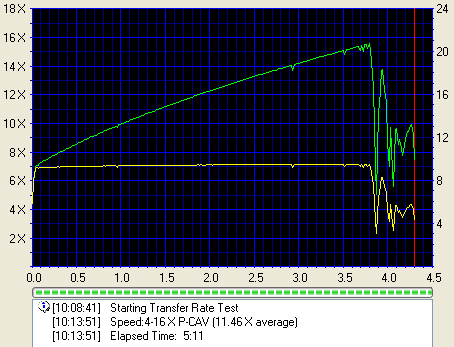
In general, a "perfect" disc should have a smooth reading curve, very low PIE/POE and zero (0) POF error rates. Most times however, even though a disc has very low PIE/POE error rates, the reading curve may not be smooth containing dropoffs. Due to the fact that we oversped the reading capabilities of the LiteON SOHD-167T, such drops are expected, especially near the outer area of the disc.

The measurements below should be taken not as the absolute criteria of the burning quality, but as an indication level.

BeAll 4x DVD-R


Ritek 4x DVD-R

SKC 4x DVD-R


Traxdata 8x DVD-R


Taiyo Yuden 4x DVD-R
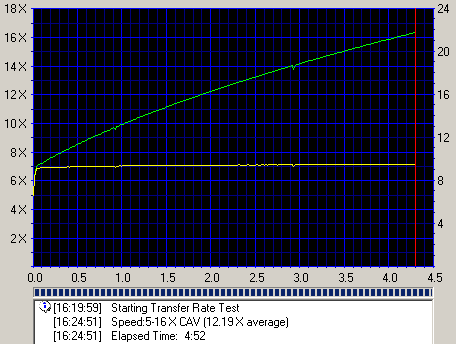

Verbatim 4x DVD-R


CMC 4x DVD-RW
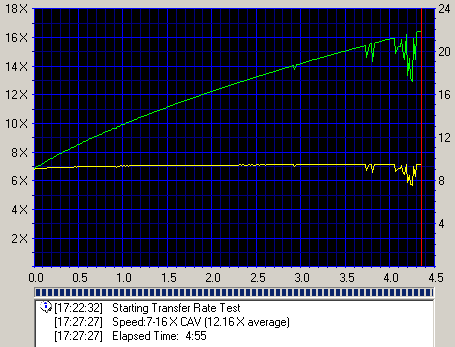
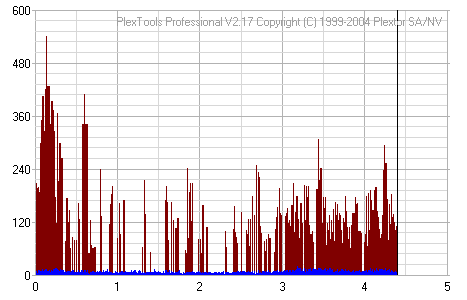
Optodisc 4x DVD-RW
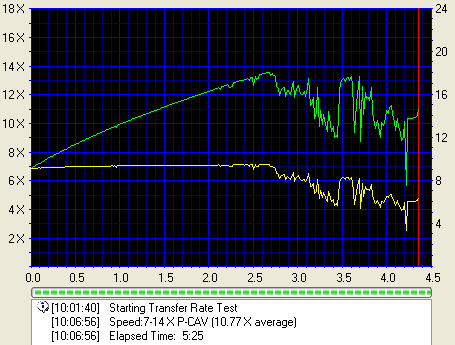
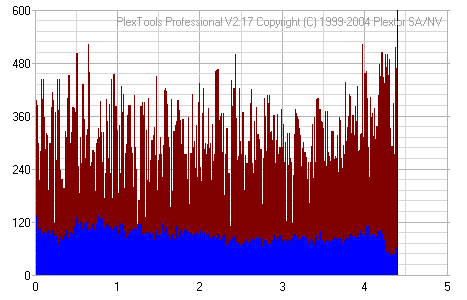
Pioneer 4x DVD-RW


TDK 4x DVD-RW
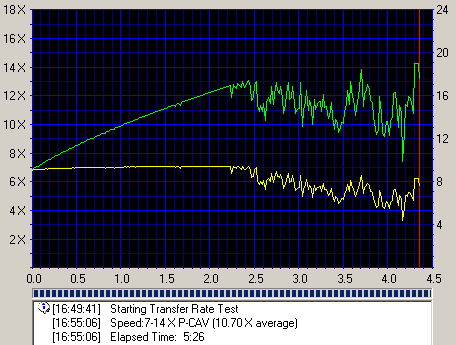

Traxdata 4x DVD-RW
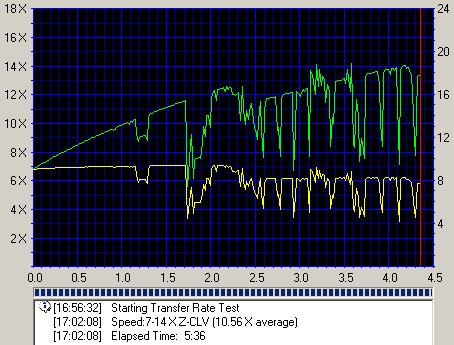
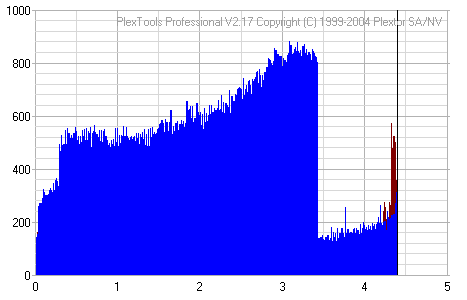
Generally, the drive offers good writing quality. However, there were instances of increased PI/PO levels, but the device managed to correct the errors, with the exception of the SKC 4x DVD-R disc where the PI/PO levels were too high near the end.


Review Pages

1. Introduction
2. Packaging & Interior Look
3. Control Menu
4. The Tuner menu
5. The Video In/Out Menu
6. The Audio Out menu
7. The Language menu
8. The Recording menu
9. The Playback menu
10. Reading Tests
11. Compressed Audio (data CD/DVD)
12. Making a recording (DVD)
13. Making a recording (HDD)
14. Recording Options
15. Chase Play Feature
16. Timer Recording & Disc Navigator (DVD)
17. Editing and Finalizing a DVD-Video Disc
18. Disc Navigator (HDD)
19. Copy Menu (HDD -> DVD)
20. Copy Menu (DVD -> HDD)
21. Copy Menu (Disc Backup)
22. The Photoviewer
23. Writing Quality Tests
24. Error Correction Tests
25. Conclusion

 

Pages

  • « first
  • ‹ previous
  • …
  • 17
  • 18
  • 19
  • 20
  • 21
  • 22
  • 23
  • 24
  • 25
  • next ›
  • last »

Pioneer

Tags: Pioneer
Previous Post
Memorex D² External
Next Post
Samsung TS-H552

Related Posts

  • Pioneer Japan announces BDR-WX01DM for US market

  • Pioneer Japan announces new optical storage drives for JIS X6257 archive format

  • Pioneer Japan updates its CD-DVD Software utility

  • Pioneer Japan announces new BDR-X13J-X external BD Writer and BDR-WX01DM for archiving

  • Pioneer Japan releases new firmware updates for external Blu-Ray Recorders

  • Pioneer BDR-XD08UMB-S External Blu-Ray Recorder

  • Pioneer Japan updates firmware for their X13 lineup (30-01-2023)

  • Pioneer BDR-X13U-S

Latest Reviews

The Difference Between American and European Stakes and Why It Changes How People Bet
Enterprise & IT

The Difference Between American and European Stakes and Why It Changes How People Bet

Endorfy Thock V2 Wireless Keyboard
PC components

Endorfy Thock V2 Wireless Keyboard

Noctua NH-D15 G2 Chromax.Black
Cooling Systems

Noctua NH-D15 G2 Chromax.Black

EnGenius ECW520 AP
Enterprise & IT

EnGenius ECW520 AP

Noctua NP-DM3 desk mat
Gaming

Noctua NP-DM3 desk mat

Popular News

COLORFUL Introduces CVN B850I GAMING FROZEN Motherboard

COLORFUL Introduces CVN B850I GAMING FROZEN Motherboard

COLORFUL Presents CVN X870 ARK FROZEN Motherboard for AMD Ryzen 9000 CPUs

COLORFUL Presents CVN X870 ARK FROZEN Motherboard for AMD Ryzen 9000 CPUs

COLORFUL Presents the B860 Series Motherboards

COLORFUL Presents the B860 Series Motherboards

TEAMGROUP Launches EXPERT P34F Find My External SSD

TEAMGROUP Launches EXPERT P34F Find My External SSD

ASRock AM5 Motherboards Now Fully Support AMD Ryzen 9 9950X3D & 9900X3D Processors

ASRock AM5 Motherboards Now Fully Support AMD Ryzen 9 9950X3D & 9900X3D Processors

Samsung announces Galaxy Tab S11 and Galaxy S25 FE series

Samsung announces Galaxy Tab S11 and Galaxy S25 FE series

Viltrox Showcases Upcoming Lens Lineup and New TTL Flash at IBC 2025

Viltrox Showcases Upcoming Lens Lineup and New TTL Flash at IBC 2025

CORSAIR announces Vanguard Pro 96 and Vanguard 96 Gaming Keyboards

CORSAIR announces Vanguard Pro 96 and Vanguard 96 Gaming Keyboards

Main menu

  • Home
  • News
  • Reviews
  • Essays
  • Forum
  • Legacy
  • About
    • Submit News

    • Contact Us
    • Privacy

    • Promotion
    • Advertise

    • RSS Feed
    • Site Map
  • About
  • Privacy
  • Contact Us
  • Promotional Opportunities @ CdrInfo.com
  • Advertise on out site
  • Submit your News to our site
  • RSS Feed