Breaking News

G.SKILL Demo New Memory Solutions for Gaming, Server, AI, Workstation Applications at Computex 2026 LIAN LI Launches HydroShift II OLED Curved 360 AIO LIAN LI Unveils O11 VISION-M CORSAIR PRO launches AI Workstations and Servers ASUS Announces T1 GeForce RTX 5070 and RTX 5060 Ti Graphics Cards

logo

  • Share Us
    • Facebook
    • Twitter
  • Home
  • Home
  • News
  • Reviews
  • Essays
  • Forum
  • Legacy
  • About
    • Submit News

    • Contact Us
    • Privacy

    • Promotion
    • Advertise

    • RSS Feed
    • Site Map

Search form

Shuttle X2700B

Jan 12,2009 0

3. Booting Up


Review Pages

1. Specifications, features
2. Opening the package
3. Booting Up
4. Memory, CPU
5. BIOS
6. Basic HDD tests
7. Basic DVD-RW tests
8. Basic GPU tests
9. Basic CPU tests
10. Final words


The device is powered by an external power adapter. Although the idea not to include the power supply in the main body of the device made it lighter, we are not very sure that plugging an external device to power the barebone up is convenient. Anyway, the power adapter is small and it doesn't make any noise since its fanless.

The next step is to connect the required cables (mouse, keyboard, VGA). We are ready-to-go.

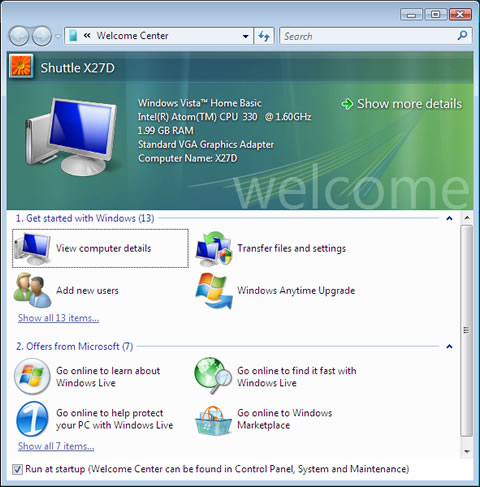
After booting up a welcome screen comes up and after a while you are into the Windows Vista Home Basic environment. Nothing special in this Welcome screen here, except the background Shuttle logo. The welcome screen also shows some details about the system:
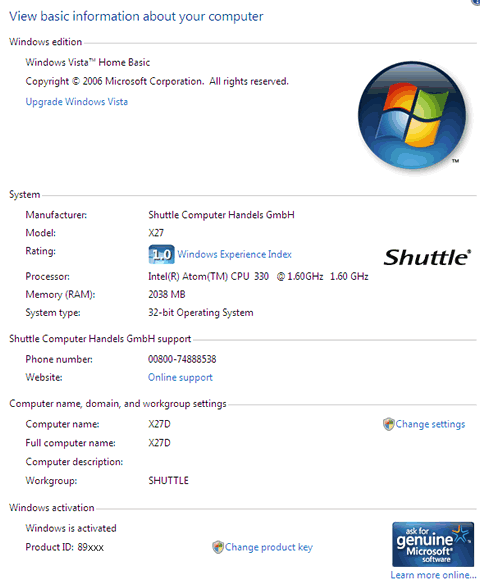
Immediately after booting, the the system is rated by Windows Vista at "1.0" (Windows Experience Index) and it is pre-activated:
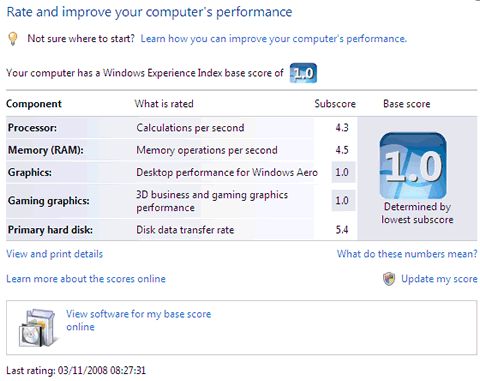
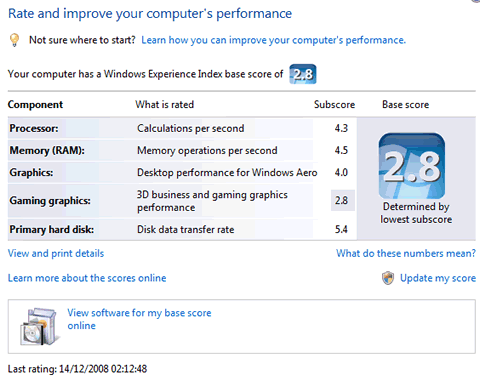
Below you can see how Windows evaluate and rate the components currently on board, without the latest drivers or updates installed. It seems that the low rating of the graphics engine results to a low overall score.
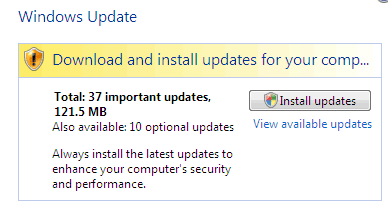
After a while, Windows prompt us for several updates .Our sample came without box even SP1 installed so we had to download all the important and recommended updates:
After rebooting and checking the installed updates, we saw that new Intel graphics driver had been installed and this time, the graphics scores were much higher, resulting to an overall base score of "2.8"
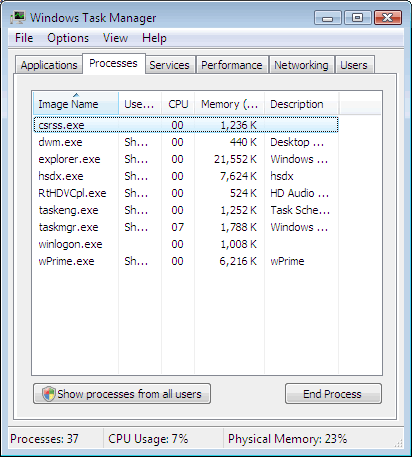
As you can see in the screen shot below, the processes that are running are the essential. It's good to see that Shuttle has not overloaded the X27D with extra software that usually ad extra load to the OS:
A rather annoying box was coming up every time we rebooted.
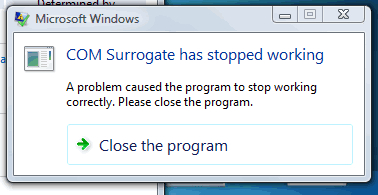
After a quick look at Google, we saw that a quick fix was available for this issue.


Review Pages

1. Specifications, features
2. Opening the package
3. Booting Up
4. Memory, CPU
5. BIOS
6. Basic HDD tests
7. Basic DVD-RW tests
8. Basic GPU tests
9. Basic CPU tests
10. Final words


Pages

  • « first
  • ‹ previous
  • 1
  • 2
  • 3
  • 4
  • 5
  • 6
  • 7
  • 8
  • 9
  • next ›
  • last »

Shuttle

Tags: Shuttle
Previous Post
LiteOn eSAU208
Next Post
LITEON iHAS422 22x

Related Posts

  • Shuttle Launches the XZ890G2

  • Shuttle Introduces SPCNV03 Ultra-Compact Edge AI Computer

  • Shuttle announces DN11H at InfoComm 2025

  • Shuttle announces NA10H - NT10H

  • Flat Mini-PC Barebones for the latest LGA1700 processors from Shuttle

  • Shuttle announces Xeon-compatible Mini-PC Barebone with 4x LAN and ECC RAM support

  • Shuttle announces Mini-PC Barebone in a 4.7-litre format for two PCI Express cards

  • Shuttle Announces DH32 Mini-PC

Latest Reviews

Swit NP-FZ100 Battery
Cameras

Swit NP-FZ100 Battery

The Technology Stack Behind Modern Digital Gaming Platforms
Consumer Electronics

The Technology Stack Behind Modern Digital Gaming Platforms

be quiet! Dark Rock Pro 6
Cooling Systems

be quiet! Dark Rock Pro 6

How Online Casinos Use Encryption, Verification, and Risk Controls to Build User Trust
Enterprise & IT

How Online Casinos Use Encryption, Verification, and Risk Controls to Build User Trust

Why Low-Latency Infrastructure Matters More Than Raw Specs
Enterprise & IT

Why Low-Latency Infrastructure Matters More Than Raw Specs

Popular News

TEAMGROUP Launches EXPERT P34F Find My External SSD

TEAMGROUP Launches EXPERT P34F Find My External SSD

CORSAIR announces Vanguard Pro 96 and Vanguard 96 Gaming Keyboards

CORSAIR announces Vanguard Pro 96 and Vanguard 96 Gaming Keyboards

Samsung announces Galaxy Tab S11 and Galaxy S25 FE series

Samsung announces Galaxy Tab S11 and Galaxy S25 FE series

Viltrox Showcases Upcoming Lens Lineup and New TTL Flash at IBC 2025

Viltrox Showcases Upcoming Lens Lineup and New TTL Flash at IBC 2025

MSI Launches FORGE GK600 TKL WIRELESS Special Edition Compact Mechanical Keyboard

MSI Launches FORGE GK600 TKL WIRELESS Special Edition Compact Mechanical Keyboard

Panasonic Introduces the First Ultra-Telephoto Zoom Lens in the LUMIX S Series

Panasonic Introduces the First Ultra-Telephoto Zoom Lens in the LUMIX S Series

MSI Launches DATAMAG 40Gbps Magnetic Portable SSD

MSI Launches DATAMAG 40Gbps Magnetic Portable SSD

Viltrox Joins the L-Mount Alliance, Expanding Creative Possibilities

Viltrox Joins the L-Mount Alliance, Expanding Creative Possibilities

Main menu

  • Home
  • News
  • Reviews
  • Essays
  • Forum
  • Legacy
  • About
    • Submit News

    • Contact Us
    • Privacy

    • Promotion
    • Advertise

    • RSS Feed
    • Site Map
  • About
  • Privacy
  • Contact Us
  • Promotional Opportunities @ CdrInfo.com
  • Advertise on out site
  • Submit your News to our site
  • RSS Feed