SONY DW-Q30A
24. Conclusion
Review Pages
2. Reading Tests
3. CD Error Correction Tests
4. DVD Error Correction Tests
5. Protected Disc Tests
6. CD Recording Tests
7. CD Writing Quality - Plextools
8. CD Writing Quality - Clover System
9. DVD Recording Tests
10. DVD Writing Quality - Page 1
11. DVD Writing Quality - Page 2
12. DVD Writing Quality - Page 3
13. DVD Writing Quality - Page 4
14. DVD Writing Quality - Page 5
15. DVD Writing Quality - Almedio
16. DVD+R DL - Page 1
17. DVD+R DL - Page 2
18. BookType Setting
19. DW-Q30A vs SA300 - Page 1
20. DW-Q30A vs SA300 - Page 2
21. DW-Q30A vs SA300 - Page 3
22. DW-Q30A vs SA300 - Page 4
23. Firmware Hacks
24. Conclusion
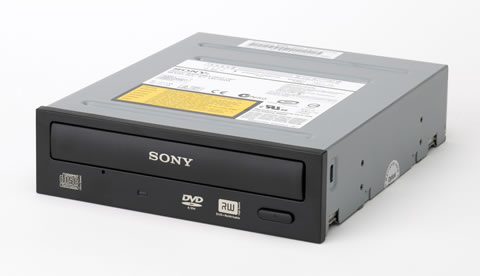
A new SONY burner is always going to arouse interest, mostly because we are curious see which OEM drive SONY has chosen to stick its label on. This time, the DW-Q30A is an OEM LiteOn SHW-1635S, a dual 16X DVD burner with 8X DVD+R DL and 4X DVD-R DL support. As for the DVD±RW formats, the maximum supported speeds are 8X for the DVD+RW and 6X for the DVD-RW.
For the CD format, the drive supports reading speeds of 48X with CD-R and 32X with US-RW media. For 48X reading, you'll have to keep the eject button pressed for a few seconds, until the activation led blinks twice, in order for the drive to set the 48X reading speed. You'll need to do this each and every time you open and close the tray. We really cannot see the benefit of such a feature, if indeed it is a feature. According to our error correction tests, the drive reported typical to average performance. This is however, something which changes with the DVD format. The DVD error correction is rather good, but the maximum DVD reading speed is set to 12X for DVD±RW media and 8X with DVD±R DL, not something to write home about since there are already a number of drives that support 16X and 12X for DVD±RW and DVD±R DL media respectively. The drive won't read 90/99min CDs but its DAE speed is good and its performance in Nero's Advanced DAE quality test even better.
AudioCD protection is not a problem for the SONY DW-Q30A drive, which managed to rip all of our test discs. In contrast, if you are looking for a drive which will help you make working backups of your favorite protected games, especially Safedisc protection, the SONY drive isn't going to be much help. It may be able to backup older versions such as v2.8 and earlier, but there are not many games using those versions any more.
One of the most important things with a burner, if not the most important, is its writing performance with CD and DVD media. In the case of CDs, the drive performed fast, needing approximately 3:00min to fully burn an 80min CD at 40X. The quality, as was reported by Plextools and Clover System, was good with MMore media, bad with Taiyo Yuden and average to good for the rest of the tested media. A further improvement is required at this point. We should not forget that the drive was tested with the only firmware available at the time of the review, so no improvements have been made available yet since the time of its release.
Moving on to the DVD recording tests, the SONY DW-Q30A is quite a fast DVD burner and needs less than 6 minutes to burn a DVD single layer disc at 16X. The reported times in our tests were good in all cases with DVD±R/RW and with DVD±R DL. What about the writing quality though? The DW-Q30A is one of the best DVD burners we have tested. Frankly, the previous models were not so good so the DW-Q30A made up for this. Most of the burned media reported good writing quality, while some of them excellent. However, there are still issues with quite a few media and we would like SONY to take care of this. We hope that with a new firmware release, the writing quality with the specific discs which reported poor quality in our tests will be improved.
In the drive's features, we should mention the ability to measure the quality of discs. Moreover, with the appropriate freeware utility, you can disable the region control and convert the drive to region free.
At the time of this review, the price for the SONY DW-Q30A on the e-market was close to US$45.
- The Good
- High DVD±R/RW reading speed
-
6X DVD-R DL and 8X DVD+R DL support
- Good DVD error correction capabilities
- Can burn DVD+RW media at 8X and DVD-RW media at 6X
- Supports audio protected discs
- DVD writing quality with most media
- The Bad
- CD error correction
- Cannot completely read 90/99min Audio CD's
- Cannot create working backups with SafeDisc protected games over v2.80
- Cannot overburn DVD recordable media
- Like To be fixed
- Writing quality with specific DVD media
- Enabling 48X CD speed by pressing on drive button is very inconvenient
| Retail Package |  |
| Reading |  |
| Error Correction | |
| Protected Discs | |
| Writing | |
| Features | |
Review Pages
2. Reading Tests
3. CD Error Correction Tests
4. DVD Error Correction Tests
5. Protected Disc Tests
6. CD Recording Tests
7. CD Writing Quality - Plextools
8. CD Writing Quality - Clover System
9. DVD Recording Tests
10. DVD Writing Quality - Page 1
11. DVD Writing Quality - Page 2
12. DVD Writing Quality - Page 3
13. DVD Writing Quality - Page 4
14. DVD Writing Quality - Page 5
15. DVD Writing Quality - Almedio
16. DVD+R DL - Page 1
17. DVD+R DL - Page 2
18. BookType Setting
19. DW-Q30A vs SA300 - Page 1
20. DW-Q30A vs SA300 - Page 2
21. DW-Q30A vs SA300 - Page 3
22. DW-Q30A vs SA300 - Page 4
23. Firmware Hacks
24. Conclusion