
Testing media quality
4. CD-R Inspector
Review Pages
2. CD-Check
3. CD-R Diagnostics
4. CD-R Inspector
5. CD Roller
6. Disc Inspector
7. EclipseSuite
8. Nero CD Speed
9. Plextor PleXTools
10. ScanCD
11. Sector Tester
12. CD Doctor
13. CD-R Tools
14. Nero CD Speed
15. UM Doctor
16. WSES - Page 1
17. WSES - Page 2
18. WSES - Page 3
19. WSES - Page 4
20. WSES - Page 5
21. WSES - Page 6
22. WSES - Page 7
23. CD Vergleich - Page 1
24. CD Vergleich - Page 2
25. EAC
26. Feurio!
27. Conclusion
Testing media quality - Page 4
CD-R Inspector
 The same company also offers an advanced version of CD-R Diagnostics by the
name CD-R
Inspector. Its cost is $129.99. The software includes all the functions
of CD-R Diagnostics and additionally offers more capabilities in three areas:
The same company also offers an advanced version of CD-R Diagnostics by the
name CD-R
Inspector. Its cost is $129.99. The software includes all the functions
of CD-R Diagnostics and additionally offers more capabilities in three areas:
- Audio discs
- Searching for possibly hidden information on the disc
- Additional control over processing
As ArrowKey says "...CD-R Inspector is more suited for the "power user" and forensic examination of discs. CD-R Diagnostic is for recovering data - CD-R Inspector does not do any better job of data recovery. The displayed graphic for CD-R Inspector and the ability to print this information out can be extremely helpful for QA purposes..."
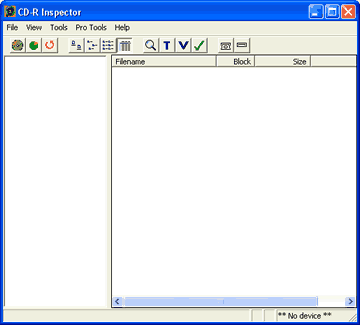
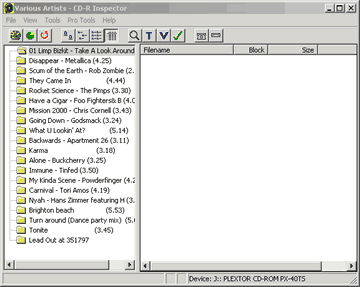
The interface of CD-R Inspector is simple. In start you have to select the reader (File->Select CD-ROM) and shortly after the software will show the disc contents:
Using the Disc Error function (under Tools) the following screen appears. By selecting the desired scan mode, you can scan the disc for errors. The possible errors graphically demonstrated on a table, among with the time position they were found on the disc.

As ArrowKey explains: "...The Error Summary tool tests the readability of a CD-R or CD-ROM. Because this test is performed on the devices you have available, it is not a scientific measurement of the readability - this can only be done with sophisticated (and expensive) equipment.
What can be done with the CD devices you have available is to measure the unrecovered and recovered errors which exist on the media when being read with a particular device. It is suggested that a CD-ROM reader be used for this purpose rather than the recorder that recorded the disc. A number of different tests are performed, depending on the capabilities of the device used.
If the CD device being used supports returning recoverable errors, the device will normally be automatically configured to do so and this information will be used. If the CD device does not support returning recoverable errors, a timing analysis is done to determine where extra time is being taken by the drive to read sectors. This has proven to be extremely valuable in locating defects with newer high-speed CD-ROM drives.
In all cases, retries are disabled if the drive allows this. This will generally cause errors to be reported for otherwise readable sectors that can be read if the drive is allowed to retry the operation. The objective is not to locate areas that are actually unreadable, but to report on potentially unreadable areas. It is important to emphasize the difference..."
a) Quick Scan (reads 500 sectors sample). It's the easier and more time cost effective option. It shows a quick scan of the disc and reports any un-readable errors:


b) Moderate Scan


c) Complete Scan
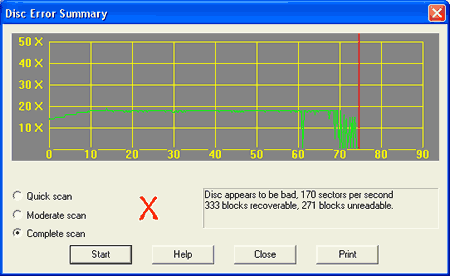

As we can see, there are major differences between the three reading (Quick, Moderate, and Complete) modes, due to different sample volume...
Review Pages
2. CD-Check
3. CD-R Diagnostics
4. CD-R Inspector
5. CD Roller
6. Disc Inspector
7. EclipseSuite
8. Nero CD Speed
9. Plextor PleXTools
10. ScanCD
11. Sector Tester
12. CD Doctor
13. CD-R Tools
14. Nero CD Speed
15. UM Doctor
16. WSES - Page 1
17. WSES - Page 2
18. WSES - Page 3
19. WSES - Page 4
20. WSES - Page 5
21. WSES - Page 6
22. WSES - Page 7
23. CD Vergleich - Page 1
24. CD Vergleich - Page 2
25. EAC
26. Feurio!
27. Conclusion










