Toshiba Canvio Flex Portable Hard Drive, Now in Metallic Blue
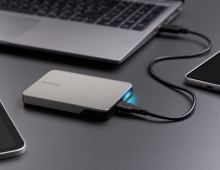
Toshiba Electronics Europe GmbH (Toshiba) has unveiled a metallic blue casing for its Canvio Flex 2.5-inch[1] portable hard disk drive (HDD). The new colour adds a fresh look to the range, alongside the original warm silver option. The new metallic blue model will be available exclusively across EMEA. Available in 1TB[2], 2TB, and 4TB capacities, the Canvio Flex is designed for easy storage across multiple devices. Pre-formatted with exFAT, it works seamlessly with Windows PCs and Macs, as well as with compatible Android and iOS tablets and smartphones, without requiring reformatting[3]. Built for flexibility, Canvio Flex includes both USB Type-C[4] and USB Type-A cables in the box, making it simple to plug in and start transferring files straight away. Whether users are backing up photos, videos, documents, or creative projects, Canvio Flex offers a convenient way to store and access content wherever they are.
“Since its initial release, Canvio Flex has seen strong demand as a flexible and convenient storage solution,” says Larry Martinez-Palomo, Vice President of the Storage Products Division at Toshiba Electronics Europe. "With the new metallic blue finish, we are pleased to offer customers an additional colour choice, reflecting growing demand for variety, especially among younger audiences.”
The new metallic blue Canvio Flex will be available exclusively in the EMEA market starting in CQ2 2026.
More information about the Canvio Flex can be accessed by visiting: https://www.toshiba-storage.com/products/canvio-flex/
[1] “2.5-inch“ means the form factor of HDDs. They do not indicate the drive‘s physical size.
[2] One Terabyte (TB) means one trillion bytes. Total available capacity will vary based on the operating environment, and your results and storage capacity will vary accordingly. A computer operating system, however, reports storage capacity using powers of 2 for the definition of 1 GB = 230 = 1 073 741 824 bytes and 1 TB = 240 = 1 099 511 627 776 bytes and therefore shows less storage capacity.
[3] Compatibility with the Canvio Flex may vary depending on the user‘s hardware configuration and operating system. Please check device compatibility and connecting instructions by reviewing the applicable user manuals for such device. The latest information can be viewed online under https://www.canvio.jp/en/compati/hdd/ot_ehdd/flex/index.htm.
[4] USB Type-C® and USB-C® are only for use with products based on and compliant with the USB Type-C® cable and connector specification.