Breaking News

DeepCool Launches the LT360 VISION ARGB Noctua and Asetek Announce Flagship AIO Liquid Coolers Toshiba Begins Sampling of 30-34 TB SMR Nearline Hard Disk Drives ASUS ROG Strix Laptop Lineup Returns With the Latest Intel Core Ultra 9 290HX Plus Processors EnGenius Brings AI-Powered Analytics and Sophisticated Cloud Management to Existing ONVIF Cameras

logo

  • Share Us
    • Facebook
    • Twitter
  • Home
  • Home
  • News
  • Reviews
  • Essays
  • Forum
  • Legacy
  • About
    • Submit News

    • Contact Us
    • Privacy

    • Promotion
    • Advertise

    • RSS Feed
    • Site Map

Search form

Vantec NexStar 3 eSATA

Dec 22,2005 0

4. Performance Test v5.0


Review Pages

1. Introduction
2. Installation
3. HD Tach
4. Performance Test v5.0
5. SiSoftware Sandra
6. PCMark05
7. eSATA vs USB2.0
8. Conclusion


Passmark PerformanceTest is an award winning PC hardware benchmark utility that allows everybody to quickly assess the performance of their computer and compare it to a number of standard 'baseline' computer systems.

Twenty seven standard benchmark tests are available in seven test suites plus there are five advanced testing windows for custom benchmarking. CPU Tests, 2D Graphics Tests, 3D Graphics Tests, Disk Tests, Memory Tests and CD/DVD Tests. In our case we selected the Disk Tests suite.

Passmark Disk Test

This suite contains a number of tests that exercise the mass storage units (hard disk or otherwise) connected to the computer. By default drive C: is used but this can be changed from the Preferences Dialog.
For each test a file is created in the root directory of the selected disk. The file size needs to be large in order to get an accurate measurement. In the case where a slow drive is used on a computer with a large amount of RAM this test can take some minutes to complete.

There are a few issues to aware of when interpreting the results of the disk test. These are covered in the precautions section.
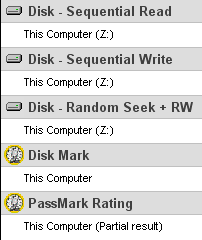
- Disk Sequential Cached Read
A large test file is created on the disk under test. The size of this test file is proportional to the amount of RAM available, which stops the entire file from being cached in RAM. The file is read sequentially from start to end. The amount of data read in each individual read operation is always 16KB

- Disk Sequential Cached Write
A large file is written to the disk under test. The size of this test file is proportional to the amount of RAM available. This stops the entire file being cached in RAM. The file is written sequentially from start to end. The amount of data written in each individual operation is always 16KB

- Disk Random cached Seek RW
A large test file is created on the disk under test. The size of this test file is proportional to the amount of RAM available, this stops the entire file being cached in RAM. The file is read randomly; a seek is performed to move the file pointer to a random position in the file, a 16KB block is read or written then another seek is performed. The amount of data actually transferred is highly dependent on the disk seek time.

Tests NexStar 3 on eSATA HD on SATA

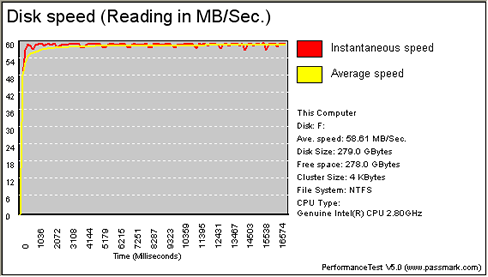
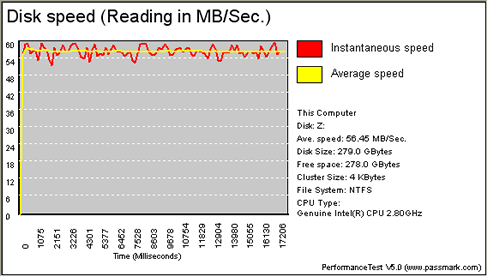
- Reading Test

HDD on NexStar 3 (eSATA)

HDD on SATA

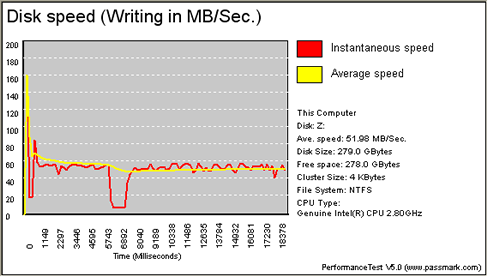
- Writing Test

HDD on NexStar 3 (eSATA)

HDD on SATA

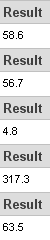
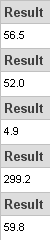
It is obvious from the graphs, that there aren't any significant differences in the average speed, either in reading or in writing. Whereas the instantaneous speed seems to be more stable when the HDD is installed in the NexStar 3.


Review Pages

1. Introduction
2. Installation
3. HD Tach
4. Performance Test v5.0
5. SiSoftware Sandra
6. PCMark05
7. eSATA vs USB2.0
8. Conclusion


Pages

  • « first
  • ‹ previous
  • 1
  • 2
  • 3
  • 4
  • 5
  • 6
  • 7
  • 8
  • next ›
  • last »

Vantec

Tags: Vantec
Previous Post
Plextor PX-755A
Next Post
SONY DW-Q30A

Related Posts

  • Vantec iCEBERQ6

  • Vantec NST-530U2 External Enclosure

  • Vantec PSU

  • New NexStar DX for DVD Burners

  • Vantec AVOX Jukebox Review

  • Vantec AVOX Jukebox

  • Vantec NexStar 3

  • Vantec ICEBERQ 5

Latest Reviews

In the Age of AI Phishing, the Best User Experience Might Be the One That Feels Safest
Enterprise & IT

In the Age of AI Phishing, the Best User Experience Might Be the One That Feels Safest

SoundPeats C30
Consumer Electronics

SoundPeats C30

Why Streaming Live Casino Games Demands Smarter Tech
Enterprise & IT

Why Streaming Live Casino Games Demands Smarter Tech

Kioxia Exceria Plus G3 512GB microSD
Cameras

Kioxia Exceria Plus G3 512GB microSD

SoundPeats Cove Pro
Consumer Electronics

SoundPeats Cove Pro

Popular News

COLORFUL Presents CVN X870 ARK FROZEN Motherboard for AMD Ryzen 9000 CPUs

COLORFUL Presents CVN X870 ARK FROZEN Motherboard for AMD Ryzen 9000 CPUs

TEAMGROUP Launches EXPERT P34F Find My External SSD

TEAMGROUP Launches EXPERT P34F Find My External SSD

Samsung announces Galaxy Tab S11 and Galaxy S25 FE series

Samsung announces Galaxy Tab S11 and Galaxy S25 FE series

Viltrox Showcases Upcoming Lens Lineup and New TTL Flash at IBC 2025

Viltrox Showcases Upcoming Lens Lineup and New TTL Flash at IBC 2025

CORSAIR announces Vanguard Pro 96 and Vanguard 96 Gaming Keyboards

CORSAIR announces Vanguard Pro 96 and Vanguard 96 Gaming Keyboards

Panasonic Introduces the First Ultra-Telephoto Zoom Lens in the LUMIX S Series

Panasonic Introduces the First Ultra-Telephoto Zoom Lens in the LUMIX S Series

MSI Launches DATAMAG 40Gbps Magnetic Portable SSD

MSI Launches DATAMAG 40Gbps Magnetic Portable SSD

MSI Launches FORGE GK600 TKL WIRELESS Special Edition Compact Mechanical Keyboard

MSI Launches FORGE GK600 TKL WIRELESS Special Edition Compact Mechanical Keyboard

Main menu

  • Home
  • News
  • Reviews
  • Essays
  • Forum
  • Legacy
  • About
    • Submit News

    • Contact Us
    • Privacy

    • Promotion
    • Advertise

    • RSS Feed
    • Site Map
  • About
  • Privacy
  • Contact Us
  • Promotional Opportunities @ CdrInfo.com
  • Advertise on out site
  • Submit your News to our site
  • RSS Feed