Breaking News

ASUS ProArt RTX Spark Windows PCs Available for Immediate Pre-Order Kioxia Introduces E1.L QLC-based SSDs for Hyperscale Data Centers CORSAIR Launches the HS80 v2 MAX WIRELESS Gaming Headset Sony Announces the World's First Eclipsa Audio Certified Microphone1 for Smartphones Razer Unveils the Basilisk V4 Line

logo

  • Share Us
    • Facebook
    • Twitter
  • Home
  • Home
  • News
  • Reviews
  • Essays
  • About
    • Submit News

    • Contact Us
    • Privacy

    • Promotion
    • Advertise

    • RSS Feed

Search form

Waitec Vision HTX

Apr 11,2005 0

5. Menus - Page 1


Review Pages

1. Introduction
2. Specifications
3. The Package
4. Internal View
5. Menus - Page 1
6. Menus - Page 2
7. Menus - Page 3
8. Menus - Page 4
9. Tests - Page 1
10. Tests - Page 2
11. Tests - Page 3
12. Tests - Page 4
13. Advanced Tests
14. Conclusion


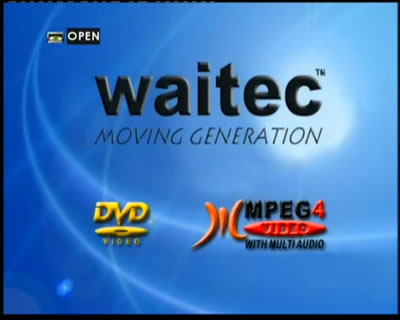
After connecting the power and the composite/s-video cables to the TV and turning on the unit, the user will be greeted with the following main welcome screen, with the Waitec, DVD-Video and Mpeg4-Video logos. On the top left corner, we can see the tray status (open/close/loading):
The player includes a screen saver so that if you don't use the player for a long period but leave it turned on, it will show a rotating DVD-Video logo, shortly after which the player will shut down. Quite useful.
The player has two audio line-in RCA inputs for hooking up external sources. The screenshots below show both inputs, appearing as LINE 1 and LINE 2 in the top left of the screen, just above the Waitec logo:

The audio line selection changes by using the "function" button on the remote control. Below we can see the screen for the FM/AM tuner:


Review Pages

1. Introduction
2. Specifications
3. The Package
4. Internal View
5. Menus - Page 1
6. Menus - Page 2
7. Menus - Page 3
8. Menus - Page 4
9. Tests - Page 1
10. Tests - Page 2
11. Tests - Page 3
12. Tests - Page 4
13. Advanced Tests
14. Conclusion


Pages

  • « first
  • ‹ previous
  • 1
  • 2
  • 3
  • 4
  • 5
  • 6
  • 7
  • 8
  • 9
  • …
  • next ›
  • last »

Waitec

Tags: Waitec
Previous Post
Toshiba SD-R5372
Next Post
VSO Online Statistic Database Results

Related Posts

  • Waitec Unveils High-Capacity Pocket HDD

  • Your DVD passion will reach its limits with VISION PX7

  • Digitally Record Your Unforgettable Moments in Any Format

  • SPEED MATTERS: Waitec presents ACTION 164

  • Waitec presents the evolution of ACTION 16.

  • Waitec presents USB 2.0 external 16x DVD Burner Double Layer, Dual Format

  • Waitec presents E-ZI Phone and E-ZI PhoneBox

  • Waitec Action16

Latest Reviews

Fanxiang MP83 M.2 NVMe SSD Enclosure
Enterprise & IT

Fanxiang MP83 M.2 NVMe SSD Enclosure

Ugreen CM642 USB4.0 Enclosure
PC components

Ugreen CM642 USB4.0 Enclosure

be quiet! Dark Power 14 IO
PC components

be quiet! Dark Power 14 IO

SanDisk High Endurance 512GB microSDXC
Cameras

SanDisk High Endurance 512GB microSDXC

Samsung PRO Ultimate 512GB microSDXC
Cameras

Samsung PRO Ultimate 512GB microSDXC

Popular News

MSI’s Latest AMD X870E MAX & EVO Series Motherboards

MSI’s Latest AMD X870E MAX & EVO Series Motherboards

COLORFUL Launches iGame B850M ULTRA Series Micro-ATX Motherboards

COLORFUL Launches iGame B850M ULTRA Series Micro-ATX Motherboards

COLORFUL Presents Limited Edition Chitu MAG-60 Magnetic Keyboard Inspired by the Year of the Horse

COLORFUL Presents Limited Edition Chitu MAG-60 Magnetic Keyboard Inspired by the Year of the Horse

COLORFUL Launches iGame B850I MINI OC V14 Motherboard

COLORFUL Launches iGame B850I MINI OC V14 Motherboard

COLORFUL Presents iGame Z890 ULTRA-S W and iGame Z890M ULTRA Z Motherboards

COLORFUL Presents iGame Z890 ULTRA-S W and iGame Z890M ULTRA Z Motherboards

COLORFUL Launches the iGame X870E VULCAN W OC Motherboard

COLORFUL Launches the iGame X870E VULCAN W OC Motherboard

COLORFUL Expands B850 Motherboard Lineup with New CVN, Battle-Ax, and MEOW Models

COLORFUL Expands B850 Motherboard Lineup with New CVN, Battle-Ax, and MEOW Models

ASRock Adds Support for One Sub-Channel DRAM Module on Intel DDR5 Motherboards

ASRock Adds Support for One Sub-Channel DRAM Module on Intel DDR5 Motherboards

Main menu

  • Home
  • News
  • Reviews
  • Essays
  • About
    • Submit News

    • Contact Us
    • Privacy

    • Promotion
    • Advertise

    • RSS Feed
  • About
  • Privacy
  • Contact Us
  • Promotional Opportunities @ CdrInfo.com
  • Advertise on out site
  • Submit your News to our site
  • RSS Feed