
Breaking News

ENDORFY introduces Atlas Electric desks Sony Unveils LinkBuds Clip Open Earbuds be quiet! enters high-end gaming mouse market with Dark Perk Ergo and Dark Perk Sym ASUS ROG announces ROG Strix GS-BE7200 Dual-Band WiFi 7 Gaming Router Transcend Launches RDE3 microSD Express Card Reader for Next-Generation High-Speed Performance

logo

  • Share Us
    • Facebook
    • Twitter
  • Home
  • Home
  • News
  • Reviews
  • Essays
  • Forum
  • Legacy
  • About
    • Submit News

    • Contact Us
    • Privacy

    • Promotion
    • Advertise

    • RSS Feed
    • Site Map

Search form

EnGenius ECW336 AP

Jan 30,2024 0

5. Conclusion


Review Pages

1. Introduction
2. Retail Package
3. The product
4. Using the device
5. Conclusion


Working with the EnGenius ECW336 was a pleasure, especially if have built a network based at network EnGenius products. First of all, after plugging the device into the Internet, it will automatically register itself to the default network (EnGenius WiFi), meaning it will take all its properties, passwords, etc, so adding new devices to the default WiFi network is a simply-plug & play situation. After that point you can select the mesh networking frequencies (2.4GHz, 5GHz, or 6GHz), in our case we selected the 5GHz since we had other EnGenius AP repeaters in our network. When a device (laptop, mobile phone, etc) connects to the default EnGenius WiFi network, according to its specifications will automatically select the best working speed from the ECW336 and the Mesh technology.
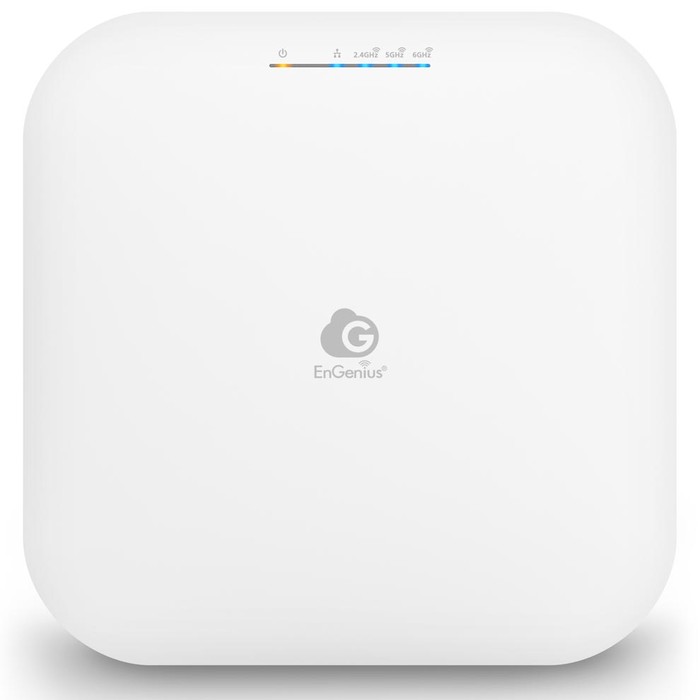
Since the ECW336 includes a 5G LAN port, it can support 1Gbit WiFi that translates a maximum theoretical 125MB/sec (per client). Since this is purely a maximum theoretical, you should expect around 90-100MB/sec when transferring big files through your local network, making 4K streaming easy. Since the device is based upon Qualcomm chipsets and with the EnGenius engineer time behind, you should expect frequent firmware updates to fix security issues and bugs. Moreover, EnGenius offers 1 year free of charge of their PRO functions that add value to the network administrator, and for a small amount you can extend the PRO license per year, even the device will work even without this. Compared with other EnGenius AP products we have tested in the past, the ECW336 has exactly the same physical dimensions and due to the use of newer Qualcomm chipsets, it doesn't have anymore a metal fan at the bottom for heat dispassion, the whole body is made out plastic ABS, which results in overall good working temperatures, even at high loads.

The device of course is noiseless and the internals seem to be carefully designed to maximize temperatures and overall speed. Working with the WiFi 6E band does require empty space, meaning having walls will reduce performance, so that product is most designed for business environments. After all the retail price is far from what a home user will ask and already EnGenius offers lower-priced solutions for entry-level users (Fit lineup of products). Concluding this review, we found the EnGenius ECW336 to be a product that aims for big business and enterprise users who need or wish to enter into the EnGenius ecosystem, highly suggested.

 

Review Pages

1. Introduction
2. Retail Package
3. The product
4. Using the device
5. Conclusion


Pages

  • « first
  • ‹ previous
  • 1
  • 2
  • 3
  • 4
  • 5

EnGenius

Tags: EnGenius
Previous Post
Kioxia EXCERIA PLUS G3 2TB SSD
Next Post
Gelid HeatPhase Ultra

Related Posts

  • EnGenius Unveils Cloud-Managed ECW536S Wi-Fi 7 with 24/7 AirGuard Security

  • EnGenius ECW520 AP

  • EnGenius Brings Wi-Fi 7 to Small Businesses with Affordable ECW510 Access Point

  • EnGenius Multi-Gigabit Switch Delivers 2.5G Performance with 90W PoE

  • EnGenius Announces Affordable ECW520 Access Point

  • EnGenius Launches Cloud-Lite Switch Series

  • EnGenius EXT1105P Switch Extender

  • EnGenius Wi-Fi 7

Latest Reviews

The Difference Between American and European Stakes and Why It Changes How People Bet
Enterprise & IT

The Difference Between American and European Stakes and Why It Changes How People Bet

Endorfy Thock V2 Wireless Keyboard
PC components

Endorfy Thock V2 Wireless Keyboard

Noctua NH-D15 G2 Chromax.Black
Cooling Systems

Noctua NH-D15 G2 Chromax.Black

EnGenius ECW520 AP
Enterprise & IT

EnGenius ECW520 AP

Noctua NP-DM3 desk mat
Gaming

Noctua NP-DM3 desk mat

Popular News

COLORFUL Introduces CVN B850I GAMING FROZEN Motherboard

COLORFUL Introduces CVN B850I GAMING FROZEN Motherboard

COLORFUL Presents CVN X870 ARK FROZEN Motherboard for AMD Ryzen 9000 CPUs

COLORFUL Presents CVN X870 ARK FROZEN Motherboard for AMD Ryzen 9000 CPUs

TEAMGROUP Launches EXPERT P34F Find My External SSD

TEAMGROUP Launches EXPERT P34F Find My External SSD

ASRock AM5 Motherboards Now Fully Support AMD Ryzen 9 9950X3D & 9900X3D Processors

ASRock AM5 Motherboards Now Fully Support AMD Ryzen 9 9950X3D & 9900X3D Processors

Samsung announces Galaxy Tab S11 and Galaxy S25 FE series

Samsung announces Galaxy Tab S11 and Galaxy S25 FE series

Viltrox Showcases Upcoming Lens Lineup and New TTL Flash at IBC 2025

Viltrox Showcases Upcoming Lens Lineup and New TTL Flash at IBC 2025

CORSAIR announces Vanguard Pro 96 and Vanguard 96 Gaming Keyboards

CORSAIR announces Vanguard Pro 96 and Vanguard 96 Gaming Keyboards

Panasonic Introduces the First Ultra-Telephoto Zoom Lens in the LUMIX S Series

Panasonic Introduces the First Ultra-Telephoto Zoom Lens in the LUMIX S Series

Main menu

  • Home
  • News
  • Reviews
  • Essays
  • Forum
  • Legacy
  • About
    • Submit News

    • Contact Us
    • Privacy

    • Promotion
    • Advertise

    • RSS Feed
    • Site Map
  • About
  • Privacy
  • Contact Us
  • Promotional Opportunities @ CdrInfo.com
  • Advertise on out site
  • Submit your News to our site
  • RSS Feed