
Breaking News

Logitech G325 LIGHTSPEED Delivers Comfort, Style, and Game-Ready Audio Samsung Launches Glasses-Free 3D Digital Signage Globally at ISE 2026 Levelplay Launches Combat Liquid HUD and Combat Liquid SE AIO CPU Coolers Intel Launches new Intel Xeon 600 Processors for Workstation Club 3D Announced their first new products of 2026

logo

  • Share Us
    • Facebook
    • Twitter
  • Home
  • Home
  • News
  • Reviews
  • Essays
  • Forum
  • Legacy
  • About
    • Submit News

    • Contact Us
    • Privacy

    • Promotion
    • Advertise

    • RSS Feed
    • Site Map

Search form

Xtreamer Pro Media Player Review

Oct 21,2010 0

3. A closer look


Review Pages

1. Features
2. Specifications
3. A closer look
4. Powering up the player, Firmware update
5. Installing a HDD
6. Settings
7. Playing Media files
8. Internet services
9. Jukebox
10. Wireless LAN Setup
11. Final words


The Xtremer Pro is listed at Xtremer's web site for €149 and the WiFi-enabled version is available for &euro169. Its price is higher than other media players we have tested at CDRinfo.com, such as the AC Ryan PlayOnHD! and the Patriot Memory Box Office. We hope that the device will worth the extra cash.

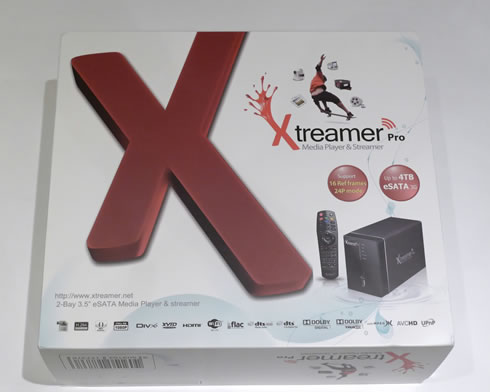
What you see below is the player's retail box. At a first glance it looks cool and includes all the necessary information about the device's capabilities, including certification logos for various supported audio and video formats:
The contents of the box are secured using protective foam packaging:

Here is what there is inside the package:

- 1x Xtreamer Pro
- 1x Remote Control
- 2x AAA Battery
- 1x 1.5m HDMI cable
- 1x e-SATA cable
- 1x USB Slave cable
- 1x Composite A/V Cable
- 1x Back panel e-SATA adapter for PC
- 1x USB extended cable for Wireless USB module
- 1x AC Adaptor
- 1x Power Cord
- 1x Quick Installation Guide

It is obvious that the provided cables should cover most of our connectivity needs. We liked the fact that there is a USB cable extension for the Wifi module, useful as you will be setting up your WiFi Lan and seek for the best reception signal.

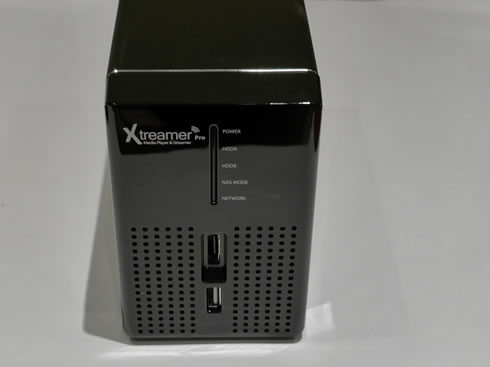
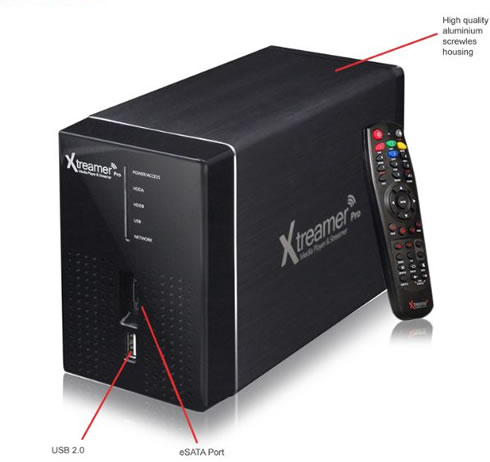
The player is compact in size at 175 x 120 x 82mm and its weight is around 1.0kg. Its housing is made out of aluminum, except from the front plastic panel. As you can see in the picture below, the front panel is simple and includes five LEDs indicating the product's operation mode (network, NES, POWER etc.), a USB and an e-SATA port:
 

The rear panel includes the connectivity ports (USB 2.0, LAN, Digital audio Optical stereo - Dolby 5.1 DTS, Analog audio & video RCA ports, HDMI 1.3a with 7.1 CH pass through)

We would like to have an 1GBit lan port, instead of the included 10/100. Also an additional USB port would be welcomed as well, in case you need to install an external device such as a USB optical disc drive.

We also show you the bottom side of the device since there is the switch that can be accessed in order to remove the front panel of the device and install your HDDs:

Bundled with the player is a remote control, which is small in size for convenient handling and has a well-designed layout, with easy to press buttons positioned at the right place. Of course, it may take you some time to familiarize yourself with colored buttons (see below), which are used while you are navigating across the player's menu:


Review Pages

1. Features
2. Specifications
3. A closer look
4. Powering up the player, Firmware update
5. Installing a HDD
6. Settings
7. Playing Media files
8. Internet services
9. Jukebox
10. Wireless LAN Setup
11. Final words


Pages

  • « first
  • ‹ previous
  • 1
  • 2
  • 3
  • 4
  • 5
  • 6
  • 7
  • 8
  • 9
  • …
  • next ›
  • last »

Xtreamer

Tags: Xtreamer
Previous Post
Optiarc AD 7260S review
Next Post
Thermaltake Massive 23 LX Notebook cooler

Related Posts

Latest Reviews

be quiet! Dark Perk Mice
Gaming

be quiet! Dark Perk Mice

Acemagic W1
PC components

Acemagic W1

be quiet! Power Zone 2 1200W
PC components

be quiet! Power Zone 2 1200W

The Difference Between American and European Stakes and Why It Changes How People Bet
Enterprise & IT

The Difference Between American and European Stakes and Why It Changes How People Bet

Endorfy Thock V2 Wireless Keyboard
PC components

Endorfy Thock V2 Wireless Keyboard

Popular News

COLORFUL Introduces CVN B850I GAMING FROZEN Motherboard

COLORFUL Introduces CVN B850I GAMING FROZEN Motherboard

COLORFUL Presents CVN X870 ARK FROZEN Motherboard for AMD Ryzen 9000 CPUs

COLORFUL Presents CVN X870 ARK FROZEN Motherboard for AMD Ryzen 9000 CPUs

TEAMGROUP Launches EXPERT P34F Find My External SSD

TEAMGROUP Launches EXPERT P34F Find My External SSD

ASRock AM5 Motherboards Now Fully Support AMD Ryzen 9 9950X3D & 9900X3D Processors

ASRock AM5 Motherboards Now Fully Support AMD Ryzen 9 9950X3D & 9900X3D Processors

Samsung announces Galaxy Tab S11 and Galaxy S25 FE series

Samsung announces Galaxy Tab S11 and Galaxy S25 FE series

Viltrox Showcases Upcoming Lens Lineup and New TTL Flash at IBC 2025

Viltrox Showcases Upcoming Lens Lineup and New TTL Flash at IBC 2025

CORSAIR announces Vanguard Pro 96 and Vanguard 96 Gaming Keyboards

CORSAIR announces Vanguard Pro 96 and Vanguard 96 Gaming Keyboards

Panasonic Introduces the First Ultra-Telephoto Zoom Lens in the LUMIX S Series

Panasonic Introduces the First Ultra-Telephoto Zoom Lens in the LUMIX S Series

Main menu

  • Home
  • News
  • Reviews
  • Essays
  • Forum
  • Legacy
  • About
    • Submit News

    • Contact Us
    • Privacy

    • Promotion
    • Advertise

    • RSS Feed
    • Site Map
  • About
  • Privacy
  • Contact Us
  • Promotional Opportunities @ CdrInfo.com
  • Advertise on out site
  • Submit your News to our site
  • RSS Feed