Breaking News

SAMA Introduces the S32 WOOD, a Compact M-ATX Case Bundled with an 80 PLUS Gold PSU Thypoch Completes Simera-C Cine Prime Lineup with New 100mm T1.9 Lens CORSAIR Launches the RM1200e Power Supply with Built-in PinProtect GPU Overcurrent Protection and Platinum-certified Efficiency CORSAIR Changes the Game with PureVector, a Science-Based Personalized Aiming Technology, Launching Exclusively in the SABRE v3 PRO PureVector Mouse Series AMD FSR Upscaling 4.1 Boosts Frames and Image Quality on More Devices

logo

  • Share Us
    • Facebook
    • Twitter
  • Home
  • Home
  • News
  • Reviews
  • Essays
  • About
    • Submit News

    • Contact Us
    • Privacy

    • Promotion
    • Advertise

    • RSS Feed

Search form

Shuttle SH55J2 review

Sep 6,2010 0

3. Internal


Review Pages

1. Features, specs
2. Opening the package
3. Internal
4. Installing the components
5. BIOS setings
6. Overclocking
7. Final words


Opening the case is very easy since just three thumbscrews are keeping the external aluminum case in position. Of course, a philips screwdriver is essential in order to install the rest of the components. The SH55J2 is offering enough free space inside, since the device is a little bit larger in size compared other Shuttle boxes we have tested in past.

There are two more screws left to access the internal by removing the drive bay:
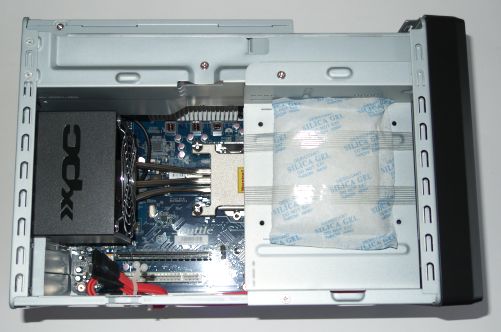
Moving south, we can see that the SATA cables are pre-installed. There are also two SATA 2 3GB/sec ports available in case you need them:

The installed power supply is rated at 300 Watt rated and carries the 80Plus bronze certification (efficiency). Two +12V rails with 16A are available. These are enough to power up three optical devices and a mid-range graphics card:

Below you can see the internal of the device with the drive bay removed:

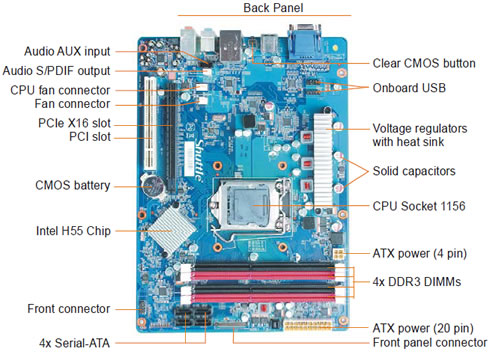
The motherboard has four memory banks where you can install 4 GB per DIMM, resulting to a total size of 16 GB of memory - more than enough for most users. The system supports DDR 800-1066 and 1333 memory speeds with an optional DDR3-1600 under overclocking mode, according to the specifications:

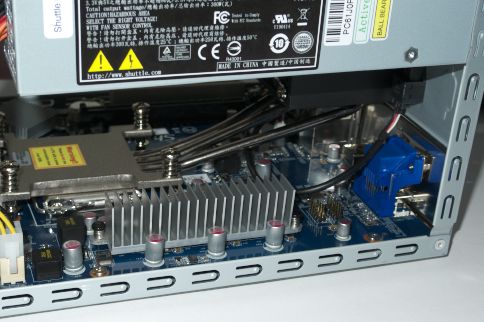
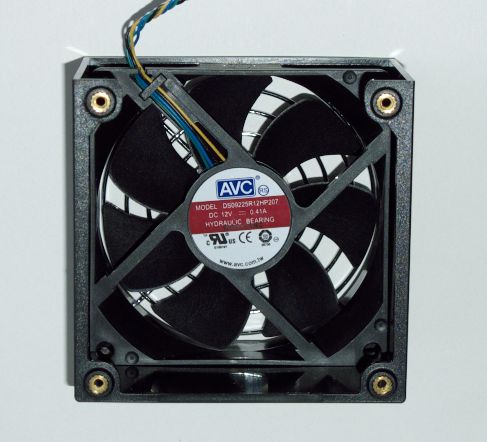
Four screws are keeping the installed thermal system in place. The thermal system is what we have seen in the past from Shuttle. A a copper base and three aluminum heatpipes transfer the produced heat to the rear side of the device, where a 92mm fan is responsible for cooling things down. The specific thermal system should be efficient enough for most users. Due to the design of the case, there are not many other aftermarket CPU coolers we could think of using after all.

Shuttle has included anti-vibration silicon at the fins to reduce the overall noise, and we must admit that it works pretty well.
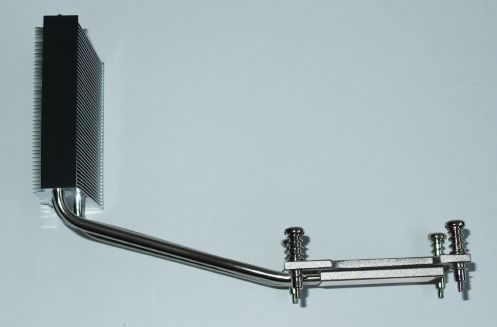
Below you see a clear view of the rear side of the motherboard, with the cpu cooler removed:


Review Pages

1. Features, specs
2. Opening the package
3. Internal
4. Installing the components
5. BIOS setings
6. Overclocking
7. Final words


Pages

  • « first
  • ‹ previous
  • 1
  • 2
  • 3
  • 4
  • 5
  • 6
  • 7
  • next ›
  • last »

Shuttle

Tags: Shuttle
Previous Post
Samsung SH-B123L review
Next Post
LiteOn iHBS112 review

Related Posts

  • Shuttle Launches the XZ890G2

  • Shuttle Introduces SPCNV03 Ultra-Compact Edge AI Computer

  • Shuttle announces DN11H at InfoComm 2025

  • Shuttle announces NA10H - NT10H

  • Flat Mini-PC Barebones for the latest LGA1700 processors from Shuttle

  • Shuttle announces Xeon-compatible Mini-PC Barebone with 4x LAN and ECC RAM support

  • Shuttle announces Mini-PC Barebone in a 4.7-litre format for two PCI Express cards

  • Shuttle Announces DH32 Mini-PC

Latest Reviews

be quiet! Light Wings Pro IO fan
Cooling Systems

be quiet! Light Wings Pro IO fan

Why Intelligent Firmware Matters More Than Peak Throughput in NAS Systems
Enterprise & IT

Why Intelligent Firmware Matters More Than Peak Throughput in NAS Systems

Fanxiang MP83 M.2 NVMe SSD Enclosure
Enterprise & IT

Fanxiang MP83 M.2 NVMe SSD Enclosure

Ugreen CM642 USB4.0 Enclosure
PC components

Ugreen CM642 USB4.0 Enclosure

be quiet! Dark Power 14 IO
PC components

be quiet! Dark Power 14 IO

Popular News

MSI’s Latest AMD X870E MAX & EVO Series Motherboards

MSI’s Latest AMD X870E MAX & EVO Series Motherboards

COLORFUL Launches iGame B850M ULTRA Series Micro-ATX Motherboards

COLORFUL Launches iGame B850M ULTRA Series Micro-ATX Motherboards

COLORFUL Presents Limited Edition Chitu MAG-60 Magnetic Keyboard Inspired by the Year of the Horse

COLORFUL Presents Limited Edition Chitu MAG-60 Magnetic Keyboard Inspired by the Year of the Horse

COLORFUL Launches iGame B850I MINI OC V14 Motherboard

COLORFUL Launches iGame B850I MINI OC V14 Motherboard

COLORFUL Launches the iGame X870E VULCAN W OC Motherboard

COLORFUL Launches the iGame X870E VULCAN W OC Motherboard

COLORFUL Presents iGame Z890 ULTRA-S W and iGame Z890M ULTRA Z Motherboards

COLORFUL Presents iGame Z890 ULTRA-S W and iGame Z890M ULTRA Z Motherboards

COLORFUL Expands B850 Motherboard Lineup with New CVN, Battle-Ax, and MEOW Models

COLORFUL Expands B850 Motherboard Lineup with New CVN, Battle-Ax, and MEOW Models

ASRock Adds Support for One Sub-Channel DRAM Module on Intel DDR5 Motherboards

ASRock Adds Support for One Sub-Channel DRAM Module on Intel DDR5 Motherboards

Main menu

  • Home
  • News
  • Reviews
  • Essays
  • About
    • Submit News

    • Contact Us
    • Privacy

    • Promotion
    • Advertise

    • RSS Feed
  • About
  • Privacy
  • Contact Us
  • Promotional Opportunities @ CdrInfo.com
  • Advertise on out site
  • Submit your News to our site
  • RSS Feed