Breaking News

Noctua at Computex 2026 GIGABYTE announces AORUS GeForce RTX 50 Series AI BOX Sony Expands Professional Display Lineup with Crystal LED UNIFY PlayStation Plus Game Catalog for June 2026 Introducing the Razer Seiren V3 Pro

logo

  • Share Us
    • Facebook
    • Twitter
  • Home
  • Home
  • News
  • Reviews
  • Essays
  • Forum
  • Legacy
  • About
    • Submit News

    • Contact Us
    • Privacy

    • Promotion
    • Advertise

    • RSS Feed
    • Site Map

Search form

ABIT AN-8 Fatal1ty

Jun 14,2005 0

4. Bios


Review Pages

1. Introduction
2. The Package
3. Detailed Look
4. Bios
5. Software Bundled
6. The Tests - Page 1
7. The Tests - Page 2
8. Overclocking
9. Memory Overclocking
10. Conclusion


BIOS

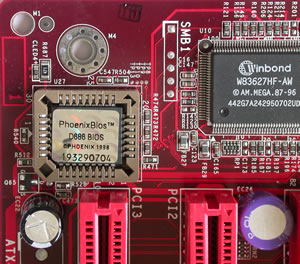
Abit BIOS was always one of my favourites. It was always complete and user friendly, and I was pleased to see that this hadn’t changed. The only negative thing is the VDIMM menu that doesn’t allow more than 2.8v. And even though this over voltage is more than enough for the majority of users, the more demanding and overclockers will certainly ask for more.

The available tweakings inside the OC Guru menu are:

  • VCore:  1.4v-1.75v
  • VDIMM:  2.5v-2.8v
  • DDR VTT:  1.25v-1.4v
  • DDR Ref Voltage:  -60 to 0 to +60
  • CPU Ref Voltage:  -60 to 0 to +60
  • Chipset Voltage:  1.5v-1.8v
  • HyperTransport Voltage:  1.2v-1.35v
  • LDT Multipliers:  1x-5x, AUTO
  • Memory Dividers:  DDR400, DDR333, DDR266, DDR200
  • PCI-E Frequency:  100MHZ-145MHZ
  • HyperTransport Frequency (HTT):  200MHZ-410MHZ
  • CPU Multiplier:  4x-highest your CPU allows
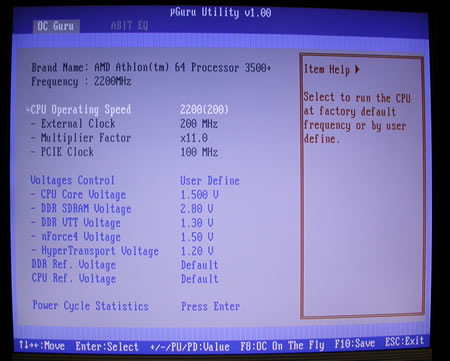
 

When we set the CPU operating speed to User Defined, various frequency related settings became accessible. The CPU maximum FSB can be only 410 MHz, but note that this setting also affects the memory and Hyper Transport bus speeds as well. The minimum option for the CPU multiplier is 4x, and the PCI Express bus speed is asynchronously set through the PCI E clock option. This option allows a maximum bus speed of 145MHz.
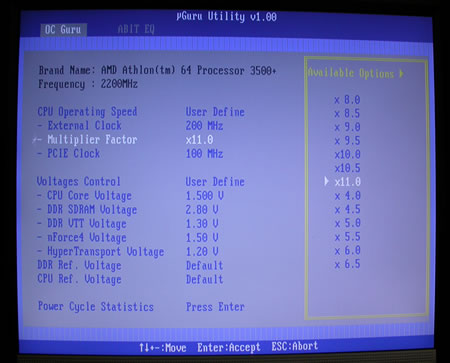
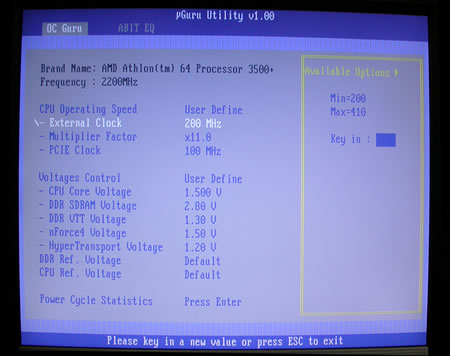
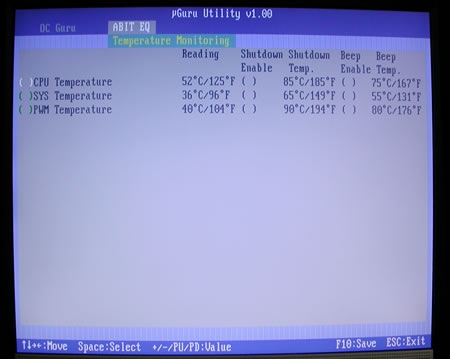
The nGuru utility menu is split in two individual sections, OC Guru and Abit EQ. OC Guru allows the manipulation of all board bus speeds and all board voltages, while the Abit EQ monitors all the voltages and the temperatures on the board.
The advanced Chipset Features menu contains various chipset related settings, such as the Hyper Transport and the memory settings.
From the HT Frequency Settings, we can actually control the speed of the Hyper Transport, with a maximum multiplier of 5x. We also have the option to disable the SSE and SSE2 CPU registers, from the SSE / SSE2 menu option.

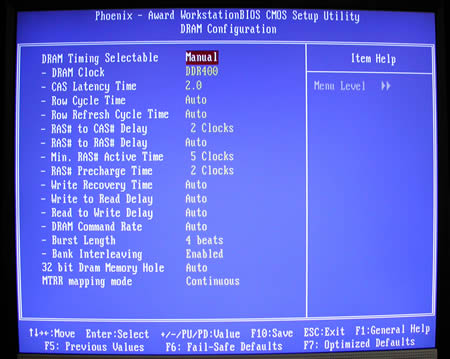
At the advanced Chipset Features, we find the memory controller settings that offer a wide variety of settings, where you can manually configure the RAS to CAS delay, row to row delay which is shown as RAS to RAS Delay, active to precharge delay shown as Min RAS Active Time, RAS precharge delay; write recovery time, write to read delay, read to write delay, command rate, burst length, and memory register access and cacheability shown as MTRR Mapping Mode. Also available is the ability to adjust a lot of secondary parameters for the memory subsystem.
 

Review Pages

1. Introduction
2. The Package
3. Detailed Look
4. Bios
5. Software Bundled
6. The Tests - Page 1
7. The Tests - Page 2
8. Overclocking
9. Memory Overclocking
10. Conclusion


Pages

  • « first
  • ‹ previous
  • 1
  • 2
  • 3
  • 4
  • 5
  • 6
  • 7
  • 8
  • 9
  • next ›
  • last »

Abit

Tags: Abit
Previous Post
OCZ PC2-5400 DDR2 667Mhz
Next Post
Arctic Cooling - Freezer 64

Related Posts

  • abit Announces I-G31, IP35P Motherboards

  • abit Introduces First AMD Phenom Ready Motherboard, the AX78

  • Intel Core 2 Extreme Overclocked at 5 GHz

  • Fatal1ty FP-IN9 SLI Motherboard Launched

  • abit Launches IN9 32X-MAX

  • ABIT - The Reclaim Computex 2006

  • ABIT's New NForce 570 SLI Motherboard for Socket AM2

  • ABIT AN8 32X

Latest Reviews

Swit NP-FZ100 Battery
Cameras

Swit NP-FZ100 Battery

The Technology Stack Behind Modern Digital Gaming Platforms
Consumer Electronics

The Technology Stack Behind Modern Digital Gaming Platforms

be quiet! Dark Rock Pro 6
Cooling Systems

be quiet! Dark Rock Pro 6

How Online Casinos Use Encryption, Verification, and Risk Controls to Build User Trust
Enterprise & IT

How Online Casinos Use Encryption, Verification, and Risk Controls to Build User Trust

Why Low-Latency Infrastructure Matters More Than Raw Specs
Enterprise & IT

Why Low-Latency Infrastructure Matters More Than Raw Specs

Popular News

CORSAIR announces Vanguard Pro 96 and Vanguard 96 Gaming Keyboards

CORSAIR announces Vanguard Pro 96 and Vanguard 96 Gaming Keyboards

TEAMGROUP Launches EXPERT P34F Find My External SSD

TEAMGROUP Launches EXPERT P34F Find My External SSD

MSI Launches FORGE GK600 TKL WIRELESS Special Edition Compact Mechanical Keyboard

MSI Launches FORGE GK600 TKL WIRELESS Special Edition Compact Mechanical Keyboard

Samsung announces Galaxy Tab S11 and Galaxy S25 FE series

Samsung announces Galaxy Tab S11 and Galaxy S25 FE series

Viltrox Showcases Upcoming Lens Lineup and New TTL Flash at IBC 2025

Viltrox Showcases Upcoming Lens Lineup and New TTL Flash at IBC 2025

Panasonic Introduces the First Ultra-Telephoto Zoom Lens in the LUMIX S Series

Panasonic Introduces the First Ultra-Telephoto Zoom Lens in the LUMIX S Series

MSI Launches DATAMAG 40Gbps Magnetic Portable SSD

MSI Launches DATAMAG 40Gbps Magnetic Portable SSD

Viltrox Joins the L-Mount Alliance, Expanding Creative Possibilities

Viltrox Joins the L-Mount Alliance, Expanding Creative Possibilities

Main menu

  • Home
  • News
  • Reviews
  • Essays
  • Forum
  • Legacy
  • About
    • Submit News

    • Contact Us
    • Privacy

    • Promotion
    • Advertise

    • RSS Feed
    • Site Map
  • About
  • Privacy
  • Contact Us
  • Promotional Opportunities @ CdrInfo.com
  • Advertise on out site
  • Submit your News to our site
  • RSS Feed