Breaking News

Arctic announces Senza AI 370 Under Desk PC for AI Applications CORSAIR Announces the Airflow-focused 3200D Mid Tower for Ambitious DIY PC Builds Silicon Power Launches Enterprise-Grade DDR5 RDIMM to Accelerate AI Workloads World Backup Day 2026: A Backup Doesn’t Always Need to be in the Cloud Sharkoon announces S100 ARGB AIO Cooler

logo

  • Share Us
    • Facebook
    • Twitter
  • Home
  • Home
  • News
  • Reviews
  • Essays
  • Forum
  • Legacy
  • About
    • Submit News

    • Contact Us
    • Privacy

    • Promotion
    • Advertise

    • RSS Feed
    • Site Map

Search form

ASUS A8N-SLI Deluxe

Feb 4,2005 0

17. BIOS & Overclocking


Review Pages

1. Introduction
2. The mainboard - Packaging
3. ASUS Extreme N6600GT - SLI enabled
4. A look in the past
5. Installation
6. Test System
7. 3DMark05
8. 3DMark 2003
9. Codecreatures
10. Half life 2
11. Doom 3
12. Far Cry
13. Thief 3
14. Colin McRae 05
15. Ground Control II
16. Other Motherboard Benchmarks
17. BIOS & Overclocking
18. Bundled Software & Overclocking
19. GPU Overclocking
20. Conclusion


ASUS A8N-SLI Deluxe - Page 17

BIOS & Overclocking

ASUS introduces in their A8N-SLI model the Crash-free (v.2) BIOS to ensure that no harm will be done to your system, and to eliminate bad flashing. There are several useful features, like Post Reporter and Instant Music that were mentioned earlier on in this review.
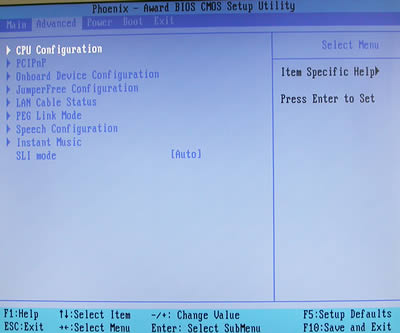
The BIOS CMOS setup utility offers a wide range of options, from standard device setup to CPU overclocking management.
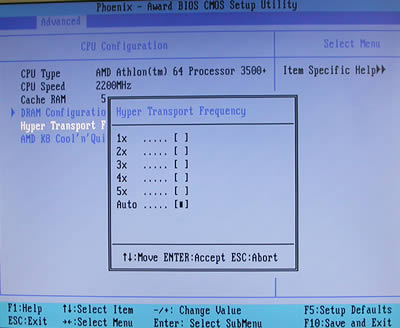
In the CPU Configuration tab, you can easily set the Hyper Transport frequency, the AMD Cool'n'Quiet feature (auto or disabled) and configure DRAM.

You can always enable or disable the Q-Fan controller from the Hardware Monitor tab. When set to "enabled", you can set a CPU target temperature for Q-Fan to use.
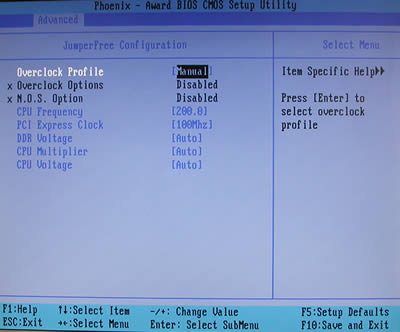
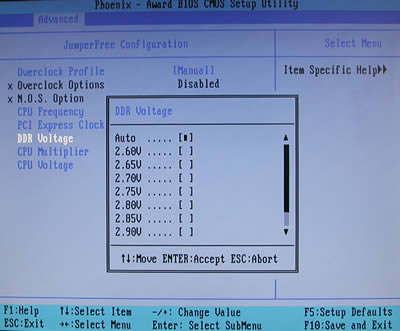
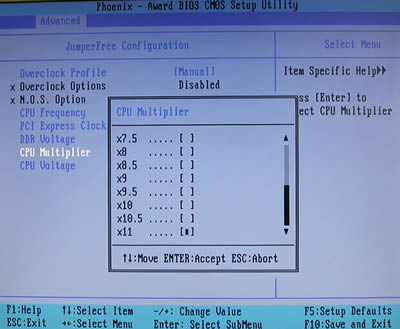
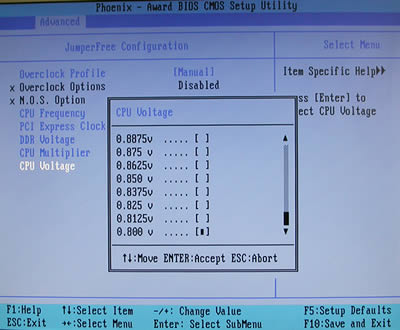
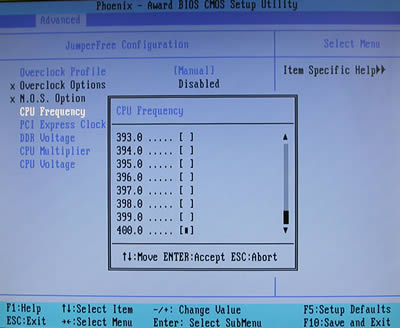
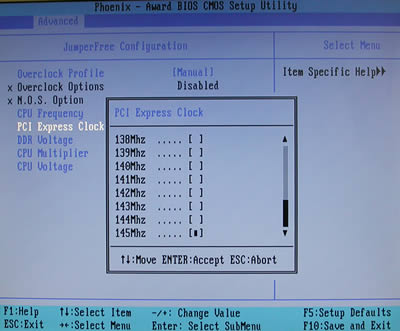
Under the "JumperFree Configuration" tab, you will find all you need to overclock your system and boost hardware performance. The overclock profile is set to "auto" by default. By using manual configuration, you can easily change CPU frequency (maximum value is 400), PCI bus clock (maximum value is 145MHz), DDR voltage (maximum value is 2.60V), and CPU Voltage and multiplier. The CPU voltage can be configured from 0.800V up to 1.650V.
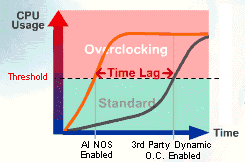
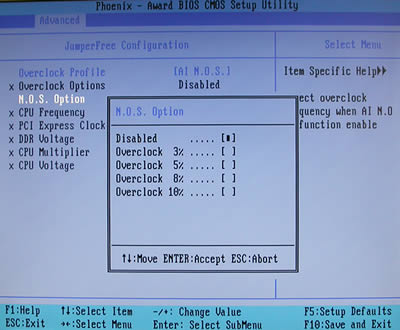
ASUS Non-delay Overclocking System (AI NOS) will monitor CPU demands and overclock the system automatically, only when it is needed. You can set a maximum overclock option to 10% more performance, but be careful, because even if your system seems to function flawlessly, even at 10%, you might get system crashes under heavy load. This might occur because the AI NOS feature does not boost your system under light loads but only when needed. We tried to overclock our AMD64 3500+ up to 10%, and for 7 hours of heavy load, we had no system crashes. Great overclocking potential from ASUS.
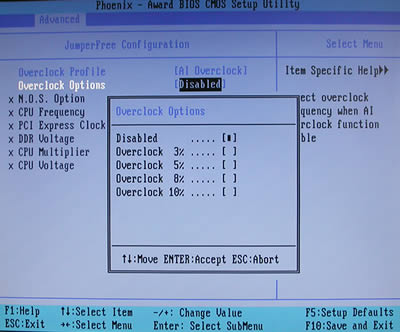
Alternatively, you can use standard overclocking options, again with up to 10% boost performance. We also tried the 10% overclocking option, and for 7 hours of heavy load we had no system crashes. It is noted that we used the standard fan that came in AMD's box, and two 12cm case fans.
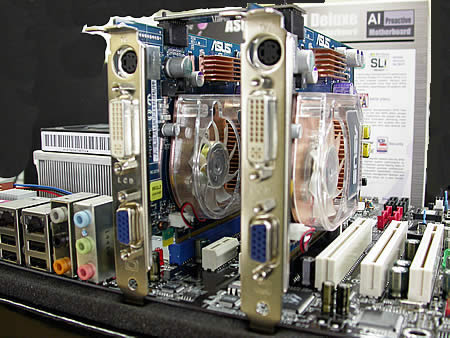
ASUS did a great job in organizing all devices connected to the motherboard. There is plenty of room for graphics cards and the CPU fan to "breath".
 

Review Pages

1. Introduction
2. The mainboard - Packaging
3. ASUS Extreme N6600GT - SLI enabled
4. A look in the past
5. Installation
6. Test System
7. 3DMark05
8. 3DMark 2003
9. Codecreatures
10. Half life 2
11. Doom 3
12. Far Cry
13. Thief 3
14. Colin McRae 05
15. Ground Control II
16. Other Motherboard Benchmarks
17. BIOS & Overclocking
18. Bundled Software & Overclocking
19. GPU Overclocking
20. Conclusion


Pages

  • « first
  • ‹ previous
  • …
  • 12
  • 13
  • 14
  • 15
  • 16
  • 17
  • 18
  • 19
  • 20
  • next ›
  • last »

ASUS

Tags: ASUS
Previous Post
LiteOn SOHW-1653S
Next Post
Asus P5AD2-E Premium

Related Posts

  • ASUS Announces 2026 TUF Gaming Laptop Lineup

  • ASUS Announces New-Gen NUC 16 Pro Mini PC

  • ASUS Unveils ExpertBook B3 G2

  • Announcing ASUS ExpertBook B5 G2

  • ASUS Unveils Mac-Friendly Features on ProArt Displays to Enhance Workflows

  • Asus at CES 2026

  • ASUS Announces ProArt PF120 Case Fan

  • ASUS Announces Prime AP303 Compact Mid-Tower ATX Case

Latest Reviews

Why Streaming Live Casino Games Demands Smarter Tech
Enterprise & IT

Why Streaming Live Casino Games Demands Smarter Tech

Kioxia Exceria Plus G3 512GB microSD
Cameras

Kioxia Exceria Plus G3 512GB microSD

SoundPeats Cove Pro
Consumer Electronics

SoundPeats Cove Pro

Asustor AS5404T 4-Bay NAS System
Enterprise & IT

Asustor AS5404T 4-Bay NAS System

be quiet! Pure Power 13M 1200W
PC components

be quiet! Pure Power 13M 1200W

Popular News

COLORFUL Presents CVN X870 ARK FROZEN Motherboard for AMD Ryzen 9000 CPUs

COLORFUL Presents CVN X870 ARK FROZEN Motherboard for AMD Ryzen 9000 CPUs

TEAMGROUP Launches EXPERT P34F Find My External SSD

TEAMGROUP Launches EXPERT P34F Find My External SSD

Samsung announces Galaxy Tab S11 and Galaxy S25 FE series

Samsung announces Galaxy Tab S11 and Galaxy S25 FE series

Viltrox Showcases Upcoming Lens Lineup and New TTL Flash at IBC 2025

Viltrox Showcases Upcoming Lens Lineup and New TTL Flash at IBC 2025

CORSAIR announces Vanguard Pro 96 and Vanguard 96 Gaming Keyboards

CORSAIR announces Vanguard Pro 96 and Vanguard 96 Gaming Keyboards

Panasonic Introduces the First Ultra-Telephoto Zoom Lens in the LUMIX S Series

Panasonic Introduces the First Ultra-Telephoto Zoom Lens in the LUMIX S Series

MSI Launches DATAMAG 40Gbps Magnetic Portable SSD

MSI Launches DATAMAG 40Gbps Magnetic Portable SSD

MSI Launches FORGE GK600 TKL WIRELESS Special Edition Compact Mechanical Keyboard

MSI Launches FORGE GK600 TKL WIRELESS Special Edition Compact Mechanical Keyboard

Main menu

  • Home
  • News
  • Reviews
  • Essays
  • Forum
  • Legacy
  • About
    • Submit News

    • Contact Us
    • Privacy

    • Promotion
    • Advertise

    • RSS Feed
    • Site Map
  • About
  • Privacy
  • Contact Us
  • Promotional Opportunities @ CdrInfo.com
  • Advertise on out site
  • Submit your News to our site
  • RSS Feed