Breaking News

be quiet! enters high-end gaming mouse market with Dark Perk Ergo and Dark Perk Sym ASUS ROG announces ROG Strix GS-BE7200 Dual-Band WiFi 7 Gaming Router Transcend Launches RDE3 microSD Express Card Reader for Next-Generation High-Speed Performance Akasa Unleashes Six New Low-Profile CPU Coolers Up to 165W TDP Cooling in Compact Form Factors SWIT announces Powercell Battery Series for Sony, Canon, Nikon, and Fujifilm Cameras

logo

  • Share Us
    • Facebook
    • Twitter
  • Home
  • Home
  • News
  • Reviews
  • Essays
  • Forum
  • Legacy
  • About
    • Submit News

    • Contact Us
    • Privacy

    • Promotion
    • Advertise

    • RSS Feed
    • Site Map

Search form

Roxio Easy Media Creator 8

Dec 14,2005 0

5. Music Features - Page 2


Review Pages

1. Introduction
2. Features
3. Interface and Manual
4. Music Features - Page 1
5. Music Features - Page 2
6. Photo Features - Page 1
7. Photo Features - Page 2
8. Video Features - Page 1
9. Video Features - Page 2
10. Backup/Copy Features
11. DVD/CD Features - Page 1
12. DVD/CD Features - Page 2
13. Conclusion


The second part of Music Features is dedicated to sound editing.

- Sound Editing -

Sound Editor: Sound Editor lets you record, preview, and modify any supported and non-copy-protected digital audio file format (including MP3, WAV, and WMA). You can use Sound Editor to import (record) audio from analog sources, including LP records and tapes, then apply audio effects to improve and enhance your recorded audio. Finally, you can save your audio tracks for use in other Roxio projects or burn them directly to CD.

Click to enlarge
For editing sound clips, Media Creator 8 has the Sound Editor

When working on a Sound Editor project, you can:

  • Add audio files stored on fixed or removable drives, copy audio tracks from CDs or DVDs, or record audio from analog sources such as LP records and tapes.
  • Edit your clips and choose from a wide range of effects to apply to either the entire project or a part of the project (for example, adjust the volume or balance, remove “crackling” sounds from audio files, or add dramatic effects to your music).
  • Export your clips and tracks into standard audio formats; quickly burn your music to disc to enjoy on your home or car stereo, or on a portable music device; or export tracks to a Music Disc Creator project.

With the sound editor, you can add to your tracks, all the famous effects that we find in most sound editing programs. You can also use this application to convert your files to other formats.

Media Creator 8 even has a utility to capture audio:
Easy Audio Capture: Easy Audio Capture lets you quickly capture (record) audio from analog sources (such as LP records, tapes, or Internet radio), using a connection from your audio equipment to your computer’s sound input.
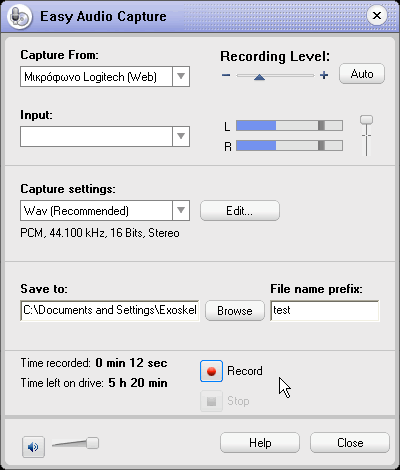

You can even capture audio with Media Creator 8

Nothing special about this utility, it has everything you need to capture good quality audio.


Review Pages

1. Introduction
2. Features
3. Interface and Manual
4. Music Features - Page 1
5. Music Features - Page 2
6. Photo Features - Page 1
7. Photo Features - Page 2
8. Video Features - Page 1
9. Video Features - Page 2
10. Backup/Copy Features
11. DVD/CD Features - Page 1
12. DVD/CD Features - Page 2
13. Conclusion

 

Pages

  • « first
  • ‹ previous
  • 1
  • 2
  • 3
  • 4
  • 5
  • 6
  • 7
  • 8
  • 9
  • …
  • next ›
  • last »

Roxio

Tags: Roxio
Previous Post
Card Cooler XT
Next Post
Labelflash Technology

Related Posts

  • Roxio Toast 18 Digital Toolkit Released for Mac

  • Roxio Toast 17 Adds MultiCam Editing

  • Roxio Creator NXT 6 Boosts Add New MultiCam Capture, 360 Video Support and More

  • Roxio Toast 16 For Macs Get New MultiCam Capture Features

  • Roxio Creator NXT 5 Supports Disc Burning With Multi-Camera Video Editing

  • Roxio Toast 15 Digital Media Toolkit Adds New Video Editing Tools and Privacy Protection

  • New Roxio Secure Burn Enterprise Protects Information on Portable Media

  • Roxio Secure Burn Enables Secure Data Recordings On Portable Media

Latest Reviews

The Difference Between American and European Stakes and Why It Changes How People Bet
Enterprise & IT

The Difference Between American and European Stakes and Why It Changes How People Bet

Endorfy Thock V2 Wireless Keyboard
PC components

Endorfy Thock V2 Wireless Keyboard

Noctua NH-D15 G2 Chromax.Black
Cooling Systems

Noctua NH-D15 G2 Chromax.Black

EnGenius ECW520 AP
Enterprise & IT

EnGenius ECW520 AP

Noctua NP-DM3 desk mat
Gaming

Noctua NP-DM3 desk mat

Popular News

COLORFUL Introduces CVN B850I GAMING FROZEN Motherboard

COLORFUL Introduces CVN B850I GAMING FROZEN Motherboard

COLORFUL Presents CVN X870 ARK FROZEN Motherboard for AMD Ryzen 9000 CPUs

COLORFUL Presents CVN X870 ARK FROZEN Motherboard for AMD Ryzen 9000 CPUs

TEAMGROUP Launches EXPERT P34F Find My External SSD

TEAMGROUP Launches EXPERT P34F Find My External SSD

ASRock AM5 Motherboards Now Fully Support AMD Ryzen 9 9950X3D & 9900X3D Processors

ASRock AM5 Motherboards Now Fully Support AMD Ryzen 9 9950X3D & 9900X3D Processors

Samsung announces Galaxy Tab S11 and Galaxy S25 FE series

Samsung announces Galaxy Tab S11 and Galaxy S25 FE series

Viltrox Showcases Upcoming Lens Lineup and New TTL Flash at IBC 2025

Viltrox Showcases Upcoming Lens Lineup and New TTL Flash at IBC 2025

CORSAIR announces Vanguard Pro 96 and Vanguard 96 Gaming Keyboards

CORSAIR announces Vanguard Pro 96 and Vanguard 96 Gaming Keyboards

Panasonic Introduces the First Ultra-Telephoto Zoom Lens in the LUMIX S Series

Panasonic Introduces the First Ultra-Telephoto Zoom Lens in the LUMIX S Series

Main menu

  • Home
  • News
  • Reviews
  • Essays
  • Forum
  • Legacy
  • About
    • Submit News

    • Contact Us
    • Privacy

    • Promotion
    • Advertise

    • RSS Feed
    • Site Map
  • About
  • Privacy
  • Contact Us
  • Promotional Opportunities @ CdrInfo.com
  • Advertise on out site
  • Submit your News to our site
  • RSS Feed