Breaking News

ASUS Hardware Showcase: AI Accelerators, Collector GPUs, and Esport Monitors Apple Unveils Major Hardware and Creative Suite Ecosystem Updates XPG Launches Third-Generation CORE REACTOR III for Next-Gen Power Safety TCL’s New Monitor Range Fits Every Kind of Gaming Setup Viltrox Launches AF 35mm F1.4 Pro FE/Z

logo

  • Share Us
    • Facebook
    • Twitter
  • Home
  • Home
  • News
  • Reviews
  • Essays
  • About
    • Submit News

    • Contact Us
    • Privacy

    • Promotion
    • Advertise

    • RSS Feed

Search form

Roxio Easy Media Creator 8

Dec 14,2005 0

13. Conclusion


Review Pages

1. Introduction
2. Features
3. Interface and Manual
4. Music Features - Page 1
5. Music Features - Page 2
6. Photo Features - Page 1
7. Photo Features - Page 2
8. Video Features - Page 1
9. Video Features - Page 2
10. Backup/Copy Features
11. DVD/CD Features - Page 1
12. DVD/CD Features - Page 2
13. Conclusion


Easy Media Creator 8 is the most complete solution that you can find when it comes to CD and DVD media compilations. We found using Easy Media Creator very enjoyable. It's most prominent features are:
  • It's fast: When you want to burn your media, all the procedures are done through Roxio's Creator 8 Suite Home. You don't have to wait for a new window to open up. You don't have to indicate if you are writing a data DVD or CD, Media Creator is smart enough to understand what type of media you have in your drive. You also don't have to go to another window to select the destination and click burn. It's all here in front of you, in a single window. Some of the other utilities like the Panorama Creator, Slideshow Creator and more, are easy to use and require only 3 clicks.
  • Helps me be more organized with my data: With Media Manager, all of your media files are stored in a single application that you can then use in all Media Creator's applications without having to copy files to or from other directories.
  • Has anything you need: With all the professional applications and the extra utilities, you have everything you need for watching DVD's or creating professional DVD movies. No need to search for another application.
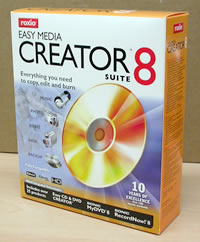
I don't think that there will be many users who will not be satisfied with Media Creator 8. Some small bugs with Roxio's Home screen, Cover Design and VideoWave should not worry user's a lot, since we believe they will be fixed by Roxio in a future release. We will update this review if Roxio releases any updates to this product that address any such problems or add new features. Stay tuned.


Review Pages
1. Introduction
2. Features
3. Interface and Manual
4. Music Features - Page 1
5. Music Features - Page 2
6. Photo Features - Page 1
7. Photo Features - Page 2
8. Video Features - Page 1
9. Video Features - Page 2
10. Backup/Copy Features
11. DVD/CD Features - Page 1
12. DVD/CD Features - Page 2
13. Conclusion


Pages

  • « first
  • ‹ previous
  • …
  • 5
  • 6
  • 7
  • 8
  • 9
  • 10
  • 11
  • 12
  • 13

Roxio

Tags: Roxio
Previous Post
Card Cooler XT
Next Post
Labelflash Technology

Related Posts

  • Roxio Toast 18 Digital Toolkit Released for Mac

  • Roxio Toast 17 Adds MultiCam Editing

  • Roxio Creator NXT 6 Boosts Add New MultiCam Capture, 360 Video Support and More

  • Roxio Toast 16 For Macs Get New MultiCam Capture Features

  • Roxio Creator NXT 5 Supports Disc Burning With Multi-Camera Video Editing

  • Roxio Toast 15 Digital Media Toolkit Adds New Video Editing Tools and Privacy Protection

  • New Roxio Secure Burn Enterprise Protects Information on Portable Media

  • Roxio Secure Burn Enables Secure Data Recordings On Portable Media

Latest Reviews

be quiet! Light Wings Pro IO fan
Cooling Systems

be quiet! Light Wings Pro IO fan

Why Intelligent Firmware Matters More Than Peak Throughput in NAS Systems
Enterprise & IT

Why Intelligent Firmware Matters More Than Peak Throughput in NAS Systems

Fanxiang MP83 M.2 NVMe SSD Enclosure
Enterprise & IT

Fanxiang MP83 M.2 NVMe SSD Enclosure

Ugreen CM642 USB4.0 Enclosure
PC components

Ugreen CM642 USB4.0 Enclosure

be quiet! Dark Power 14 IO
PC components

be quiet! Dark Power 14 IO

Popular News

MSI’s Latest AMD X870E MAX & EVO Series Motherboards

MSI’s Latest AMD X870E MAX & EVO Series Motherboards

COLORFUL Launches iGame B850M ULTRA Series Micro-ATX Motherboards

COLORFUL Launches iGame B850M ULTRA Series Micro-ATX Motherboards

COLORFUL Presents Limited Edition Chitu MAG-60 Magnetic Keyboard Inspired by the Year of the Horse

COLORFUL Presents Limited Edition Chitu MAG-60 Magnetic Keyboard Inspired by the Year of the Horse

COLORFUL Launches iGame B850I MINI OC V14 Motherboard

COLORFUL Launches iGame B850I MINI OC V14 Motherboard

COLORFUL Launches the iGame X870E VULCAN W OC Motherboard

COLORFUL Launches the iGame X870E VULCAN W OC Motherboard

COLORFUL Presents iGame Z890 ULTRA-S W and iGame Z890M ULTRA Z Motherboards

COLORFUL Presents iGame Z890 ULTRA-S W and iGame Z890M ULTRA Z Motherboards

COLORFUL Expands B850 Motherboard Lineup with New CVN, Battle-Ax, and MEOW Models

COLORFUL Expands B850 Motherboard Lineup with New CVN, Battle-Ax, and MEOW Models

ASRock Adds Support for One Sub-Channel DRAM Module on Intel DDR5 Motherboards

ASRock Adds Support for One Sub-Channel DRAM Module on Intel DDR5 Motherboards

Main menu

  • Home
  • News
  • Reviews
  • Essays
  • About
    • Submit News

    • Contact Us
    • Privacy

    • Promotion
    • Advertise

    • RSS Feed
  • About
  • Privacy
  • Contact Us
  • Promotional Opportunities @ CdrInfo.com
  • Advertise on out site
  • Submit your News to our site
  • RSS Feed