Breaking News

GAMEMAX Unveils NEX C53 Panoramic Chassis be quiet! announces new Power Zone 2 1200W and Pure Power 13 M 1200W Thypoch announces 21mm f/3.5 M Mount Lens ASUS showcases new AI technologies and celebrates 20 years of ROG gaming at CES Prograde Digital Announces Pro Card Caddy

logo

  • Share Us
    • Facebook
    • Twitter
  • Home
  • Home
  • News
  • Reviews
  • Essays
  • Forum
  • Legacy
  • About
    • Submit News

    • Contact Us
    • Privacy

    • Promotion
    • Advertise

    • RSS Feed
    • Site Map

Search form

Toshiba Exceria Pro 64GB SDXC UHS-II review

Oct 7,2015 0

2. Performance


Review Pages

1. Features
2. Performance
3. Summary


The Toshiba Exceria PRO 64GB USH -II SDXC retails in the box you see below. As you see below, on the outside of the package you can find everything that we need to know from the capacity and speed to the more detailed card information. The back of the box contains additional specifications.
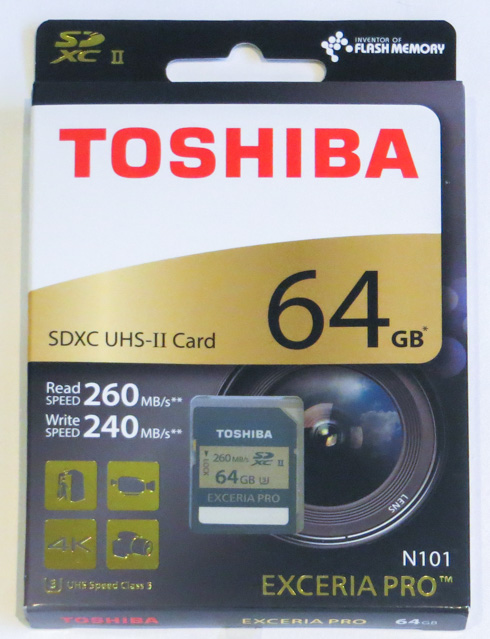
The card has the typical 32.0 mm (L) x 24.0 mm (W) x 2.1 mm (H) size for the category and its read and write speed ratings are visible on its body, along with its SDXC UHS-II interface and UHS speed class 3 speed class symbols.
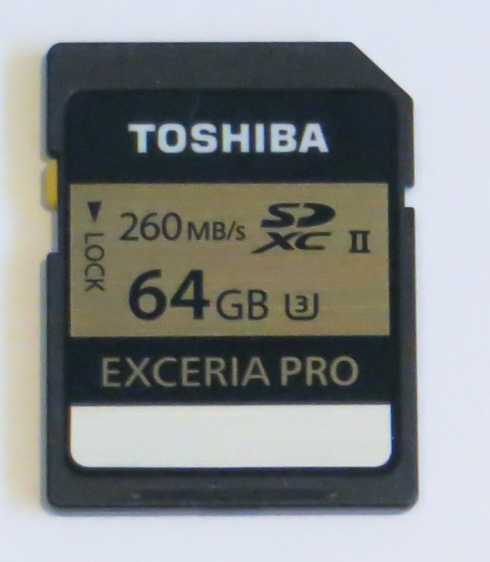
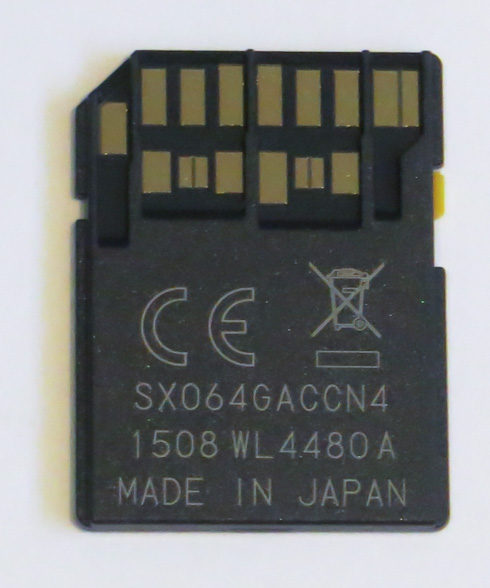
By utilizing the new UHS-II 4-channel serial bus with contacts for 17 pin configuration the card operates at UHS-II bus modes HD312 (3.12 Gbps) and FD156 (1.56 Gbps). In UHS-II devices, Toshiba claims the card can provide up to 260 MB/s read and 240 MB/s write. Still, the card is backward compatible with UHS-I and conventional SD devices. At UHS-I can operate up to 104 MB/s bus speed (SDR104). Toshiba says it provides 95 MB/s read and 90 MB/s write speed in UHS-I mode. Conventional SD operation is quoted as 25 MB/s bus speed for 23 MB/s read and write.
It's time to run some benchmarks with the new SD card. For our tests, we measured speeds of the Toshiba Exceria PRO 64GB SDXC UHS-II card using a Panasonic AJMPD1 USB 3.0 card reader. The reader was plugged into a USB3.0 port of a PC, with the following specs:

  • Motherboard: Gigabyte ga-z77x-d3H, BIOS Ver.F18
  • Memory: 2x4GB Crucial RAM 2133MHz
  • HDD: 500GB WD HDD
  • Graphics card: HIS IceQ X2 VGA card
  • VIA USB 3.0 controller

As it was expected, in order to get the full speeds out of the Exceria Pro UHS-II, you should use a UHS-II compatible reader. The card performed at 247.6 MB/s sequential read and 214.5 MB/s sequential write.

When used in a UHS-I card reader such as the Kingston fcr-h23, the card reverted to UHS-I speeds. It gave 87.3 MB/s read and 79.99 MB/s write.

CrystalDiskMark
Sequential Read
Sequential Write
Kingston UltimateX 32GB SDHC Class 10
33.58 MB/s
17.02 MB/s
Kingston UltimateXX 32GB SDHC
92.97 MB/s
48.59 MB/s
Sandisk Extreme 32GB SDHC UHS-I
47.83 MB/s
43.99 MB/s
Toshiba Exceria PRO 64GB SDXC UHS-II
247.6 MB/s
214.5 MB/s
Toshiba Exceria PRO 32GB SDHC UHS-II
236.5 MB/s
209.8 MB/s

Consequently, cameras that do not support UHS-II will force the Exceria Pro UHS-II card operate at UHS-I speed.
 

Review Pages

1. Features
2. Performance
3. Summary


Pages

  • « first
  • ‹ previous
  • 1
  • 2
  • 3
  • next ›
  • last »

Toshiba

Tags: Toshiba
Previous Post
Toshiba 16GB NFC SDHC UHS-I Card
Next Post
Toshiba FlashAir III 32GB SDHC review

Related Posts

  • Toshiba Storage Trends 2026

  • Toshiba launches S300 AI surveillance HDD for AI-driven video applications

  • Toshiba First in Industry to Verify 12-Disk Stacking Technology for Hard Drives

  • Toshiba Canvio Flex 2TB

  • Toshiba expands storage evaluation services in EMEA with new HDD Innovation Lab

  • Toshiba Unveils New Canvio Flex and Canvio Gaming 2.5” Portable Hard Drives

  • Toshiba Collaborates with PROMISE Technology on Providing the Optimal Data Storage Technology for CERN’s Large Hadron Collider

  • Toshiba Announces 24TB CMR and 28TB SMR Enterprise Hard Disk Drives

Latest Reviews

The Difference Between American and European Stakes and Why It Changes How People Bet
Enterprise & IT

The Difference Between American and European Stakes and Why It Changes How People Bet

Endorfy Thock V2 Wireless Keyboard
PC components

Endorfy Thock V2 Wireless Keyboard

Noctua NH-D15 G2 Chromax.Black
Cooling Systems

Noctua NH-D15 G2 Chromax.Black

EnGenius ECW520 AP
Enterprise & IT

EnGenius ECW520 AP

Noctua NP-DM3 desk mat
Gaming

Noctua NP-DM3 desk mat

Popular News

COLORFUL Introduces CVN B850I GAMING FROZEN Motherboard

COLORFUL Introduces CVN B850I GAMING FROZEN Motherboard

COLORFUL Presents CVN X870 ARK FROZEN Motherboard for AMD Ryzen 9000 CPUs

COLORFUL Presents CVN X870 ARK FROZEN Motherboard for AMD Ryzen 9000 CPUs

COLORFUL Presents the B860 Series Motherboards

COLORFUL Presents the B860 Series Motherboards

TEAMGROUP Launches EXPERT P34F Find My External SSD

TEAMGROUP Launches EXPERT P34F Find My External SSD

ASRock AM5 Motherboards Now Fully Support AMD Ryzen 9 9950X3D & 9900X3D Processors

ASRock AM5 Motherboards Now Fully Support AMD Ryzen 9 9950X3D & 9900X3D Processors

Samsung announces Galaxy Tab S11 and Galaxy S25 FE series

Samsung announces Galaxy Tab S11 and Galaxy S25 FE series

Viltrox Showcases Upcoming Lens Lineup and New TTL Flash at IBC 2025

Viltrox Showcases Upcoming Lens Lineup and New TTL Flash at IBC 2025

CORSAIR announces Vanguard Pro 96 and Vanguard 96 Gaming Keyboards

CORSAIR announces Vanguard Pro 96 and Vanguard 96 Gaming Keyboards

Main menu

  • Home
  • News
  • Reviews
  • Essays
  • Forum
  • Legacy
  • About
    • Submit News

    • Contact Us
    • Privacy

    • Promotion
    • Advertise

    • RSS Feed
    • Site Map
  • About
  • Privacy
  • Contact Us
  • Promotional Opportunities @ CdrInfo.com
  • Advertise on out site
  • Submit your News to our site
  • RSS Feed