Breaking News

Samsung Introduces Galaxy Tab S12 Series PlayStation Plus Monthly Games for October 2026 Logitech announces Zone Vibe Pro Headset Razer Expands Sanrio Collection With Pompompurin Eared Headset And Kuromi Earbuds TerraMaster Launches Storage Upgrade Season with Up to 30% Off During Prime Big Deal Days

logo

  • Share Us
    • Facebook
    • Twitter
  • Home
  • Home
  • News
  • Reviews
  • Essays
  • About
    • Submit News

    • Contact Us
    • Privacy

    • Promotion
    • Advertise

    • RSS Feed

Search form

Plextor PX-740A

Jul 1,2005 0

20. Booktype Setting


Review Pages

1. Introduction
2. Transfer Rate Reading Tests
3. CD Error Correction Tests
4. DVD Error Correction Tests
5. Protected Disc Tests - Reading Tests
6. DAE Tests
7. Protected AudioCDs
8. CD Recording Tests
9. C1 / C2 Error Measurements
10. Writing Quality Tests - Clover System Tests
11. DVD Recording Tests
12. CDSpeed/PlexTools Scans - Page 1
13. CDSpeed/PlexTools Scans - Page 2
14. CDSpeed/PlexTools Scans - Page 3
15. CDSpeed/PlexTools Scans - Page 4
16. CDSpeed/PlexTools Scans - Page 5
17. Writing Quality Tests - Almedio AEC-1000
18. DVDR DL - Page 1
19. DVDR DL - Page 2
20. Booktype Setting
21. Conclusion


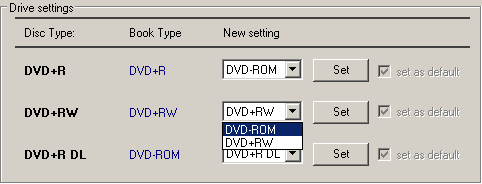
The Plextor 740A supports Booktype setting, through some of the well know utilities such as Nero CD-DVD Speed and DVDInfo Pro. We used a blank Datawrite (Prodisc W02) 4X DVD+RW disc and tried to modify its booktype, with the aid of DVDInfo Pro. Since the Plextor drive uses the same chipset as the BenQ 1640, we used the BenQ booktype management utility to see if that works.

  • CD-DVD Speed Bitsetting
1.We choose the DVD-ROM setting for +RW media at the drop down menu...

The only known traditional way to change the booktype prior to burning, in order to maximize compatibility with Plextor drives, is Nero CD-DVD Speed...
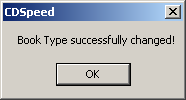
2.The confirmation message...


3.We successfully changed the DVD+RW booktype to DVD-ROM.
  • DVD Info Pro

Notice here the DVD Info Pro BitSetting utility title : "BenQ Drives Only". As mentioned before, Plextor uses the same Chipset as the BenQ 1640.

1.We insert the DVD+RW media in the drive...
2.We change its book type...

Here we used the Nero CD DVD Speed utility and through the Disc Info tab, we confirmed the book type change.

3. We check to see if the change has been made...
  • Book Type Management Ver. 8.3

Now lets see if the BenQ BookType management utility can be used likewise.

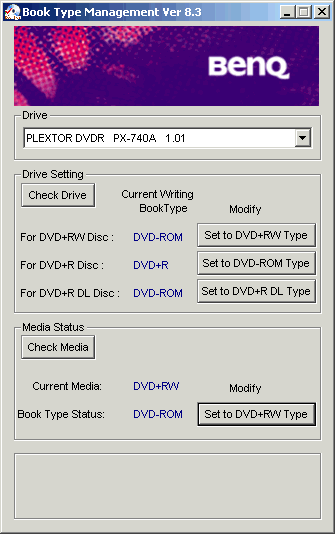
Same procedure here, as we insert the +RW media, modify its booktype to DVD-ROM.
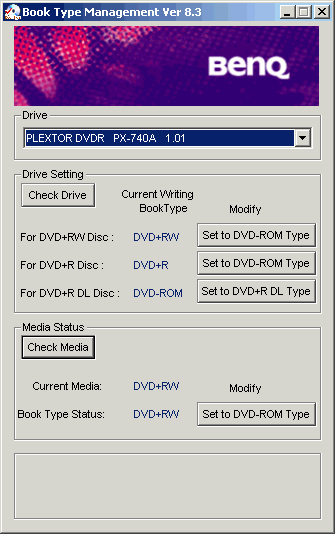
And as we check the media to see if the changes have been saved, we get the DVD-ROM Book Type status, as can be seen at the bottom of the screenshot.
 

Review Pages

1. Introduction
2. Transfer Rate Reading Tests
3. CD Error Correction Tests
4. DVD Error Correction Tests
5. Protected Disc Tests - Reading Tests
6. DAE Tests
7. Protected AudioCDs
8. CD Recording Tests
9. C1 / C2 Error Measurements
10. Writing Quality Tests - Clover System Tests
11. DVD Recording Tests
12. CDSpeed/PlexTools Scans - Page 1
13. CDSpeed/PlexTools Scans - Page 2
14. CDSpeed/PlexTools Scans - Page 3
15. CDSpeed/PlexTools Scans - Page 4
16. CDSpeed/PlexTools Scans - Page 5
17. Writing Quality Tests - Almedio AEC-1000
18. DVDR DL - Page 1
19. DVDR DL - Page 2
20. Booktype Setting
21. Conclusion

 

Pages

  • « first
  • ‹ previous
  • …
  • 13
  • 14
  • 15
  • 16
  • 17
  • 18
  • 19
  • 20
  • 21
  • next ›
  • last »

Plextor

Tags: Plextor
Previous Post
Introduction to 3D graphics
Next Post
OCZ DDR PC-3200 Dual Channel Gold

Related Posts

  • Plextor SSD RMA Services Transition to SSSTC Official Website

  • Plextor Unveils M10P Series PCIe Gen4 Solid State Drives

  • Plextor Launches the M9P Plus Series of SSDs

  • LITE-ON Technology Approves the Transfer of its Solid State Drives Business to Toshiba Memory

  • Shinano Kenshi Introduces New ASPINA Corporate Brand

  • PLEXTOR Debuts New Consumer SSDs at CES 2019

  • Plextor Unveils the M9Pe Extreme NVMe SSD at Computex Taipei 2018

  • Plextool NVMe Edition Released

Latest Reviews

Fanxiang MP83 M.2 NVMe SSD Enclosure
Enterprise & IT

Fanxiang MP83 M.2 NVMe SSD Enclosure

Ugreen CM642 USB4.0 Enclosure
PC components

Ugreen CM642 USB4.0 Enclosure

be quiet! Dark Power 14 IO
PC components

be quiet! Dark Power 14 IO

SanDisk High Endurance 512GB microSDXC
Cameras

SanDisk High Endurance 512GB microSDXC

Samsung PRO Ultimate 512GB microSDXC
Cameras

Samsung PRO Ultimate 512GB microSDXC

Popular News

MSI’s Latest AMD X870E MAX & EVO Series Motherboards

MSI’s Latest AMD X870E MAX & EVO Series Motherboards

COLORFUL Launches iGame B850M ULTRA Series Micro-ATX Motherboards

COLORFUL Launches iGame B850M ULTRA Series Micro-ATX Motherboards

COLORFUL Presents Limited Edition Chitu MAG-60 Magnetic Keyboard Inspired by the Year of the Horse

COLORFUL Presents Limited Edition Chitu MAG-60 Magnetic Keyboard Inspired by the Year of the Horse

COLORFUL Presents iGame Z890 ULTRA-S W and iGame Z890M ULTRA Z Motherboards

COLORFUL Presents iGame Z890 ULTRA-S W and iGame Z890M ULTRA Z Motherboards

COLORFUL Launches iGame B850I MINI OC V14 Motherboard

COLORFUL Launches iGame B850I MINI OC V14 Motherboard

COLORFUL Expands B850 Motherboard Lineup with New CVN, Battle-Ax, and MEOW Models

COLORFUL Expands B850 Motherboard Lineup with New CVN, Battle-Ax, and MEOW Models

ASRock Adds Support for One Sub-Channel DRAM Module on Intel DDR5 Motherboards

ASRock Adds Support for One Sub-Channel DRAM Module on Intel DDR5 Motherboards

Exceed the Infinite with New ASRock X870E Taichi White Motherboard

Exceed the Infinite with New ASRock X870E Taichi White Motherboard

Main menu

  • Home
  • News
  • Reviews
  • Essays
  • About
    • Submit News

    • Contact Us
    • Privacy

    • Promotion
    • Advertise

    • RSS Feed
  • About
  • Privacy
  • Contact Us
  • Promotional Opportunities @ CdrInfo.com
  • Advertise on out site
  • Submit your News to our site
  • RSS Feed