Breaking News

ASUS Hardware Showcase: AI Accelerators, Collector GPUs, and Esport Monitors Apple Unveils Major Hardware and Creative Suite Ecosystem Updates XPG Launches Third-Generation CORE REACTOR III for Next-Gen Power Safety TCL’s New Monitor Range Fits Every Kind of Gaming Setup Viltrox Launches AF 35mm F1.4 Pro FE/Z

logo

  • Share Us
    • Facebook
    • Twitter
  • Home
  • Home
  • News
  • Reviews
  • Essays
  • About
    • Submit News

    • Contact Us
    • Privacy

    • Promotion
    • Advertise

    • RSS Feed

Search form

KISS DP-558

May 18,2005 0

13. FTP Link


Review Pages

1. Introduction
2. Specifications
3. Installation - Page 1
4. Installation - Page 2
5. Installation - Page 3
6. The Menus - Page 1
7. The Menus - Page 2
8. Online Functions - Page 1
9. Online Functions - Page 2
10. Online Functions - Page 3
11. Online Functions - Page 4
12. Recording
13. FTP Link
14. PC Link
15. The Tests - Page 1
16. Playback Tests - Page 2
17. Playback Tests - Page 3
18. Playback Tests - Page 4
19. Playback Tests - Page 5
20. Conclusion


In order for a user to view their recorded files or edit them, they would have to use the network functions and specifically the FTP server, which allows the contents of the DP-558 to be shared around the local network. From the Setup screen, we can set the FTP server access: disabled, read only or allow both reading and writing to the DP-558.

By selecting either Read Only or Read/Write, you will be able to read the contents of the DP-558 HDD.

From your PC, you can then access the contents of the DP-558 by using an FTP client program or by simply using an internet browser and entering in the address bar the following url: ftp://KISS_DP_558_IP_ADDRESS.

Entering the PVR folder, you can view all the recorded videos. As you can see in the snapshot below, the recorded videos have been given a unique name based on the program number, name of the channel and recorded date/time. The file sizes are variable of course, depending on the bitrate and total recording time. Note that the .IDX files (typed as "Subtitle Files" by IE), are required in order to carry out any editing of the VOB files.

Unfortunately, while it is not available on the DP-558, we would like to have the option to be able to edit the VOB files directly on the DP-558 player, since this is a feature offered on other DVR recorders.

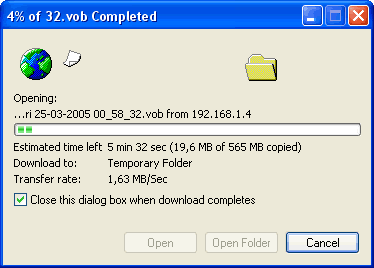
During the DP-558's FTP-Server Setup we chose reading/writing access, which means that we can read from as well as write to the device. What was a bit puzzling though was the transfer rate which was only 1.63MB/sec, meaning that big files would take a long time to transfer to our PC HDD. We don't know where the problem is since KISS states that the player is 10/100 compatible...
 

Review Pages

1. Introduction
2. Specifications
3. Installation - Page 1
4. Installation - Page 2
5. Installation - Page 3
6. The Menus - Page 1
7. The Menus - Page 2
8. Online Functions - Page 1
9. Online Functions - Page 2
10. Online Functions - Page 3
11. Online Functions - Page 4
12. Recording
13. FTP Link
14. PC Link
15. The Tests - Page 1
16. Playback Tests - Page 2
17. Playback Tests - Page 3
18. Playback Tests - Page 4
19. Playback Tests - Page 5
20. Conclusion


Pages

  • « first
  • ‹ previous
  • …
  • 9
  • 10
  • 11
  • 12
  • 13
  • 14
  • 15
  • 16
  • 17
  • …
  • next ›
  • last »

KiSS Technology

Tags: KiSS Technology
Previous Post
Asus DRW-1608P
Next Post
Ridisc Media Tests

Related Posts

  • Nero Digital Certified High-Definition Media Player Now Available from KiSS

  • KiSS to Release AVC/H.264 High Definition DVD Player

  • Cisco Acquires KiSS Technology For $61 Million

  • DVD programming and recording via the Internet and the cell phone

  • KiSS DVD Players now support Nero Digital files

  • KiSS Technology and CinemaNow demonstrate movie streaming to connected DVD-players at CES

  • KiSS Technology introduces networked TVs for the Digital Home

  • KiSS Technology introduces DP-600 DVD-player for High Definition Windows Media Video

Latest Reviews

be quiet! Light Wings Pro IO fan
Cooling Systems

be quiet! Light Wings Pro IO fan

Why Intelligent Firmware Matters More Than Peak Throughput in NAS Systems
Enterprise & IT

Why Intelligent Firmware Matters More Than Peak Throughput in NAS Systems

Fanxiang MP83 M.2 NVMe SSD Enclosure
Enterprise & IT

Fanxiang MP83 M.2 NVMe SSD Enclosure

Ugreen CM642 USB4.0 Enclosure
PC components

Ugreen CM642 USB4.0 Enclosure

be quiet! Dark Power 14 IO
PC components

be quiet! Dark Power 14 IO

Popular News

MSI’s Latest AMD X870E MAX & EVO Series Motherboards

MSI’s Latest AMD X870E MAX & EVO Series Motherboards

COLORFUL Launches iGame B850M ULTRA Series Micro-ATX Motherboards

COLORFUL Launches iGame B850M ULTRA Series Micro-ATX Motherboards

COLORFUL Presents Limited Edition Chitu MAG-60 Magnetic Keyboard Inspired by the Year of the Horse

COLORFUL Presents Limited Edition Chitu MAG-60 Magnetic Keyboard Inspired by the Year of the Horse

COLORFUL Launches iGame B850I MINI OC V14 Motherboard

COLORFUL Launches iGame B850I MINI OC V14 Motherboard

COLORFUL Launches the iGame X870E VULCAN W OC Motherboard

COLORFUL Launches the iGame X870E VULCAN W OC Motherboard

COLORFUL Presents iGame Z890 ULTRA-S W and iGame Z890M ULTRA Z Motherboards

COLORFUL Presents iGame Z890 ULTRA-S W and iGame Z890M ULTRA Z Motherboards

COLORFUL Expands B850 Motherboard Lineup with New CVN, Battle-Ax, and MEOW Models

COLORFUL Expands B850 Motherboard Lineup with New CVN, Battle-Ax, and MEOW Models

ASRock Adds Support for One Sub-Channel DRAM Module on Intel DDR5 Motherboards

ASRock Adds Support for One Sub-Channel DRAM Module on Intel DDR5 Motherboards

Main menu

  • Home
  • News
  • Reviews
  • Essays
  • About
    • Submit News

    • Contact Us
    • Privacy

    • Promotion
    • Advertise

    • RSS Feed
  • About
  • Privacy
  • Contact Us
  • Promotional Opportunities @ CdrInfo.com
  • Advertise on out site
  • Submit your News to our site
  • RSS Feed