Breaking News

G.SKILL Showcases DDR5-9200 1.1V 16GBx2 High-Speed CU-DIMM Memory Kit Sony Introduces BRAVIA 9 II and BRAVIA 7 II RGB TVs and the BRAVIA Theatre Trio Creative Announces Sound Blaster AE-X Acer Expands Gaming Portfolio With Predator Atlas 8 Handheld Powered by Intel COLORFUL Presents Limited Edition iGame GeForce RTX 5070 Ultra OC 12GB x 007 First Light Edition

logo

  • Share Us
    • Facebook
    • Twitter
  • Home
  • Home
  • News
  • Reviews
  • Essays
  • Forum
  • Legacy
  • About
    • Submit News

    • Contact Us
    • Privacy

    • Promotion
    • Advertise

    • RSS Feed
    • Site Map

Search form

KISS DP-558

May 18,2005 0

13. FTP Link


Review Pages

1. Introduction
2. Specifications
3. Installation - Page 1
4. Installation - Page 2
5. Installation - Page 3
6. The Menus - Page 1
7. The Menus - Page 2
8. Online Functions - Page 1
9. Online Functions - Page 2
10. Online Functions - Page 3
11. Online Functions - Page 4
12. Recording
13. FTP Link
14. PC Link
15. The Tests - Page 1
16. Playback Tests - Page 2
17. Playback Tests - Page 3
18. Playback Tests - Page 4
19. Playback Tests - Page 5
20. Conclusion


In order for a user to view their recorded files or edit them, they would have to use the network functions and specifically the FTP server, which allows the contents of the DP-558 to be shared around the local network. From the Setup screen, we can set the FTP server access: disabled, read only or allow both reading and writing to the DP-558.

By selecting either Read Only or Read/Write, you will be able to read the contents of the DP-558 HDD.

From your PC, you can then access the contents of the DP-558 by using an FTP client program or by simply using an internet browser and entering in the address bar the following url: ftp://KISS_DP_558_IP_ADDRESS.

Entering the PVR folder, you can view all the recorded videos. As you can see in the snapshot below, the recorded videos have been given a unique name based on the program number, name of the channel and recorded date/time. The file sizes are variable of course, depending on the bitrate and total recording time. Note that the .IDX files (typed as "Subtitle Files" by IE), are required in order to carry out any editing of the VOB files.

Unfortunately, while it is not available on the DP-558, we would like to have the option to be able to edit the VOB files directly on the DP-558 player, since this is a feature offered on other DVR recorders.

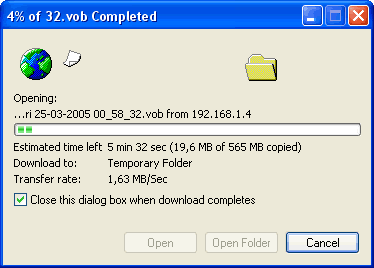
During the DP-558's FTP-Server Setup we chose reading/writing access, which means that we can read from as well as write to the device. What was a bit puzzling though was the transfer rate which was only 1.63MB/sec, meaning that big files would take a long time to transfer to our PC HDD. We don't know where the problem is since KISS states that the player is 10/100 compatible...
 

Review Pages

1. Introduction
2. Specifications
3. Installation - Page 1
4. Installation - Page 2
5. Installation - Page 3
6. The Menus - Page 1
7. The Menus - Page 2
8. Online Functions - Page 1
9. Online Functions - Page 2
10. Online Functions - Page 3
11. Online Functions - Page 4
12. Recording
13. FTP Link
14. PC Link
15. The Tests - Page 1
16. Playback Tests - Page 2
17. Playback Tests - Page 3
18. Playback Tests - Page 4
19. Playback Tests - Page 5
20. Conclusion


Pages

  • « first
  • ‹ previous
  • …
  • 9
  • 10
  • 11
  • 12
  • 13
  • 14
  • 15
  • 16
  • 17
  • …
  • next ›
  • last »

KiSS Technology

Tags: KiSS Technology
Previous Post
Asus DRW-1608P
Next Post
Ridisc Media Tests

Related Posts

  • Nero Digital Certified High-Definition Media Player Now Available from KiSS

  • KiSS to Release AVC/H.264 High Definition DVD Player

  • Cisco Acquires KiSS Technology For $61 Million

  • DVD programming and recording via the Internet and the cell phone

  • KiSS DVD Players now support Nero Digital files

  • KiSS Technology and CinemaNow demonstrate movie streaming to connected DVD-players at CES

  • KiSS Technology introduces networked TVs for the Digital Home

  • KiSS Technology introduces DP-600 DVD-player for High Definition Windows Media Video

Latest Reviews

Swit NP-FZ100 Battery
Cameras

Swit NP-FZ100 Battery

The Technology Stack Behind Modern Digital Gaming Platforms
Consumer Electronics

The Technology Stack Behind Modern Digital Gaming Platforms

be quiet! Dark Rock Pro 6
Cooling Systems

be quiet! Dark Rock Pro 6

How Online Casinos Use Encryption, Verification, and Risk Controls to Build User Trust
Enterprise & IT

How Online Casinos Use Encryption, Verification, and Risk Controls to Build User Trust

Why Low-Latency Infrastructure Matters More Than Raw Specs
Enterprise & IT

Why Low-Latency Infrastructure Matters More Than Raw Specs

Popular News

TEAMGROUP Launches EXPERT P34F Find My External SSD

TEAMGROUP Launches EXPERT P34F Find My External SSD

CORSAIR announces Vanguard Pro 96 and Vanguard 96 Gaming Keyboards

CORSAIR announces Vanguard Pro 96 and Vanguard 96 Gaming Keyboards

MSI Launches FORGE GK600 TKL WIRELESS Special Edition Compact Mechanical Keyboard

MSI Launches FORGE GK600 TKL WIRELESS Special Edition Compact Mechanical Keyboard

Samsung announces Galaxy Tab S11 and Galaxy S25 FE series

Samsung announces Galaxy Tab S11 and Galaxy S25 FE series

Viltrox Showcases Upcoming Lens Lineup and New TTL Flash at IBC 2025

Viltrox Showcases Upcoming Lens Lineup and New TTL Flash at IBC 2025

Panasonic Introduces the First Ultra-Telephoto Zoom Lens in the LUMIX S Series

Panasonic Introduces the First Ultra-Telephoto Zoom Lens in the LUMIX S Series

MSI Launches DATAMAG 40Gbps Magnetic Portable SSD

MSI Launches DATAMAG 40Gbps Magnetic Portable SSD

Viltrox Joins the L-Mount Alliance, Expanding Creative Possibilities

Viltrox Joins the L-Mount Alliance, Expanding Creative Possibilities

Main menu

  • Home
  • News
  • Reviews
  • Essays
  • Forum
  • Legacy
  • About
    • Submit News

    • Contact Us
    • Privacy

    • Promotion
    • Advertise

    • RSS Feed
    • Site Map
  • About
  • Privacy
  • Contact Us
  • Promotional Opportunities @ CdrInfo.com
  • Advertise on out site
  • Submit your News to our site
  • RSS Feed