Breaking News

Samsung Unveils Galaxy S26 Series and Galaxy Buds4 Razer announces Kiyo V2 4K AI Webcamera Innodisk Launches CXL Add-In Card for Scalable Edge AI Memory Expansion PlayStation Plus Monthly Games for March 2026 Gemtek Unveils Wi-Fi 8 Vision at MWC 2026, Advancing Intelligent, AI-Driven Connectivity

logo

  • Share Us
    • Facebook
    • Twitter
  • Home
  • Home
  • News
  • Reviews
  • Essays
  • Forum
  • Legacy
  • About
    • Submit News

    • Contact Us
    • Privacy

    • Promotion
    • Advertise

    • RSS Feed
    • Site Map

Search form

KISS DP-558

May 18,2005 0

3. Installation - Page 1


Review Pages

1. Introduction
2. Specifications
3. Installation - Page 1
4. Installation - Page 2
5. Installation - Page 3
6. The Menus - Page 1
7. The Menus - Page 2
8. Online Functions - Page 1
9. Online Functions - Page 2
10. Online Functions - Page 3
11. Online Functions - Page 4
12. Recording
13. FTP Link
14. PC Link
15. The Tests - Page 1
16. Playback Tests - Page 2
17. Playback Tests - Page 3
18. Playback Tests - Page 4
19. Playback Tests - Page 5
20. Conclusion


After unpacking the DP-558, we hooked up the antenna cable to the recorder and connected the TV via the SCART output cable. As KISS Technology suggests, the TV Tuner inside DP-558, will give much better picture than most TVs. This setup however has a big negative. In order to watch TV, you have to use the DP-558 functions and not your TV, so its suggested you use a second antenna cable and bypass the DP-558 TV tuner. Next step was to connect the device to the local ethernet network. We simply used a 10/100 cable and connected it to our switch/router, which was connected to the internet. The player automatically determined the IP settings and was immediately able to access the Internet. In case you need to use a different setup, you will need to make changes in the appropriate setup menu.

When we powered up the DP-558 for the first time, the welcome screen came up followed by the quick setup wizard. The first thing on the agenda is to choose the language.
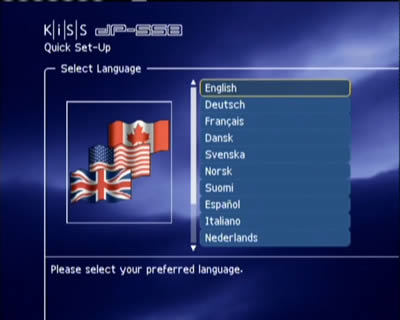
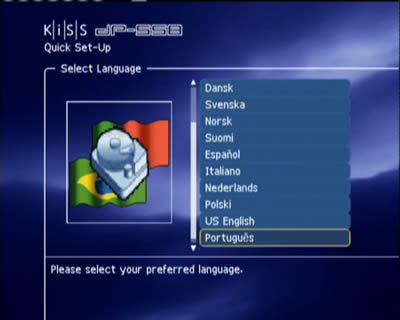
We chose English and were then prompted to indicate our location (region/country):

This is then followed by the type of video connection used between the player and our TV, the format of our TV (widescreen or conventional) and finally, our audio configuration:


Review Pages

1. Introduction
2. Specifications
3. Installation - Page 1
4. Installation - Page 2
5. Installation - Page 3
6. The Menus - Page 1
7. The Menus - Page 2
8. Online Functions - Page 1
9. Online Functions - Page 2
10. Online Functions - Page 3
11. Online Functions - Page 4
12. Recording
13. FTP Link
14. PC Link
15. The Tests - Page 1
16. Playback Tests - Page 2
17. Playback Tests - Page 3
18. Playback Tests - Page 4
19. Playback Tests - Page 5
20. Conclusion


Pages

  • « first
  • ‹ previous
  • 1
  • 2
  • 3
  • 4
  • 5
  • 6
  • 7
  • 8
  • 9
  • …
  • next ›
  • last »

KiSS Technology

Tags: KiSS Technology
Previous Post
Asus DRW-1608P
Next Post
Ridisc Media Tests

Related Posts

  • Nero Digital Certified High-Definition Media Player Now Available from KiSS

  • KiSS to Release AVC/H.264 High Definition DVD Player

  • Cisco Acquires KiSS Technology For $61 Million

  • DVD programming and recording via the Internet and the cell phone

  • KiSS DVD Players now support Nero Digital files

  • KiSS Technology and CinemaNow demonstrate movie streaming to connected DVD-players at CES

  • KiSS Technology introduces networked TVs for the Digital Home

  • KiSS Technology introduces DP-600 DVD-player for High Definition Windows Media Video

Latest Reviews

Kioxia Exceria Plus G3 512GB microSD
Cameras

Kioxia Exceria Plus G3 512GB microSD

SoundPeats Cove Pro
Consumer Electronics

SoundPeats Cove Pro

Asustor AS5404T 4-Bay NAS System
Enterprise & IT

Asustor AS5404T 4-Bay NAS System

be quiet! Pure Power 13M 1200W
PC components

be quiet! Pure Power 13M 1200W

Server-Side Gaming Why Canadian Online Casinos Are Abandoning Local Clients for HTML5 Clouds
Enterprise & IT

Server-Side Gaming Why Canadian Online Casinos Are Abandoning Local Clients for HTML5 Clouds

Popular News

COLORFUL Introduces CVN B850I GAMING FROZEN Motherboard

COLORFUL Introduces CVN B850I GAMING FROZEN Motherboard

COLORFUL Presents CVN X870 ARK FROZEN Motherboard for AMD Ryzen 9000 CPUs

COLORFUL Presents CVN X870 ARK FROZEN Motherboard for AMD Ryzen 9000 CPUs

TEAMGROUP Launches EXPERT P34F Find My External SSD

TEAMGROUP Launches EXPERT P34F Find My External SSD

Samsung announces Galaxy Tab S11 and Galaxy S25 FE series

Samsung announces Galaxy Tab S11 and Galaxy S25 FE series

Viltrox Showcases Upcoming Lens Lineup and New TTL Flash at IBC 2025

Viltrox Showcases Upcoming Lens Lineup and New TTL Flash at IBC 2025

CORSAIR announces Vanguard Pro 96 and Vanguard 96 Gaming Keyboards

CORSAIR announces Vanguard Pro 96 and Vanguard 96 Gaming Keyboards

Panasonic Introduces the First Ultra-Telephoto Zoom Lens in the LUMIX S Series

Panasonic Introduces the First Ultra-Telephoto Zoom Lens in the LUMIX S Series

MSI Launches DATAMAG 40Gbps Magnetic Portable SSD

MSI Launches DATAMAG 40Gbps Magnetic Portable SSD

Main menu

  • Home
  • News
  • Reviews
  • Essays
  • Forum
  • Legacy
  • About
    • Submit News

    • Contact Us
    • Privacy

    • Promotion
    • Advertise

    • RSS Feed
    • Site Map
  • About
  • Privacy
  • Contact Us
  • Promotional Opportunities @ CdrInfo.com
  • Advertise on out site
  • Submit your News to our site
  • RSS Feed